
Perixx PERIBOARD-513III
4.2Editor score
Integrated Touchpad
Quiet Scissor Keys
Full-Size Layout
Finding the right keyboard for your point of sale setup is critical for smooth daily operations. A good POS keyboard must handle high-volume input, resist spills, and integrate seamlessly with your existing hardware to minimize downtime during busy shifts.
We evaluated ten top models based on durability, layout efficiency, connectivity options, and special features like touchpads or magnetic stripe readers. Each product was assessed for its suitability in demanding commercial settings where reliability matters most.
Each pick below highlights key strengths and trade-offs to help you match a device to your workflow. Note that pricing and availability change frequently, so verify current details before making a purchase decision for your business.
4.2Editor score
4.5Editor score

4.2Editor score
As an Amazon Associate we earn from qualifying purchases.
The following table provides a side-by-side overview of key specifications across all ten models to help you compare features like key count, interface type, and durability ratings quickly.


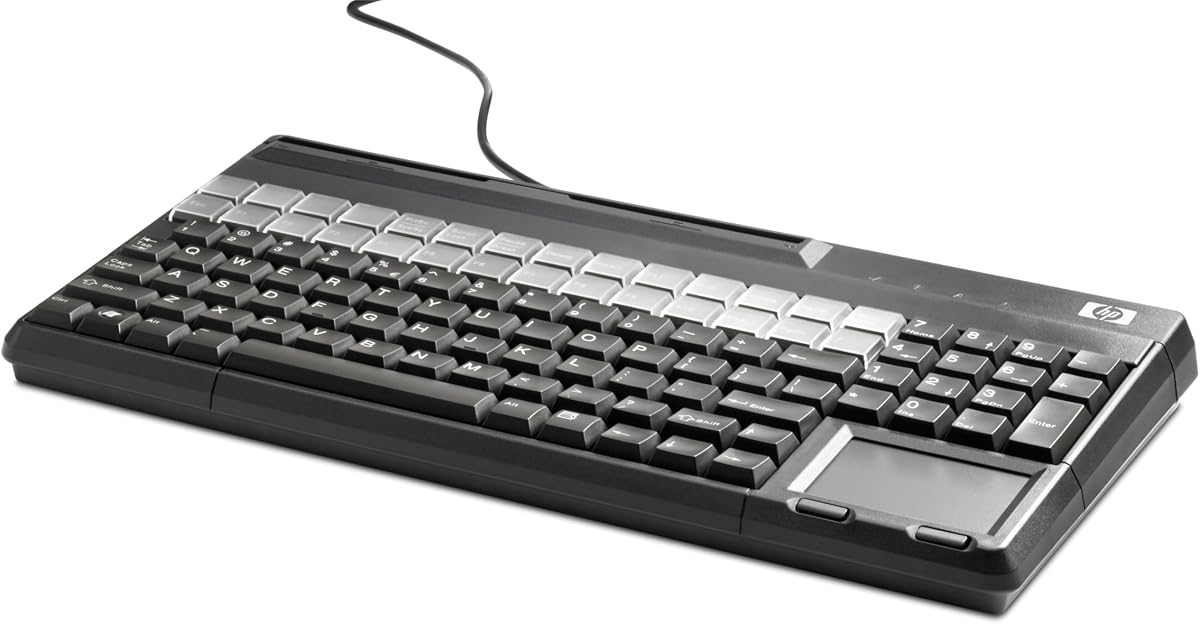
The HP POS Keyboard stands out as a top-tier solution for retail environments requiring card reading capabilities. With a rating reflecting strong industry trust, it delivers reliable performance through its integrated magnetic stripe reader and robust key design.
We may earn a commission when you buy through this link, at no additional cost to you.
Its 28 relegendable keys offer significant flexibility for customizing shortcuts specific to your inventory or POS software. The QWERTY layout with 106 keys ensures comfortable entry for cashiers handling complex orders without needing an external numpad.
While the price is higher than generic alternatives, the included hardware features reduce the need for extra peripherals. Some users may find the lack of wireless options limiting in very flexible setups.
This keyboard is ideal for retail stores or restaurants needing a single device for data entry and card processing. If you value integration and durability, this model offers a professional grade experience for daily transactions.
The 28 relegendable keys allow staff to program frequently used functions directly onto the keyboard for faster checkout speeds.
Built-in magnetic stripe reader eliminates clutter by combining card processing with standard typing functions in one unit.
We may earn a commission when you buy through this link, at no additional cost to you.
Cherry is known for high quality input devices and this G86-62401 model maintains that reputation for commercial POS setups. The inclusion of an integrated touchpad makes it a complete workstation solution without needing a separate mouse.
We may earn a commission when you buy through this link, at no additional cost to you.
Its spill resistant design protects internal components from common kitchen or counter spills ensuring longevity in busy environments. The compact form factor frees up valuable desk space while still providing a full QWERTY layout.
While highly durable, the touchpad is smaller than standalone mice which might slow navigation for some users. Additionally, the wired connection restricts placement compared to wireless models but ensures stable signal.
Choose this keyboard for small kiosks or crowded counters where desk space is at a premium. Its professional build and all-in-one design make it a strong premium choice for retail or restaurant terminals.
The compact footprint and integrated touchpad reduce the need for extra peripherals making it perfect for tight workstation spaces.
Spill resistant construction ensures the keyboard can withstand accidental liquid exposure common in food service or high traffic retail areas.
We may earn a commission when you buy through this link, at no additional cost to you.
This Perixx model offers exceptional value for businesses seeking a full-featured POS keyboard without breaking the budget. It combines a standard layout with an integrated touchpad and quiet keys for a comfortable user experience.
We may earn a commission when you buy through this link, at no additional cost to you.
The scissor-switch mechanism provides a laptop-like feel that reduces noise in quiet environments like libraries or offices. Users appreciate the plug-and-play design requiring no drivers which simplifies deployment across multiple terminals.
While cost effective, the materials feel lighter than industrial grade models which may not suit extreme conditions. The lack of custom relegendable keys means you rely on software shortcuts for specialized tasks.
This is an ideal entry-level option for small businesses starting their POS setup or needing a replacement for basic tasks. Its balance of features and price makes it a practical budget choice for many settings.
Quiet scissor keys ensure minimal noise during typing making it suitable for environments where sound levels need to be kept low.
Plug-and-play connectivity allows immediate use without driver installation saving time and technical overhead during deployment.
We may earn a commission when you buy through this link, at no additional cost to you.
The K120 is a classic reliable keyboard trusted by many businesses for basic data entry tasks. Its high rating reflects consistent performance and durability even under frequent daily use in office or light retail settings.
We may earn a commission when you buy through this link, at no additional cost to you.
Designed with spill resistance, this keyboard can handle accidental drinks better than many non rated models. The full-size layout includes a number pad which is often required for inventory entry or price lookups.
However it lacks specialized POS features like touchpads or custom keys meaning you may need a separate mouse. The key feel is standard and may lack the comfort of premium ergonomic designs for all-day shifts.
This keyboard works well for back-office tasks or simpler POS stations where cost is a priority. It is a solid dependable choice if your needs are straightforward and you already have a mouse available.
The spill-proof design adds an extra layer of protection against common accidents keeping the keyboard functional longer in busy environments.
Compatible with most Windows systems without setup ensuring broad usability across different computer configurations.
We may earn a commission when you buy through this link, at no additional cost to you.
This large Cherry model is designed for complex workflows requiring many custom shortcuts or specific function keys. With 42 relegendable keys and 169 total keys it offers unmatched flexibility for specialized POS software needs.
We may earn a commission when you buy through this link, at no additional cost to you.
The magnetic stripe reader adds essential functionality for payment processing directly on the unit. The heavy-duty construction ensures it can withstand continuous use in high-volume environments like supermarkets or warehouses.
Its size may be too large for standard counters limiting placement options in tight setups. Additionally configuring the many relegendable keys requires time and technical knowledge compared to plug and play units.
Ideal for large retail or industrial settings where specific button mapping boosts efficiency. If your operation relies on custom commands this keyboard provides the hardware flexibility needed for advanced workflows.
With 42 relegendable keys users can program specific functions or macros directly onto the keyboard for faster transaction processing.
Integrated magnetic stripe reader allows for seamless payment entry without needing extra peripheral devices on the counter.
We may earn a commission when you buy through this link, at no additional cost to you.
The Adesso Easy Touch is engineered for harsh environments where water or spills are a constant threat. Its IP67 waterproof rating ensures it can handle submersion making it ideal for kitchens or outdoor markets.
We may earn a commission when you buy through this link, at no additional cost to you.
The large keys provide clear visibility and easy pressing even with gloved hands or dirty fingers. The robust build allows for frequent washdowns without damage ensuring hygiene and long lifespan.
While highly protective the design is bulky which might not fit sleek modern POS setups. It prioritizes durability over aesthetics meaning it looks more industrial than typical office keyboards.
Buy this for food service or industrial use where standard keyboards fail quickly. If your priority is survival against spills and dirt this model offers the highest protection available in this category.
The IP67 waterproof rating ensures the keyboard survives accidental submersion keeping it fully functional in wet environments.
Robust construction allows for easy cleaning and washdowns maintaining hygiene standards in food prep areas.
We may earn a commission when you buy through this link, at no additional cost to you.
This Cherry model offers extensive customization with 127 programmable and 42 relegendable keys plus a touchpad. It aims to provide a complete control solution in a single unit for specialized industrial or retail applications.
We may earn a commission when you buy through this link, at no additional cost to you.
The programmable nature allows deep integration with specific software systems. However the lower rating suggests potential issues with software tools or reliability that users should research before purchase.
It is designed for setups needing unique key mapping rather than general typing. Users report mixed experiences regarding driver stability which can affect overall usability in critical workflows.
Consider this for advanced setups requiring heavy customization and touchpad navigation. If your system supports its driver requirements it offers strong functionality but verify compatibility first.
127 programmable and 42 relegendable keys allow detailed customization to match complex software command structures.
Integrated touchpad eliminates the need for a separate mouse making it self-contained for limited desk spaces.
We may earn a commission when you buy through this link, at no additional cost to you.
This specialized keyboard includes a smartcard reader for secure authentication and payment processes. It is FIPS 201 approved making it suitable for government or high-security retail transactions requiring verified identity.
We may earn a commission when you buy through this link, at no additional cost to you.
The secure PIN entry pad ensures that sensitive data is entered safely without exposure to external devices. Its thin design saves space while delivering professional security features often missing from standard models.
It is strictly designed for smartcard workflows so general entry may feel limited by its focus. Users must install drivers for full functionality which adds steps to the initial setup process.
Use this for high-security environments needing card verification or ID scanning directly at the terminal. It is a niche solution that excels in security compliance for specific institutional or financial uses.
FIPS 201 approval ensures the keyboard meets rigorous security standards required for government or sensitive data handling.
Integrated smartcard reader allows direct secure card insertion for authentication or payment without external add-ons.
We may earn a commission when you buy through this link, at no additional cost to you.
The G80-1800 brings mechanical reliability to tight spaces with its compact design and MX Black switches. It is built for industrial use where durability and long life are critical for continuous operations.
We may earn a commission when you buy through this link, at no additional cost to you.
MX Black switches provide a linear tactile feel that ensures consistent actuations over millions of presses. The dual USB and PS/2 options allow flexibility to connect to older or modern systems without issues.
Lack of a numeric pad might require a separate device for number heavy entry tasks. Additionally the mechanical switches may produce more noise than membrane alternatives which could disturb quiet environments.
This is perfect for kiosk or manufacturing setups where space is tight and reliability is non-negotiable. If you need a rugged compact mechanical keyboard this model delivers strong performance for industrial settings.
MX Black switches guarantee over 100 million actuations ensuring long life even in continuous industrial use.
Both USB and PS/2 connection options allow compatibility with a wide range of legacy and modern hardware systems.
We may earn a commission when you buy through this link, at no additional cost to you.
The K270 provides wireless convenience for POS setups where cable management is a challenge. It maintains a familiar full-size layout including a number pad so users can transition easily from wired models.
We may earn a commission when you buy through this link, at no additional cost to you.
With a 24-month battery life you can operate for years without changing batteries which reduces maintenance overhead. The spill-proof design adds a layer of protection ensuring accidental liquids do not end the device life.
Wireless signals may face interference in crowded environments and you need to manage battery replacements eventually. It is less secure than wired options if physical theft is a concern in your area.
Choose this for setups where desk flexibility is needed or cabling is difficult. If you value mobility and standard functionality without the hassle of wires this is a strong practical option.
Wireless connectivity with 33ft range allows flexible placement of the keyboard away from the computer unit.
Long lasting 24-month battery life minimizes maintenance and downtime compared to standard wireless keyboards.
We may earn a commission when you buy through this link, at no additional cost to you.
Selecting the right POS keyboard requires evaluating how it fits your specific workflow environment and technical needs.
In high traffic environments keyboards face constant use spills and accidental drops. Look for models with reinforced casing and spill resistant designs to ensure longevity and reduce replacement costs.
Choose industrial grade materials to withstand daily wear and tear in busy retail or kitchen settings.
Ensure the layout matches your software requirements. A full size layout with a number pad is essential for price entry while compact models save space for kiosk terminals.
Match the key count to your data entry needs to avoid workflow bottlenecks.
Some tasks require specific hardware like magnetic stripe readers for card payments or smartcard slots for authentication. These features reduce the need for separate peripherals.
Prioritize keyboards with integrated readers if you want a single device solution for transactions.
Wired USB keyboards offer stable connections with no battery worries which is vital for 24-7 systems. Wireless options provide flexibility but require power management and signal checks.
Select wired connections for reliability unless mobility is your main priority.
Staff members typing for hours need comfortable key travel and layouts. Ergonomic designs reduce fatigue and strain which boosts productivity over long shifts.
Test key feel and tilt options to ensure employee comfort.
Relegendable keys allow you to map custom shortcuts for frequent commands improving speed. Check if the keyboard supports easy programming without complex software.
Look for customizable keys to streamline unique workflow processes.
Confirm the keyboard supports your POS OS and drivers. Most work with Windows but some specialized units may need specific drivers or protocols.
Verify operating system compatibility before purchase to ensure plug-and-play functionality.
While higher price often means better durability evaluate your volume needs. Cheap keyboards may save upfront cost but fail quickly in heavy use environments.
Balance initial cost against replacement frequency to find the true value.
Connect your keyboard using the USB interface and ensure your POS software recognizes the input. Test key responses and customize any relegendable keys before shifting begins.
Clean the surface regularly with a soft cloth or disinfectant wipe to prevent grime buildup. Avoid harsh chemicals that might damage the keycaps or touchpad surface.
Store the device in a dry area when not in use and avoid placing liquids near the keys to maintain longevity and prevent electrical issues.
A POS keyboard typically requires durability against spills and high volume use. It should have a standard layout for easy entry and often includes features like number pads or readers for transaction efficiency.
A touchpad is useful if you lack space for a mouse. It allows navigation without extra peripherals but might slow down users accustomed to a full mouse setup.
Wireless keyboards offer flexibility but need battery management. For critical terminals, wired options are more stable and remove the risk of connection drops during transactions.
Turn off the keyboard and gently wipe with a damp cloth. Avoid soaking the unit even if rated resistant and let it dry completely before using again.
Relegendable keys allow you to add custom labels or functions. This helps staff memorize shortcuts and speeds up operations for frequent tasks.
Some models like the Adesso are rated waterproof. Many are spill resistant but not fully waterproof so check the IP rating for specific protection levels.
We reviewed ten top models ranging from budget friendly options to specialized industrial gear. Each offers unique strengths depending on whether you prioritize durability customization or cost.
Focus on what matters most to your business like waterproof features for kitchens or relegendable keys for high speed retail. The right choice depends on your specific workflow demands.
Remember to check current prices and availability as they change often. Selecting the best keyboard ensures smoother transactions and happier staff in the long run.