
HDMI KVM Switch 3 Monitors 2 Computers 4K@60Hz
HDMI 4K@60Hz
4 USB 3.0 ports
Dual switching methods
This guide compares the top KVM switches for triple monitors supporting 2 computers with 4K 8K video USB 3.0 and reliable switching for workstations and gaming
Finding the right KVM switch for triple monitors can transform your workspace efficiency. It allows seamless switching between two computers while sharing three displays and peripherals without constant cable swapping.
We evaluated ten leading models based on resolution support, connectivity options, build quality, and ease of use. Our analysis focuses on performance for professional workflows and high-end multimedia tasks requiring multiple screens.
Each pick highlights specific strengths and limitations to help you match the device to your setup. Prices and availability may change so verify details before purchasing to ensure compatibility with your existing hardware.

4.9Editor score

3.9Editor score
The following table provides a side-by-side overview of key specifications for all ten models evaluated. Use this to quickly identify compatibility with your monitors and computers before making a final decision.




This docking station excels by combining KVM switching with full laptop charging and network sharing. It holds a high rating for performance and versatility across demanding professional workflows.
We may earn a commission when you buy through this link, at no additional cost to you.
The support for up to 100W Power Delivery through a single USB-C cable reduces desk clutter significantly. Shared Ethernet ensures downloads continue on the inactive computer while you switch focus.
While expensive it replaces multiple devices including hubs and card readers. The complexity of setup may require careful planning of your existing monitor ports and cables.
Ideal for workstation users needing reliable multi-monitor switching without losing connectivity. It delivers exceptional value when you factor in the replacement of other peripherals.
Supports up to 100W charging plus 10Gbps USB transfer speeds for efficient file sharing.
Shared Ethernet keeps background tasks running on both systems during switching.
We may earn a commission when you buy through this link, at no additional cost to you.
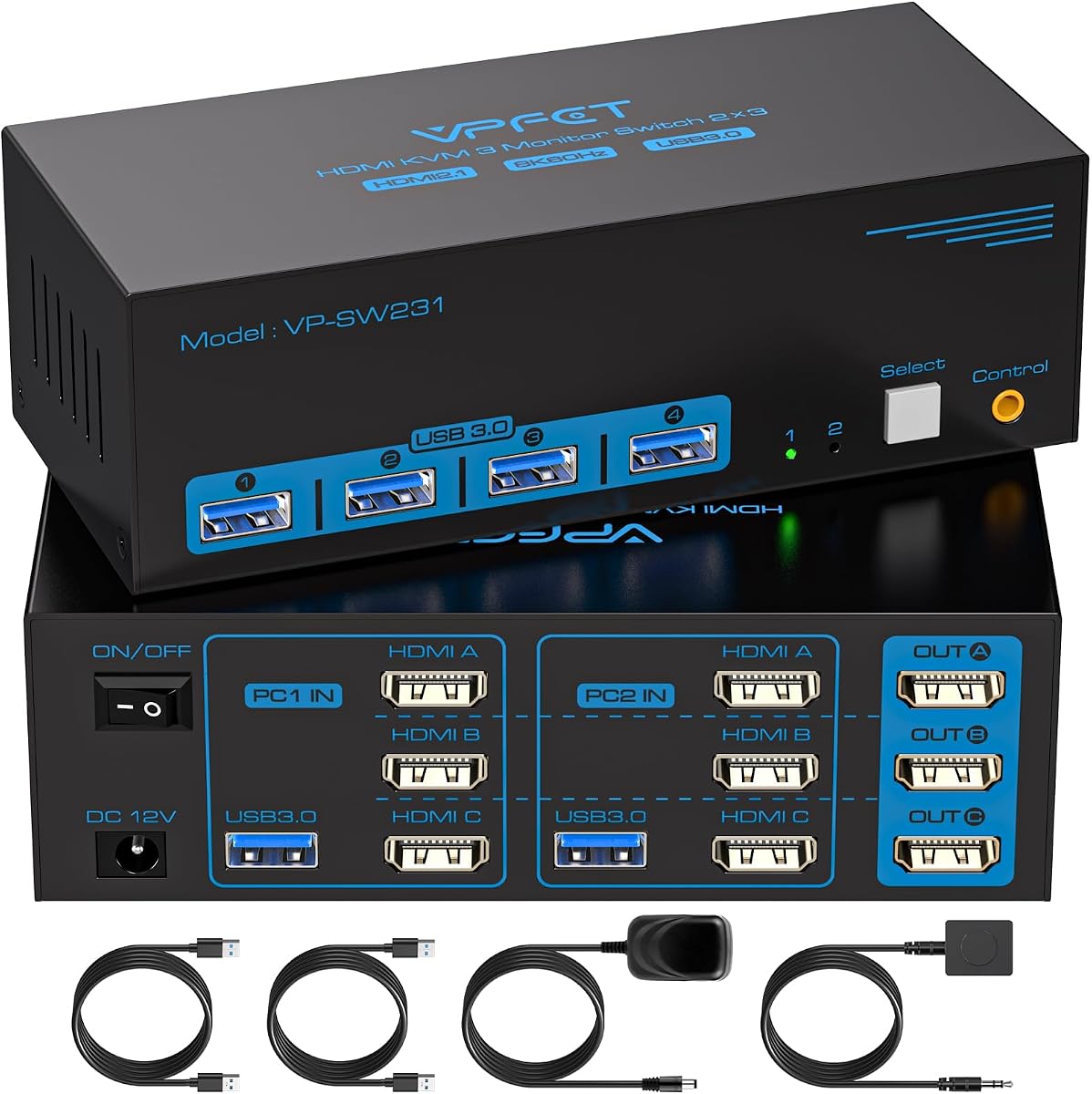
This model offers a straightforward solution for users needing triple monitor support on a budget. It lacks advanced features but delivers solid 4K performance for everyday tasks and basic setups.
We may earn a commission when you buy through this link, at no additional cost to you.
The inclusion of both panel and wired controller switching provides flexibility in placement. USB 3.0 ports ensure fast data transfer for connected peripherals like printers and drives.
Compatibility relies heavily on HDMI inputs which may limit options for DisplayPort-only systems. Users must ensure their computers support three simultaneous outputs via HDMI.
A strong choice for home offices where HDMI connectivity is sufficient. It balances essential features with affordability making multi-monitor switching accessible to more users.
Handles 4K@60Hz with four USB 3.0 ports for efficient peripheral sharing.
Offers both physical button and external controller options for convenience.
We may earn a commission when you buy through this link, at no additional cost to you.
Designed for high-end displays this switch supports 8K and 4K@240Hz with HDR10 and VRR. The aluminum housing adds durability and a professional aesthetic to demanding workstation environments.
We may earn a commission when you buy through this link, at no additional cost to you.
It delivers superior visual fidelity through compatibility with high refresh rates and adaptive sync technologies. The included package provides essential cables to simplify initial setup for users.
Achieving maximum resolution depends on using short high-quality cables as specified. Users must verify their monitors support the specific features before relying on them for critical tasks.
Perfect for creative professionals and gamers needing top-tier video performance. It justifies the cost with advanced capabilities that standard switches cannot match effectively.
Supports 8K@60Hz and 4K@240Hz with HDR10 and G-Sync compatibility.
Constructed with aluminum and includes multiple cables for quick installation.
We may earn a commission when you buy through this link, at no additional cost to you.
This switch stands out by accommodating four computers instead of the standard two. It uses a mix of HDMI and DisplayPort inputs to handle high resolutions for shared displays.
We may earn a commission when you buy through this link, at no additional cost to you.
The ability to serve four systems makes it valuable for IT testing or shared office stations. USB 3.0 ports enable rapid file sharing across connected devices and peripherals.
Setup complexity increases with more inputs and cable requirements. Users must ensure each computer supports triple output modes before attempting full configuration.
Best for environments needing multi-computer flexibility with a single peripheral set. It offers unique scalability for shared workspaces or testing labs.
Allows four computers to share three monitors and USB devices efficiently.
Combines HDMI 2.1 and DP 1.4 for high-resolution output.
We may earn a commission when you buy through this link, at no additional cost to you.
This model provides dual input standards for wider hardware compatibility. It supports high resolutions and refresh rates suitable for both creative and gaming applications.
We may earn a commission when you buy through this link, at no additional cost to you.
A dedicated power switch simplifies restarting signal recognition without unplugging cables. USB 3.0 ports enable quick data sharing across connected external drives.
Cable length recommendations may limit setup flexibility in larger desks. Users should verify adapter compatibility before relying on port alternatives.
Ideal for mixed systems needing both HDMI and DisplayPort connections. It balances performance with versatility for diverse workstation requirements.
Supports both HDMI 2.1 and DP 1.4 for wide hardware compatibility.
Dedicated power switch allows restarts without disconnecting cables.
We may earn a commission when you buy through this link, at no additional cost to you.
This unit functions as a complete docking station offering expanded connectivity beyond switching. It supports high refresh rates and shared network access for seamless multitasking.
We may earn a commission when you buy through this link, at no additional cost to you.
Ethernet continuity allows background updates on one PC while using the other. USB 3.2 ports deliver fast file transfer rates for large media projects.
Compatibility with MacBooks is limited to mirrored displays only. Users should confirm their laptop supports video output via USB-C before purchasing.
Best for users needing extensive connectivity alongside switching. It provides a centralized hub for peripherals and power.
Includes Ethernet and USB 3.2 ports for shared connectivity and storage.
Supports 100W charging for laptops via single USB-C connection.
We may earn a commission when you buy through this link, at no additional cost to you.
This switch offers solid HDMI 2.1 performance at a competitive price point. It supports 8K resolutions ensuring future-proofing for higher resolution displays.
We may earn a commission when you buy through this link, at no additional cost to you.
The wired controller keeps the desktop clean and simplifies switching. USB 3.0 ports allow fast connection to printers and external storage.
Compatibility is restricted to HDMI inputs which may not suit all systems. Users should ensure their devices support triple HDMI outputs.
Ideal for budget-conscious users needing 4K and 8K support. It delivers reliable switching without advanced video features.
Supports 8K@60Hz for sharp visuals across three monitors.
Wired controller and plug and play setup reduce complexity.
We may earn a commission when you buy through this link, at no additional cost to you.
Unique for its three-computer input support this switch enables flexible sharing across multiple systems. It maintains high video quality through HDMI 2.1 and DP 1.4 inputs.
We may earn a commission when you buy through this link, at no additional cost to you.
The wired remote simplifies control for distant workstations. USB 3.0 ports ensure peripherals function efficiently across all connected computers.
Users must verify triple output capabilities on each machine. The setup requires careful cabling to maintain all three active displays.
Excellent for shared offices needing three PC access. It offers a balance of performance and multi-computer flexibility.
Accommodates three computers sharing one triple monitor setup.
USB 3.0 ports enable rapid data transfer between devices.
We may earn a commission when you buy through this link, at no additional cost to you.
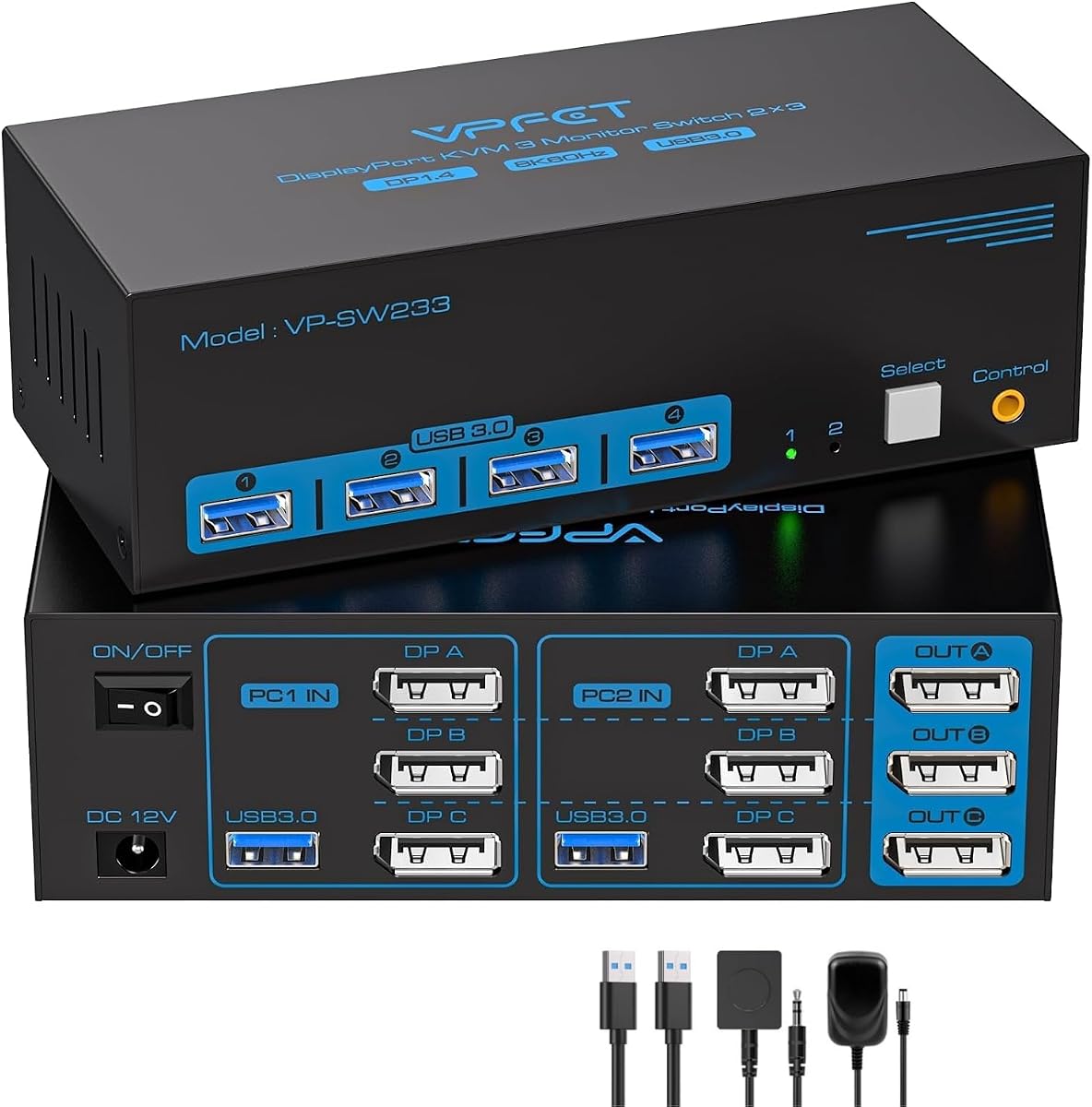
This switch focuses on DisplayPort reliability for stable multi-monitor performance. It supports high refresh rates ideal for fast-paced professional workflows.
We may earn a commission when you buy through this link, at no additional cost to you.
Each computer must have three DisplayPort outputs for full functionality. The switch maintains clean desktops with plug and play simplicity.
Lack of HDMI limits compatibility with mixed display setups. Users should confirm hardware requirements before purchasing.
Best for dedicated DisplayPort workstation setups. It prioritizes stability and consistent performance.
Designed for reliable DisplayPort signals in demanding environments.
Supports 4K@144Hz for smooth visuals and motion.
We may earn a commission when you buy through this link, at no additional cost to you.
This all-in-one package includes cables and remote for immediate setup. It supports high resolutions through both HDMI and DisplayPort inputs for broad compatibility.
We may earn a commission when you buy through this link, at no additional cost to you.
The warranty offers added security for long-term usage. USB 3.0 ports allow efficient peripheral sharing across systems.
External power requirement is standard but adds cable management. Users should verify PC support for triple outputs before purchase.
A complete solution for users needing flexibility. It balances performance and essential accessories effectively.
Includes cables remote and adapter for ready-to-use setup.
Supports 8K@60Hz with flexible input options.
We may earn a commission when you buy through this link, at no additional cost to you.
Selecting the right KVM switch requires understanding your hardware and usage needs. This section outlines the critical factors to consider.
Ensure your computers support three simultaneous outputs matching the switch's inputs. Some units require DisplayPort or HDMI 2.1 specific configurations to activate all three screens correctly.
Always verify port availability before purchasing to avoid compatibility issues with your existing monitors and graphics cards.
Check that the switch supports the maximum resolution and refresh rate your monitors require. 4K at 144Hz or 8K at 60Hz may need specific HDMI 2.1 or DP 1.4 cables for proper functionality.
Prioritize models that meet the highest video specs of your setup to prevent downscaling or stuttering.
Look for USB 3.0 ports to ensure fast data transfer and compatibility with modern peripherals. This prevents slowdowns when transferring files to external drives or connecting high-demand devices.
Verify the number of USB ports available since some models include fewer connections than others.
Choose between physical button panel switches or external wired controllers based on your desk layout. External controllers offer cleaner aesthetics by placing controls away from the central workspace.
Ensure the method is intuitive to minimize workflow interruptions during daily switching.
Most units require an external 12V power adapter for stability especially when powering multiple USB devices. Verify that your workspace includes a nearby outlet for continuous operation.
Models with integrated power switches add convenience for restarts without unplugging cables.
Confirm that the KVM switch supports extended or duplicate display modes through your operating system. This allows flexible window arrangements across three monitors when switching between computers.
Check that the switch does not restrict OS-level display configurations or cause mode conflicts.
Verify that the KVM switch works with your specific operating system including Windows Linux or macOS. Some units may have limitations with certain OS versions or features.
Review manufacturer compatibility charts to ensure seamless integration with your software.
Consider the build materials and included warranty length for long-term reliability. Aluminum housings offer better heat dissipation and durability compared to plastic enclosures.
A warranty provides protection against defects and ensures support if technical issues arise.
Connect your computer video outputs to the KVM switch inputs matching HDMI or DisplayPort ports accurately. Use the provided USB cables to link each computer to the switch for peripheral sharing.
Attach monitors to the switch outputs and plug in the power adapter to ensure stable operation. Verify all connections are secure to prevent signal dropouts during switching.
Use the control button or remote to toggle between active computers. Adjust OS display settings to ensure triple monitor modes function correctly on the selected system.
No both computers must support three simultaneous displays to use all monitors. If one computer supports only two screens the extra monitor will not activate.
Yes HDMI 2.1 and DP 1.4 cables are required for maximum resolution. Shorter cables within two meters are recommended for signal stability.
Most switches are plug and play requiring no additional drivers. USB 3.0 devices are recognized automatically after connection.
Yes as long as the laptop supports video output via its ports. USB-C laptops may need docking stations or specific adapters.
Restart both computers and check cable connections. Ensure the external power adapter is connected properly.
Some high-end models support HDR and G-Sync. Check specifications before purchase to confirm compatibility.
These ten models cover a wide range of needs from budget-friendly HDMI solutions to premium docking stations. Choosing the right one depends on your ports and performance requirements.
Prioritize resolution support and switching flexibility when deciding. Ensure your setup allows all three monitors to function correctly.
Always verify current availability and check all technical requirements before purchasing. This ensures a smooth setup process.