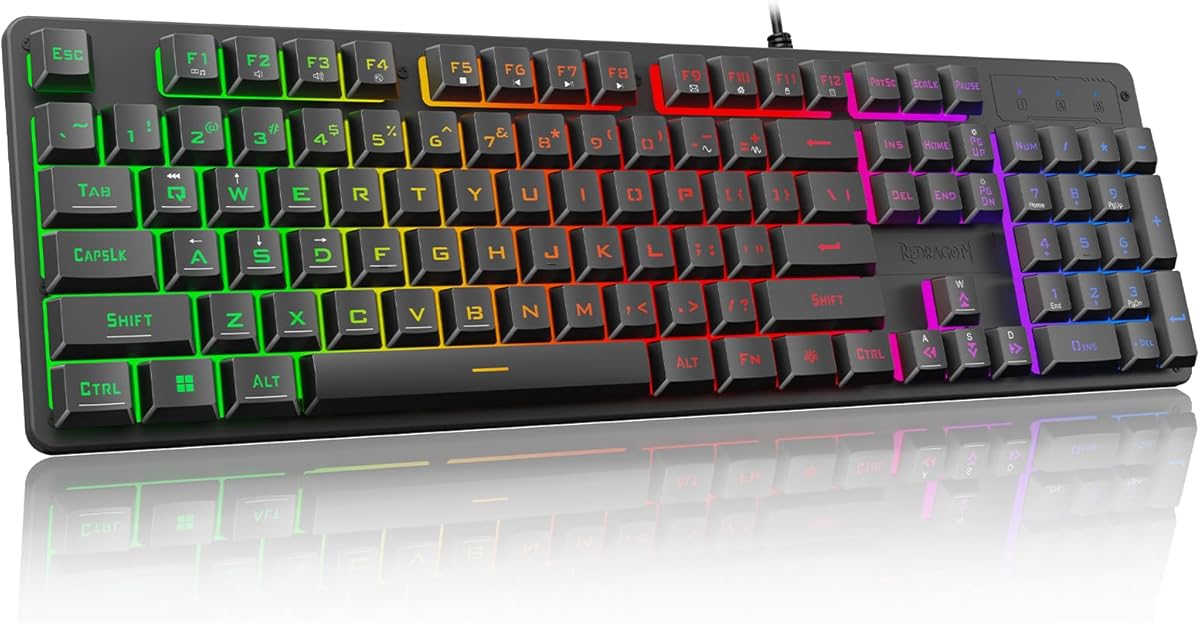
Redragon K521 Upgrade Rainbow LED Gaming Keyboard
4.4Editor score
Fast mechanical feeling keys
Anti-ghosting support
Rainbow LED lighting
Discover the top keyboards for Rainbow Six Siege with fast response, durability, and RGB lighting to enhance your tactical gameplay and competitive edge today.
Finding the right keyboard for Rainbow Six Siege is crucial for tactical precision and fast reactions during intense multiplayer matches. A responsive device ensures every keystroke registers instantly when you need to peek or shoot.
We compared ten top models based on switch speed, durability, layout, and comfort for long gaming sessions. Each option offers unique features to help you dominate in tactical shooter environments with confidence.
Every pick highlights key strengths and trade-offs to match your playstyle and budget needs. Note that stock and availability change frequently, so check current details before making your final choice for your setup.
4.4Editor score

4.4Editor score

4.6Editor score
This side-by-side comparison outlines the key specifications and design elements of each keyboard to help you identify the best fit for your tactical gaming needs.



The Corsair K55 RGB PRO stands out as a top-tier option for Rainbow Six Siege players seeking a balance between functionality and comfort. With a solid 4.4 rating from thousands of users, it delivers dependable performance for tactical gaming without breaking the bank. Its standout qualities include six dedicated macro keys that allow for rapid execution of complex commands essential in competitive play. The IP42-rated protection ensures that accidental spills do not disrupt your gameplay, keeping your setup reliable during long sessions. Combined with dynamic RGB backlighting and a detachable palm rest, this keyboard offers a premium feel at an accessible price point.
We may earn a commission when you buy through this link, at no additional cost to you.
One of the key strengths of the K55 RGB PRO is its macro functionality. The six dedicated macro keys can be programmed via CORSAIR iCUE software to activate functions or shortcuts in a single stroke. For Rainbow Six Siege, this means you can bind grenade throws, ability activations, or communication commands to these keys for faster reaction times. The software integration also allows for instant streaming commands through Elgato Stream Deck software, making it versatile for streamers. The rubber palm rest features a textured surface to prevent slipping and reduces stress on your hands, enabling you to play longer in comfort. Dedicated volume and media keys let you fine-tune audio or pause music without interrupting your game, which is crucial for maintaining situational awareness.
However, there are honest trade-offs to consider with this model. The switches are membrane-based rather than mechanical, which means they may lack the tactile feedback and precision some competitive gamers prefer. While they are reliable and quiet, you might not feel the same level of responsiveness as with mechanical switches in rapid-fire scenarios. Additionally, the customization relies heavily on the CORSAIR iCUE software, which may be overkill for users who only need basic settings. Despite these minor drawbacks, the durability and feature set make it a highly acceptable choice for players who value comfort and programmability over pure mechanical actuation.
This keyboard is ideal for players who want a reliable, spill-resistant device with robust macro support for utility usage in Rainbow Six Siege. If you prioritize comfort during long matchmaking sessions and need a way to quickly access media controls, this model fits the bill perfectly. It is also a great choice for beginners or intermediate players who do not want to invest in a high-end mechanical keyboard but still need performance features. Ultimately, the K55 RGB PRO provides a strong foundation for tactical gaming with its blend of customization and ergonomic design.
Six dedicated macro keys allow single-stroke activation of grenades or abilities for faster in-game responses.
IP42 spill resistance and a textured palm rest protect against accidents and reduce hand strain during extended play.
We may earn a commission when you buy through this link, at no additional cost to you.
The SteelSeries Apex 3 is an excellent choice for Rainbow Six Siege players who value a quiet and durable gaming environment. Boasting a high 4.6 rating, this keyboard combines stealthy operation with practical features designed to withstand daily use. Its whisper-quiet gaming switches ensure that your keystrokes do not create unnecessary noise, allowing for better concentration on in-game audio cues. The IP32 water-resistant design adds a layer of protection against liquid spills, ensuring that accidental drinks do not damage the device. With 10-zone RGB illumination and a premium magnetic wrist rest, it offers a comfortable and visually appealing setup for both gaming and everyday use.
We may earn a commission when you buy through this link, at no additional cost to you.
The standout feature of the Apex 3 is its nearly silent operation. The switches are designed to be whisper quiet while still providing 20 million low-friction keypresses. This is particularly beneficial for players who game late at night or share a space with others, as it minimizes noise pollution without sacrificing responsiveness. The 10-zone RGB illumination allows for gorgeous color schemes and reactive effects that can be customized to match your setup. The premium magnetic wrist rest provides full palm support and comfort, which is essential during long ranked or tournament sessions. Dedicated multimedia controls let you adjust volume and settings on the fly, keeping your focus on the game.
Despite its strengths, there are trade-offs to consider. The membrane switches, while quiet, may not offer the tactile feedback that competitive players often seek for precision aiming and movement. The lighting customization is functional but may not be as extensive as software-driven RGB systems found on higher-end models. The wrist rest is magnetic, which is convenient, but it may not be as adjustable as ergonomic rests found on other keyboards. Nevertheless, the durability, silence, and comfort make these trade-offs acceptable for players prioritizing noise reduction and ease of use.
This keyboard is best suited for players who require a quiet, reliable device that can withstand accidental spills and provide all-day comfort. It is ideal for those who game in shared spaces or prefer a softer typing experience without loud clicking. The compatibility with Windows, Mac, Xbox, and PlayStation makes it a versatile option for multi-platform gamers. If you want a durable keyboard that keeps noise down and hands supported, the Apex 3 is a strong contender for your setup.
Whisper quiet switches minimize noise pollution for better concentration on in-game audio cues during tactical play.
IP32 water-resistant design protects against liquid spills, ensuring reliability during intense or extended gaming sessions.
We may earn a commission when you buy through this link, at no additional cost to you.
The Razer Ornata V3 offers a unique low-profile design that appeals to Rainbow Six Siege players seeking ergonomic efficiency without sacrificing tactile feedback. With a 4.5 rating, it provides a blend of style and performance that supports natural hand positioning during long sessions. The low-profile keys feature slimmer keycaps and shorter switches, reducing strain on your hands and allowing for quicker access to the game area. The mecha-membrane switches fuse the snappy, clicky feedback of a mechanical switch with the familiar feel of a conventional keyboard. This hybrid design ensures that each keystroke is precise and satisfying, enhancing your control during critical gameplay moments.
We may earn a commission when you buy through this link, at no additional cost to you.
Key strengths of the Ornata V3 include its durable construction and comfort features. The UV-coated keycaps ensure more fade-resistant legends and greater protection against wear and tear from frequent use, keeping the keyboard looking new for longer. The backlit dedicated media keys allow you to configure them to pause, play, skip, or adjust brightness and volume, providing ultimate convenience without interrupting your game. The magnetic soft touch wrist rest seamlessly snaps to the keyboard, providing ample comfort and support for your wrists during extended periods of use. This ergonomic support is vital for preventing fatigue during intense ranked matches.
There are honest trade-offs to consider with this model. While the mecha-membrane switches offer a satisfying feel, they may not match the precision or customization of high-end mechanical switches for rapid-fire scenarios. The media keys are dedicated but require access to specific keys, which might limit your macro setup compared to models with extra programmable keys. Additionally, the low-profile design may not suit players who prefer a traditional key height for certain grip styles. Despite these limitations, the combination of comfort, durability, and hybrid switch feel makes it a compelling choice for players who value ergonomics.
This keyboard is ideal for players who want a stylish, ergonomic device that reduces strain during long gaming sessions. If you prefer a lower key profile for comfort but still want tactile feedback, this model is a strong fit. It is also suitable for those who need reliable media controls without navigating complex menus. The Razer Ornata V3 delivers a refined experience that balances comfort with the responsiveness needed for tactical gaming in environments like Rainbow Six Siege.
Slimmer keycaps and shorter switches allow for natural hand positioning and reduced strain during extended tactical play.
Mecha-membrane switches provide precise, satisfying keystrokes with UV-coated keycaps for long-lasting performance and fade resistance.
We may earn a commission when you buy through this link, at no additional cost to you.
The Logitech G413 TKL SE is a robust tenkeyless mechanical keyboard that delivers the precision and durability needed for competitive Rainbow Six Siege gameplay. With a 4.6 rating, it is praised for its gaming-first features and compact design. The tenkeyless layout removes the numpad to save desk space, giving you more room for mouse movement which is crucial for aiming in tactical shooters. The PBT keycaps are heat- and wear-resistant, ensuring that your keyboard remains functional and looking sharp even after thousands of hours of use. Tactile mechanical switches provide uncompromising performance, giving you clear feedback with every keystroke to enhance your timing and control.
We may earn a commission when you buy through this link, at no additional cost to you.
One of the key strengths of the G413 TKL SE is its build quality and reliability. The brushed aluminum-magnesium alloy top case serves as the keyboard’s backbone, providing a premium look and minimal flex during intense typing. The 6-key rollover anti-ghosting performance ensures that every key input is registered reliably, preventing missed commands during complex combos. FN key media controls let you control volume, play, pause, and mute without needing separate dedicated buttons, keeping the layout clean and focused on gaming. The white LED lighting adds a sleek aesthetic that complements any setup while maintaining readability.
Honest trade-offs include the lack of per-key RGB customization, as the keyboard uses white LED lighting which may not suit players who prefer colorful effects. The media keys require a FN combination to access, which might slow down quick volume adjustments compared to dedicated media keys. Additionally, the tactile switches may not be as quiet as membrane options if noise is a concern. Despite these points, the durability and space-saving design make these trade-offs acceptable for players who prioritize performance and desk space.
This keyboard is best suited for gamers who want a reliable, space-saving mechanical keyboard with high-quality keycaps. It is ideal for players who prefer a clean layout with tactile feedback and solid build quality. The tenkeyless design makes it perfect for competitive setups where mouse space is a priority. If you value durability and precise mechanical switches without excessive software dependency, the G413 TKL SE is a top recommendation for your gaming environment.
Removing the numpad provides more mouse space for better aiming and movement in tactical FPS games like Siege.
PBT keycaps resist wear and heat, while the aluminum-magnesium alloy case ensures durability and minimal flex during use.
We may earn a commission when you buy through this link, at no additional cost to you.
The Redragon K521 offers an impressive value proposition for budget-conscious players looking to upgrade their setup for Rainbow Six Siege. With a 4.4 rating, this keyboard is designed to deliver a mechanical feeling at an accessible price point. Its standout qualities include the upgraded LED backlight design that provides a dazzling visual effect to enhance your gaming process. The mechanical feeling keys are designed for fast tapping, allowing you to trigger keys quickly and accurately to increase your winning rate. This makes it a fantastic entry point for players who want better performance than standard office keyboards without a high cost.
We may earn a commission when you buy through this link, at no additional cost to you.
One of the key strengths of the K521 is its anti-ghosting capability. With 19 keys anti-ghosting, every button can be triggered accurately, ensuring that key combinations are released precisely during intense moments. This is essential for executing complex maneuvers or abilities simultaneously in tactical shooters. The 12 multimedia combination keys greatly enhance your efficiency, allowing you to control playback and settings without switching apps. The one-touch on/off lighting button and adjustable breathing and brightness modes give you control over the visual experience without needing software. Its wide compatibility ensures it works seamlessly with Windows, Mac, PS4/5, and Xbox without requiring drivers.
There are honest trade-offs to consider with this model. The build quality is not as premium as high-end mechanical keyboards, which may result in more flex or less tactile precision. The lighting effects are bright and colorful but lack the granular customization of per-key RGB systems. While the mechanical feeling is satisfying, it may not match the speed or durability of true mechanical switches in the long run. Nevertheless, for the price, these trade-offs are highly acceptable given the performance and features delivered.
This keyboard is ideal for budget gamers, students, or anyone needing a reliable and feature-rich device for tactical games. If you want colorful LED lighting and multimedia control without spending much, this model fits the bill perfectly. It is also a great choice for console gamers who need a versatile controller. The Redragon K521 provides a strong foundation for improving your setup without breaking the bank.
19-key anti-ghosting ensures precise key combinations are registered for complex in-game maneuvers and abilities.
Upgraded LED lighting and 12 multimedia keys enhance your setup visually and functionally without needing software drivers.
We may earn a commission when you buy through this link, at no additional cost to you.
The AULA F75 Pro is a versatile wireless mechanical keyboard that brings custom flexibility to the average gamer. With a 4.6 rating, it excels in providing wireless freedom without sacrificing performance. The tri-mode connection allows you to connect via Bluetooth, 2.4GHz wireless, or USB-C, switching between devices easily. The 75% layout saves desktop space while retaining arrow keys necessary for gaming. The 16.8 million RGB backlight provides vibrant effects to match your setup. Its standout feature is the pre-lubed Reaper switches and hot-swappable base, allowing you to customize switches without soldering for a personalized feel.
We may earn a commission when you buy through this link, at no additional cost to you.
One of the key strengths of the F75 Pro is its customization capabilities. The hot-swap custom keyboard supports 3-pin or 5-pin switches, making it easy for beginners to DIY their keyboards. The pre-lubricated stabilizers and LEOBOG reaper switches provide a smooth typing feeling and pleasant sound. The multi-function knob allows you to control backlight brightness or volume by rotating and clicking. The side-printed PBT keycaps use double injection molding for durability without fading. The five layers of filling silencer optimize stability and counteract cavity noise for a solid feel during intense matches.
Honest trade-offs include the slight complexity of the knob and the weight of the wireless components. The battery life is long but requires charging when wireless. The side-printed keycaps may have a unique look that not everyone prefers. However, the convenience of customization and the solid performance make these trade-offs acceptable. The keyboard supports N-key rollover and WIN key lock to prevent accidental touches in games.
This keyboard is ideal for players who want wireless performance with the ability to swap switches and adjust controls physically. It is a great choice for those who value customization and space-saving designs. The knob control adds convenience for media and lighting. The AULA F75 Pro delivers a high-end experience at an accessible price point for wireless gaming.
Hot-swappable base lets you change switches easily to tailor sound and feel without soldering or technical skills.
Tri-mode connection and multi-function knob provide seamless device switching and quick control over volume and lighting.
We may earn a commission when you buy through this link, at no additional cost to you.
The ASUS ROG Strix Scope II 96 is a premium wireless mechanical keyboard that combines full functionality with a space-saving design. With a 4.6 rating, it delivers exceptional performance for competitive players. The 96% layout is only one cm wider than a TKL but retains the number pad and all keys for full productivity. The tri-mode connectivity supports Bluetooth, low-latency 2.4GHz wireless with ROG SpeedNova technology, and USB wired connection. The PBT keycaps and hot swappable switches allow for a customizable typing experience. Its standout quality is the integrated sound-dampening foam for superior acoustics.
We may earn a commission when you buy through this link, at no additional cost to you.
One of the key strengths of the ROG Strix Scope II 96 is its versatility. The tri-mode connectivity allows you to switch between up to three devices with Bluetooth or use the low-latency wireless mode for gaming. The battery life of up to 1500 hours ensures you can game for days without interruption. The hot swappable pre-lubed ROG NX Snow switches provide smooth, thocky keystrokes with minimal effort. The multi-function wheel allows for intuitive media and lighting adjustments. Pre-programmed hotkeys provide convenient control over Xbox Game Bar and recording functions for streamers.
Honest trade-offs include the higher price point compared to standard keyboards and the slightly larger footprint if your desk is very tight. The PBT keycaps are durable but may feel different to those used to ABS. Despite these points, the build quality, customization, and acoustics make it a highly premium choice for serious gamers who want top-tier features.
This keyboard is best suited for premium users who want a wireless mechanical keyboard with full functionality. It is ideal for players who need a compact layout without sacrificing numpad or arrow keys. The sound dampening ensures quiet yet satisfying keystrokes. The ASUS ROG Strix Scope II 96 delivers the ultimate gaming and productivity experience for high-end setups.
The 96% layout retains full functionality and numpad in a space-saving design perfect for large desks.
Integrated sound-dampening foam reduces noise while the exceptional battery life ensures days of wireless gaming without charging.
We may earn a commission when you buy through this link, at no additional cost to you.
The ASUS ROG Strix Scope II X is a premium wired mechanical keyboard designed for players who prioritize consistency and a full layout. With a 4.5 rating, it offers a weighty and durable presence. The 100% full-size layout includes a number pad, perfect for players who need numbers for input or general productivity. The hot swappable pre-lubed ROG NX Snow V2 linear switches provide smooth, thocky keystrokes that are factory-lubricated for enhanced stability. The aluminum top plate and PBT doubleshot keycaps give it a durable build that resists wear. Its standout quality is the integrated sound-dampening foam for improved acoustics.
We may earn a commission when you buy through this link, at no additional cost to you.
One of the key strengths of the ROG Strix Scope II X is its build quality and customization. The hot-swappable switches allow you to create your own custom aesthetics and typing experience. The ROG NX V2 switches retain the dust-proof design while adding an LED lens for enhanced RGB illumination. The multi-function wheel allows for intuitive media and lighting adjustments. Pre-programmed hotkeys provide control over Xbox Game Bar and recording functions. The detachable wrist rest positions your hands correctly for long sessions.
Honest trade-offs include the lack of wireless connectivity, which limits mobility, and the requirement for cable management. The size is full which may be too large for small desks. The PBT keycaps are durable but may be harder to clean than ABS. Despite these points, the wired consistency and full layout make it a strong choice for users who prioritize precision and desk space.
This keyboard is best suited for gamers who want a full-size mechanical keyboard with premium features. It is ideal for those who use a number pad frequently and prefer a wired connection for zero latency. The sound dampening ensures a pleasant typing experience. The ASUS ROG Strix Scope II X delivers a high-end, reliable typing experience for serious setups.
100% layout includes number pad and hot-swappable switches for full functionality and customizable typing feel.
Aluminum top plate and PBT keycaps ensure durability and resistance to wear during intense daily gaming sessions.
We may earn a commission when you buy through this link, at no additional cost to you.
The Razer BlackWidow V4 X is a high-performance mechanical keyboard designed for speed and customization. With a 4.5 rating, it features Yellow mechanical linear switches that offer zero distance between actuation and reset points. The 1.2mm actuation and 45g force provide instant, rapid-fire inputs with minimal noise. The 6 dedicated macro keys expand your arsenal for preferred playstyle. The Chroma RGB per-key lighting allows for over 16.8 million colors. Its standout quality is the improved acoustics with special foam under the circuit board.
We may earn a commission when you buy through this link, at no additional cost to you.
One of the key strengths of the BlackWidow V4 X is its speed and customization. The linear switches are just as quiet thanks to built-in sound dampeners, ensuring rapid typing without noise. The 6 dedicated macro keys can be programmed to your playstyle for efficient command execution. The multi-function roller and secondary media keys allow for quick volume adjustments. The doubleshot ABS keycaps ensure labeling never wears off while having extra-thick walls to withstand intense gaming.
Honest trade-offs include the ABS keycaps which may show shine over time compared to PBT. The lack of a wrist rest means you may need to buy one separately. The switches are linear which may not suit those who prefer tactile clicks. Despite these points, the speed and quiet operation make it a strong choice for competitive FPS gamers.
This keyboard is best suited for players who prioritize rapid-fire inputs and quiet typing. It is ideal for those who want extensive RGB customization and macro control. The linear switches help you execute complex commands quickly. The Razer BlackWidow V4 X delivers a competitive edge with its high-performance design.
Yellow switches offer 1.2mm actuation for zero delay and quick resetting to enhance rapid-fire performance.
Six dedicated macro keys expand your command arsenal for preferred playstyle and complex ability usage.
We may earn a commission when you buy through this link, at no additional cost to you.
The Aula WIN60 HE is a high-performance magnetic keyboard optimized for FPS games like Rainbow Six Siege. With a 4.5 rating, it features self-developed magnetic switches that deliver polling rates up to 8000Hz for ultra-fast response times. The rapid trigger mode ensures lightning-fast response times perfect for rapid shooting and complex combos. The 60% layout saves desk space without sacrificing functionality. The dynamic RGB lighting illuminates PBT keycaps. Its standout quality is the adjustable actuation and rapid trigger mode that gives you a competitive edge in high-stakes moments.
We may earn a commission when you buy through this link, at no additional cost to you.
One of the key strengths of the WIN60 HE is its precision and speed. The hall effect magnetic switches ensure precise and consistent actuation without physical contact. The 0.02mm RT step distance is perfect for rapid shooting and staying ahead in intense matches. The compact 60% design saves desk space making it ideal for gamers and typists alike. The web-based driver allows for effortless remapping and advanced macros without bulky software.
Honest trade-offs include the 60% layout which removes the numpad and arrows requiring a learning curve for some keys. The web-based driver is easy but requires internet access. The RGB lighting is dynamic but may not be as bright as others. Despite these points, the speed and customization make it a highly competitive choice for FPS gamers.
This keyboard is best suited for competitive gamers who want ultra-fast response and trigger. It is ideal for those who need a compact layout and adjustable actuation. The rapid trigger mode enhances accuracy and positioning in high-stakes moments. The Aula WIN60 HE delivers unmatched precision for serious players.
Adjustable actuation and rapid trigger mode enable faster peeking and quick-stop shooting for enhanced positioning.
8000Hz polling rate and hall effect switches ensure precise and consistent actuation without wear and tear.
We may earn a commission when you buy through this link, at no additional cost to you.
Choosing the right keyboard for Rainbow Six Siege depends on several factors that impact your speed, comfort, and durability during tactical gameplay.
The type of switch is the most critical factor for responsiveness. Mechanical switches offer tactile feedback and durability while membrane switches are quieter and cheaper. For Rainbow Six Siege, linear mechanical switches are often preferred for rapid-fire inputs without the tactile bump slowing you down.
Choose mechanical for precision and durability or membrane for quiet operation and budget savings.
Actuation speed determines how quickly a keypress registers. Lower actuation points allow for faster responses which is vital in a tactical shooter like Rainbow Six Siege. Rapid trigger technology allows keys to reset faster for quicker inputs.
Prioritize low actuation points and rapid trigger features for competitive advantages in fast-paced scenarios.
Layout size impacts desk space and ergonomics. Full-size keyboards offer numpads but take up space while TKL and 60% layouts save room for mouse movement. For FPS games, a compact layout is often preferred to free up more space for your mouse.
Select a TKL or 60% layout if you need more mouse space or a full-size if you need numpad functions.
Durability is key for long-term use. Look for keyboards with PBT keycaps which resist shine and wear better than ABS. Aluminum frames offer rigidity while plastic frames are lighter. Spill resistance ensures accidental liquid exposure does not ruin your device.
Invest in PBT keycaps and robust build materials to ensure longevity and consistent performance over time.
Comfort is essential for long gaming sessions. A detachable or magnetic wrist rest supports your hands and reduces fatigue. Tilt angles and keycap profiles also impact your hand position. A comfortable setup helps maintain focus during long ranked matches.
Ensure your keyboard has ergonomic features like wrist rests and adjustable tilt to maintain comfort during extended play.
Wired keyboards offer zero latency and reliability while wireless options provide freedom of movement. For competitive games like Rainbow Six Siege, wired is generally preferred for consistent performance. However, modern wireless tech like 2.4GHz offers near-zero latency if you prefer clutter-free setups.
Opt for wired connection for competitive integrity or high-quality wireless if convenience is your priority.
Programmability allows you to bind macros and customize keys. Dedicated macro keys are useful for complex commands like grenade throws. Software-driven customization lets you map specific actions to keys for faster access. This is vital for utility-heavy games like Rainbow Six Siege.
Look for dedicated macro keys or robust software support to streamline your command execution during matches.
Audio feedback helps you confirm keypresses but noise can be a distraction. Some keyboards offer sound-dampening foam to reduce noise while maintaining feedback. Quiet switches are beneficial if you game late at night or share a space. Balancing sound and feedback is important.
Choose keyboards with sound-dampening features if noise is a concern or loud tactile switches for feedback.
Keep your keyboard clean by regularly removing dust and debris from under the keycaps. Use a can of compressed air to blow out particles that might interfere with switch function or cause sticky keys over time.
Avoid placing liquids near your keyboard to prevent accidental spills. If a spill occurs, disconnect the keyboard immediately and let it dry completely before reconnecting to avoid internal damage to the circuitry.
Take breaks during long gaming sessions to rest your hands and wrists. Ensure your keyboard is at a comfortable height and angle to prevent strain. Adjust your wrist rest if included to maintain a neutral posture while typing.
Yes, mechanical switches offer faster actuation and durability compared to membrane switches. In a tactical shooter like Rainbow Six Siege, consistent keypresses and tactile feedback can improve your reaction time and ability to execute commands quickly during matches.
For most players, a compact layout like TKL or 60% is better because it frees up desk space for mouse movement. This extra space allows for smoother aiming which is crucial for tactical shooters. Full-size layouts are only necessary if you need the numpad for other tasks.
Rapid trigger technology allows a key to reset immediately after being released rather than returning to a fixed resting point. This enables faster repeating presses and quicker stopping which is highly beneficial for peeking and shooting in games like Rainbow Six Siege.
Wired keyboards are generally preferred for competitive play due to zero latency and consistent power. Wireless keyboards have improved significantly but can still introduce minimal lag or require charging. For professional matches or serious ranked play, a wired connection is the safest choice.
Yes, macro keys are very useful for binding grenades, abilities, or quick communication commands. They allow you to execute complex actions with a single press improving your reaction time. Most dedicated gaming keyboards offer programmable macro keys that can be customized for your loadout.
PBT keycaps are more durable and resist shine better than ABS keycaps over time. They provide a better texture for grip which can improve control during long sessions. While ABS is cheaper, PBT is preferred for longevity and consistent feel during intense gaming.
We reviewed ten top keyboards for Rainbow Six Siege including the Corsair K55 RGB PRO, SteelSeries Apex 3, and ASUS ROG Strix Scope II 96. Each option offers unique features from macro keys to rapid trigger technology to suit different playstyles and budgets.
When choosing prioritize switch speed and comfort for long sessions. A good keyboard should support quick inputs without causing hand fatigue. Whether you pick a budget option like the Redragon K521 or a premium wireless model, ensure it aligns with your specific tactical needs.
Remember that prices and availability change frequently so check current stock before purchasing. Investing in the right tool can significantly enhance your performance and enjoyment in competitive shooters like Rainbow Six Siege.