
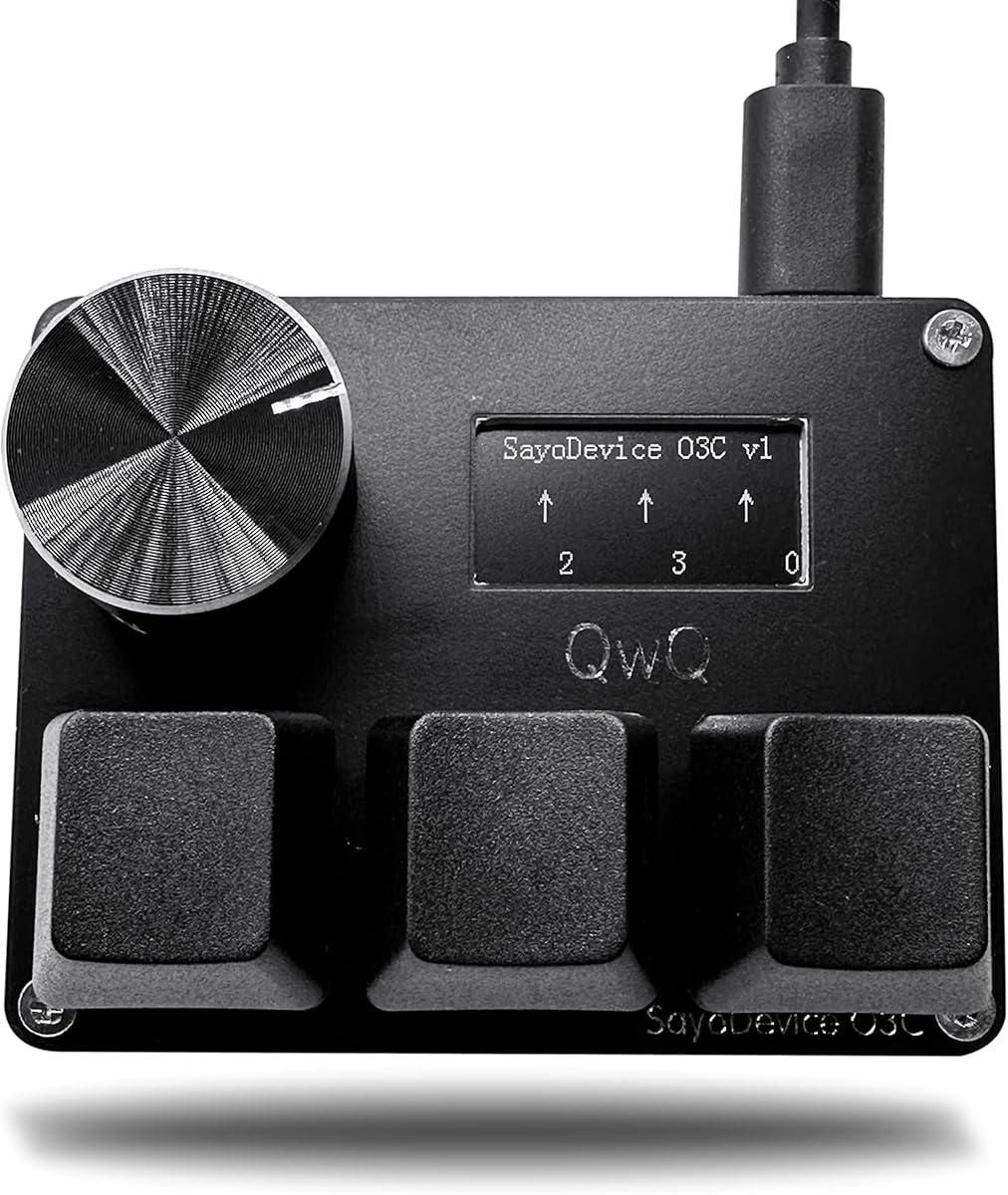
KPXOS OSU3X Custom Gaming Keyboard
3.4Editor score
Adjustable trigger distance
Visual feedback display
Programmable keys included
Plug-and-play setup
This guide compares the top 10 keyboards for Geometry Dash, focusing on rapid trigger switches, actuation points, and key features to enhance your gameplay
Finding the right keyboard for Geometry Dash can significantly impact your ability to hit precise notes and maintain rhythm during intense levels. Players often struggle with standard mechanical switches that lack the speed and customization needed for high-level play. The ideal device offers rapid trigger technology and adjustable actuation to match your unique finger movements.
We have evaluated ten distinct models based on their switch technology, polling rates, and customization options relevant to rhythm gaming. Each product was assessed for its ability to handle rapid inputs without ghosting or delay. Our analysis prioritizes keyboards that support hot-swap functionality and offer software for fine-tuning sensitivity.
Each pick below highlights specific strengths and potential limitations to help you make an informed decision for your setup. We include detailed specifications and real-world performance notes to ensure transparency. Please note that product availability and pricing may fluctuate frequently so verify details before purchasing.
3.4Editor score
4.7Editor score
4.5Editor score
The following comparison table provides a side-by-side overview of key specifications for all ten keyboards analyzed in this guide. This allows you to quickly identify differences in switch types, polling rates, and physical features to find the model that best suits your specific needs and budget constraints.




This keyboard stands out as a top contender for Geometry Dash players seeking precision and customization. It features Hall magnetic switches that allow for rapid trigger technology which is essential for rhythm games. The device includes an IPS screen and a knob that can be programmed for various functions like scrolling song lists.
We may earn a commission when you buy through this link, at no additional cost to you.
The standout quality of this model is its ability to offer fine-grained control over actuation points. Users can adjust the trigger distance to match their finger sensitivity which can significantly improve reaction times. The high-speed USB connection ensures that inputs are registered instantly without delay.
However potential users should be aware that calibration is sometimes required before first use or after firmware updates. This extra step might be inconvenient for some but it ensures the device operates at peak performance. The mini keypad form factor is also a limitation if you need a full layout.
If you are serious about optimizing your performance in Geometry Dash this keyboard offers the tools you need. The combination of rapid trigger and customizable controls makes it a powerful choice for competitive players. We recommend this for those willing to invest time in setup for better results.
Rapid trigger technology allows keys to reset immediately when released rather than waiting for a fixed reset point. This dynamic response is crucial for quick input sequences common in rhythm games.
The IPS screen allows you to display custom text such as your player ID or real-time status. This feature enhances the aesthetic and functional experience of your setup.
We may earn a commission when you buy through this link, at no additional cost to you.
This model offers an accessible entry point for players wanting rapid trigger features without a high cost. It includes magnetic switches and a screen that provides real-time feedback on key travel and status. The design supports multi-key combinations which can streamline common tasks like copy and paste.
We may earn a commission when you buy through this link, at no additional cost to you.
The key strength lies in its customizable interface and adjustable trigger distance down to very low millimeters. This flexibility allows users to tailor the keyboard to their specific playstyle which is vital for fast-paced games. The plug-and-play setup minimizes the time needed to get started.
One trade-off is that user feedback suggests the software may not be as robust as higher-end options. Additionally the lower rating indicates some users may face consistency issues. However for the price the functionality provided is quite comprehensive for a specialized device.
We recommend this keyboard for budget-conscious gamers who prioritize core rapid trigger functionality. It is a solid choice for those who want to experiment with magnetic switches before committing to a more expensive model.
This keyboard delivers essential rapid trigger capabilities at a fraction of the cost of premium models. It is an excellent way to test if magnetic switches improve your gameplay.
The visual feedback display helps you monitor key travel and counts in real time. This feature aids in understanding how your inputs are being registered.
We may earn a commission when you buy through this link, at no additional cost to you.
This keyboard shares many features with the top-rated model including Hall switches and a color screen. It is designed for users who need precise control over their inputs during gameplay. The ability to customize the first line of text on the screen adds a personal touch to your setup.
We may earn a commission when you buy through this link, at no additional cost to you.
The high-speed connection and rapid trigger capability ensure that your inputs are registered instantly. This responsiveness is critical for maintaining flow in rhythm games where timing is everything. The screen also allows you to set your own ID which can be useful for tournaments.
Users should note that calibration steps are shown in the figures and may be necessary for optimal performance. This requirement ensures accuracy but adds a small hurdle for new users. The hotswap design is a plus for those who want to experiment with different switches.
If you need a reliable device that offers both visual feedback and magnetic switches this is a strong candidate. It balances performance and customization well making it suitable for dedicated players.
The screen allows you to write your own ID or other text which adds a personal flair to your gaming setup. This can be useful for identifying your profile quickly.
The hotswap design means you can replace switches without soldering which gives you flexibility to tune the feel of the keyboard. This is a valuable feature for enthusiasts.
We may earn a commission when you buy through this link, at no additional cost to you.
This keyboard is specifically marketed for OSU and Geometry Dash making it a targeted choice for rhythm gamers. It features Hall switches that support rapid trigger which is essential for fast-paced play. The screen supports custom animations which can enhance the visual experience.
We may earn a commission when you buy through this link, at no additional cost to you.
The ability to customize trigger release points allows you to fine-tune the sensitivity to your preference. This level of control can help reduce fatigue and improve consistency during long gaming sessions. The knob can also be set to any key offering additional flexibility.
One consideration is that you may need to perform calibration before first use to ensure accuracy. This step is standard for magnetic switch keyboards but requires attention to detail. The compact design is great for saving desk space but limits the number of keys available.
We suggest this model if you prioritize specific features like custom animations and rapid trigger over a full keyboard layout. It is a specialized tool designed to meet the needs of rhythm game players.
The screen supports custom animations which can add a dynamic visual element to your setup. This feature distinguishes it from many standard keyboards.
Custom trigger release points allow you to adjust how quickly a key resets after being pressed. This can significantly impact your ability to execute rapid inputs.
We may earn a commission when you buy through this link, at no additional cost to you.
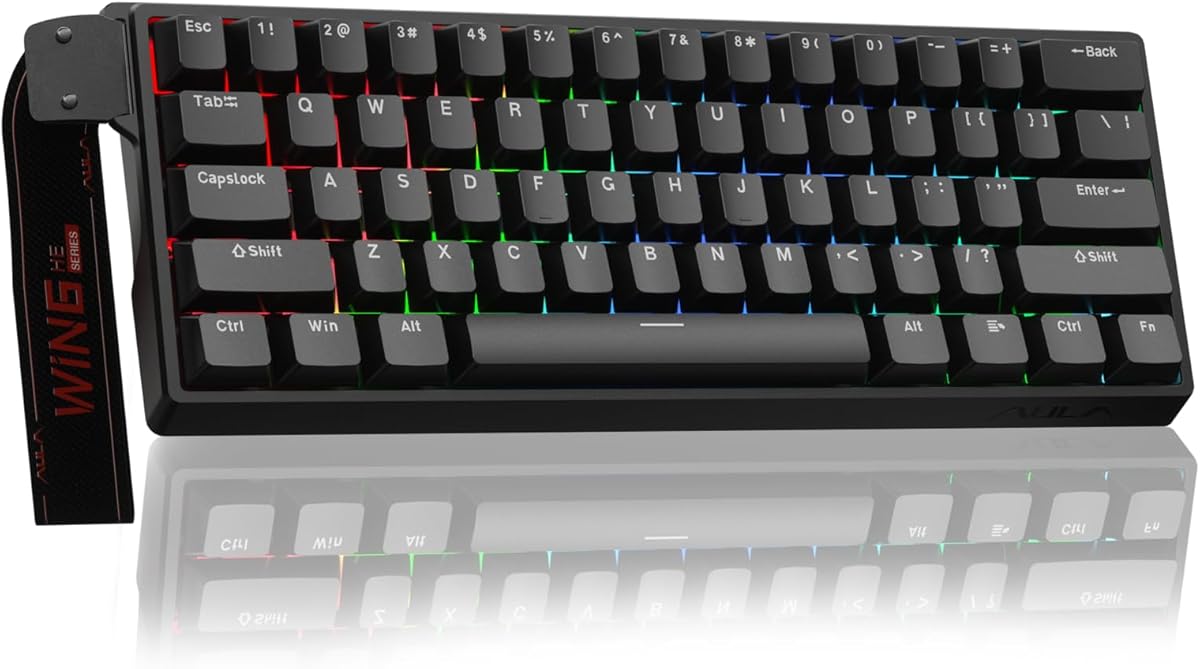
This 60% keyboard brings premium magnetic switch technology to a compact form factor ideal for gamers. It features self-developed magnetic switches that provide precise and consistent actuation without physical contact. The web-based driver simplifies customization without requiring bulky software downloads.
We may earn a commission when you buy through this link, at no additional cost to you.
The high polling rate of 8000Hz ensures minimal latency which is crucial for competitive gaming. The rapid trigger mode supports ultra-low step distances enhancing your ability to execute complex combos quickly. RGB lighting adds visual flair and can be customized to match your mood.
While the compact design saves space it may limit functionality for users who rely heavily on function keys. Also the web driver is currently only compatible with Windows systems which is a limitation for Mac users. However for PC users this offers a seamless customization experience.
If you need a powerful yet compact keyboard with advanced magnetic features this is an excellent choice. It balances performance and convenience well making it suitable for both gaming and work.
The web-based driver allows you to customize keys and RGB without installing additional software. This streamlines the setup process and ensures compatibility.
The 60 percent layout saves desk space while retaining essential keys through function layers. This is ideal for setups where space is at a premium.
We may earn a commission when you buy through this link, at no additional cost to you.
This keyboard offers a robust feature set including wireless connectivity and a large TFT screen for various information display. It uses a gasket design which provides a comfortable typing feel and reduces harsh vibrations. The battery life is impressive allowing for extended use without recharging.
We may earn a commission when you buy through this link, at no additional cost to you.
The hot-swappable PCB gives you the freedom to experiment with different switches without soldering. This is a significant advantage for those who want to customize the typing experience. The triple mode connection allows seamless switching between devices which is useful for multitasking.
While the price is higher than basic models the additional features justify the cost for many users. The large screen and wireless capability offer flexibility that is hard to find in specialized keyboards. You do need to monitor battery levels for continuous use though.
We recommend this for users who want a premium typing experience with extra connectivity options. It is a versatile tool that can serve well beyond just gaming scenarios.
The wireless capability removes cord shackles while maintaining a wired experience when charging. This provides the best of both worlds for connectivity.
The gasket design uses shock absorption to provide a softer and more comfortable typing feel. This enhances long-term comfort during extended sessions.
We may earn a commission when you buy through this link, at no additional cost to you.
This model is designed for high-performance gaming with advanced features like DKS and SOCD for better control. The adjustable actuation ranges from 0.01mm to 4mm allowing for extreme customization of key sensitivity. The web-based driver makes it easy to access these settings across devices.
We may earn a commission when you buy through this link, at no additional cost to you.
The rapid trigger technology resets keys based on movement rather than fixed points which enhances control during intense matches. The gasket structure ensures a satisfying typing feel and quiet operation that does not disturb others. RGB effects are customizable to match your setup aesthetics.
Users should note that the web driver requires an internet connection and may not be as intuitive as native software. However the flexibility it offers is substantial for competitive players. The compact design with arrow keys is a thoughtful inclusion for space-saving.
If you need precise control and advanced gaming features this keyboard is a strong contender. It is suitable for both FPS and rhythm games due to its versatile adjustment options.
Dynamic Keystroke and Simultaneous Opposing Cardinal Directions support allow for more complex input handling. This can improve your strategy in competitive titles.
The PBT keycaps resist wear and shine ensuring a consistent feel over time. The gasket structure adds to the overall build quality.
We may earn a commission when you buy through this link, at no additional cost to you.
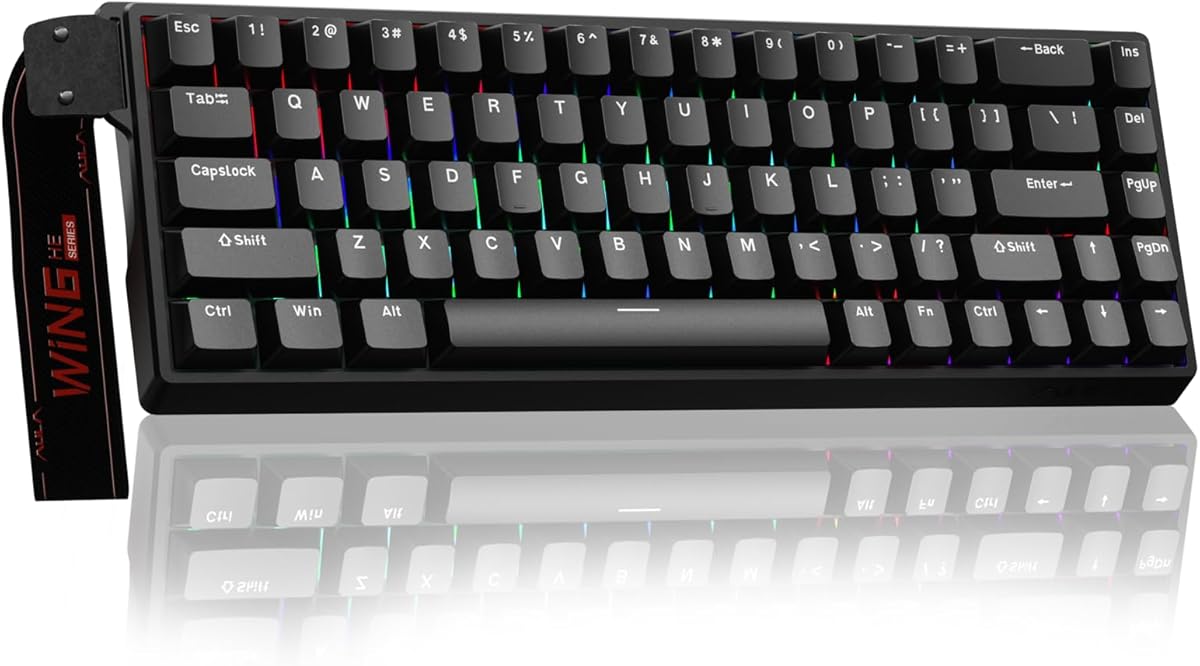
This keyboard offers industry-leading polling rates and adjustable actuation points for precise gaming. The fast trigger mode ensures that commands take effect instantly which is essential for competitive play. The compact 60 percent design saves desk space while retaining arrow keys.
We may earn a commission when you buy through this link, at no additional cost to you.
The web driver allows for comprehensive customization of RGB and macros without heavy software installation. This convenience is appreciated by users who value efficiency. The detachable USB cable adds to the portability making it easy to transport to events.
A limitation is that the driver does not support macOS which may restrict users on that platform. Additionally the compact layout requires using function combinations for some commands. However for PC users this provides a high-performance option.
We suggest this for gamers who prioritize speed and compact design. It delivers professional-level features at a reasonable price point for most users.
The fast trigger mode ensures that inputs are registered with minimal latency. This speed gives you a competitive edge in games where timing is critical.
Saving up to 40 percent of desktop space helps you maximize your gaming area. The arrow keys are retained for better functionality in a small footprint.
We may earn a commission when you buy through this link, at no additional cost to you.
This white edition offers a clean aesthetic while maintaining the functional features of the black version. It supports magnetic switches and visual feedback displays to help you monitor your inputs. The design supports multi-key combinations which can streamline your workflow.
We may earn a commission when you buy through this link, at no additional cost to you.
The adjustable trigger distance allows for customization to your specific finger movements. This feature is essential for optimizing performance in rhythm games. The plug-and-play setup ensures you can start using it immediately without complex drivers.
User ratings are lower than other models suggesting potential inconsistencies or interface limitations. However the core functionality remains solid for those who prefer a minimalist look. The white color scheme is a distinct advantage for matching certain setups.
If you want a visually distinct device with rapid trigger features this could be the right choice. We recommend it for users who prioritize aesthetics alongside performance.
The white color scheme offers a clean look that can match your room or desk setup. This is a valuable consideration for users with specific design preferences.
Despite the aesthetic focus the core magnetic switch and rapid trigger functions are preserved. This ensures you do not sacrifice performance for style.
We may earn a commission when you buy through this link, at no additional cost to you.
This keypad is designed for rhythm games including OSU and Geometry Dash with specific features for song selection. It includes a knob and screen that can be customized to display key travel and counts. The plug-and-play interface ensures you do not need additional drivers.
We may earn a commission when you buy through this link, at no additional cost to you.
The calibration feature supports individual button adjustments allowing you to fine-tune each key. This is useful for ensuring consistency across your inputs. The USB 2.0 connection provides reliable high-speed data transfer for your commands.
The limited number of buttons means you may need to rely on macros or combos for additional functions. User feedback suggests reliability can vary compared to higher-end models. However for a specialized tool it offers good functionality.
We recommend this for users looking for an affordable specialized keypad for rhythm games. It is best suited for secondary setups or specific use cases.
The screen allows you to display key travel and status in real time. This feedback is helpful for debugging your input precision.
The device works immediately upon connection without requiring software installation. This simplicity reduces barriers to entry for new users.
We may earn a commission when you buy through this link, at no additional cost to you.
Choosing the right keyboard involves evaluating several technical aspects that directly impact your gameplay experience. We have outlined the key factors you should consider to make an informed decision.
Rapid trigger technology allows keys to reset instantly upon release rather than requiring a fixed distance. This feature is essential for rhythm games where fast successive inputs are common. Look for keyboards that explicitly advertise this capability.
Ensure the device supports rapid trigger to avoid input delays that can disrupt your flow.
Hall effect switches use magnetic fields instead of physical contact to register keypresses. This reduces wear and tear and provides more consistent actuation over time. They are often preferred for gaming due to their durability and precision.
Prioritize keyboards with Hall effect switches for long-term reliability and precision.
The polling rate determines how often the keyboard reports data to your computer. A higher rate like 8000Hz ensures minimal latency which is crucial for competitive gaming. Lower rates may introduce noticeable delays in fast-paced scenarios.
Aim for a polling rate of at least 1000Hz or higher for optimal responsiveness.
Adjustable actuation allows you to set the depth at which a key triggers. This customization can help reduce finger fatigue and improve consistency. Look for ranges that support adjustments down to sub-millimeter levels.
Choose a model with wide adjustability to match your specific finger sensitivity.
The physical size of the keyboard affects how much desk space it occupies. Compact layouts like 60 percent or mini keypads save space but limit physical keys. Ensure the layout fits your setup and workflow requirements.
Select a form factor that balances space savings with necessary functionality for your games.
Software allows you to remap keys create macros and adjust lighting settings. Robust software ensures you can fully utilize the keyboard's features without technical barriers. Web-based drivers are increasingly popular for ease of access.
Verify the software compatibility with your operating system before purchasing.
A hot-swappable design lets you change switches without soldering which offers flexibility. This feature is useful if you want to experiment with different switch types. It simplifies maintenance and customization significantly.
Look for hot-swap support if you plan to modify your keyboard later.
Build materials such as PBT keycaps contribute to the longevity of the device. High-quality materials resist wear and provide a consistent feel over time. Review the construction details to ensure the keyboard can withstand heavy use.
Invest in a model with durable materials to ensure long-term satisfaction.
To ensure optimal performance start by calibrating your keyboard if required. Follow the manufacturer's instructions carefully to set the trigger points correctly. This step helps the device understand your specific input style and prevents errors.
Keep the keyboard clean by gently wiping the surface with a microfiber cloth. Avoid using liquids directly on the switches and always unplug before cleaning. Regular maintenance prevents dust from interfering with the magnetic sensors.
Use the software to update firmware when updates are available to benefit from improvements. Monitor the keyboard's behavior periodically to ensure all keys are functioning as expected. Proper care extends the lifespan and maintains consistent performance.
Yes magnetic switches offer faster actuation and reduced latency which can improve your reaction times. They also allow for adjustable actuation points that can be tailored to your preferences. This makes them a popular choice for competitive rhythm players.
Rapid trigger mode allows keys to reset immediately when released rather than waiting for a fixed point. This feature helps in executing rapid inputs without delay which is essential for rhythm games. It significantly enhances your ability to hit notes precisely.
Compatibility varies by model so check the software requirements before purchasing. Some keyboards offer web-based drivers that work on macOS while others are Windows-only. Ensure you verify OS support to avoid connectivity issues.
Many models feature hot-swap designs that allow you to change switches without soldering. This provides the freedom to experiment with different switch types and feels. It is a great feature for enthusiasts who want to customize their setup.
Basic functions are available without software but advanced features require a driver. The software allows you to customize RGB lighting macros and actuation points. Some models offer web-based drivers for easier access across devices.
Calibration ensures that the magnetic sensors detect keypresses accurately. It helps the keyboard understand your specific finger movements and prevents false inputs. This step is crucial for maintaining consistent performance over time.
Mini keypads can be sufficient if they support the required keys and macros. They save desk space and focus on essential functionality for rhythm games. Ensure the layout matches your specific game requirements before deciding.
Use a soft cloth to wipe the keys and surface gently avoiding liquids. Disconnect the device before cleaning to prevent any electrical issues. Regular maintenance helps keep the sensors free from dust and debris.
We have reviewed ten keyboards offering a range of features to suit different needs. The top picks include models with rapid trigger technology and adjustable actuation points for precision. Each device brings unique strengths that can enhance your gameplay experience.
Prioritize features like Hall effect switches and polling rate to ensure you get the performance you need. Consider the layout and software compatibility to make sure the keyboard fits your setup seamlessly. Your choice should align with your specific gaming habits.
Remember to check current prices and availability as they may change frequently. Investing in the right keyboard can make a significant difference in your progress. We hope this guide helps you find the perfect tool for your Geometry Dash journey.