
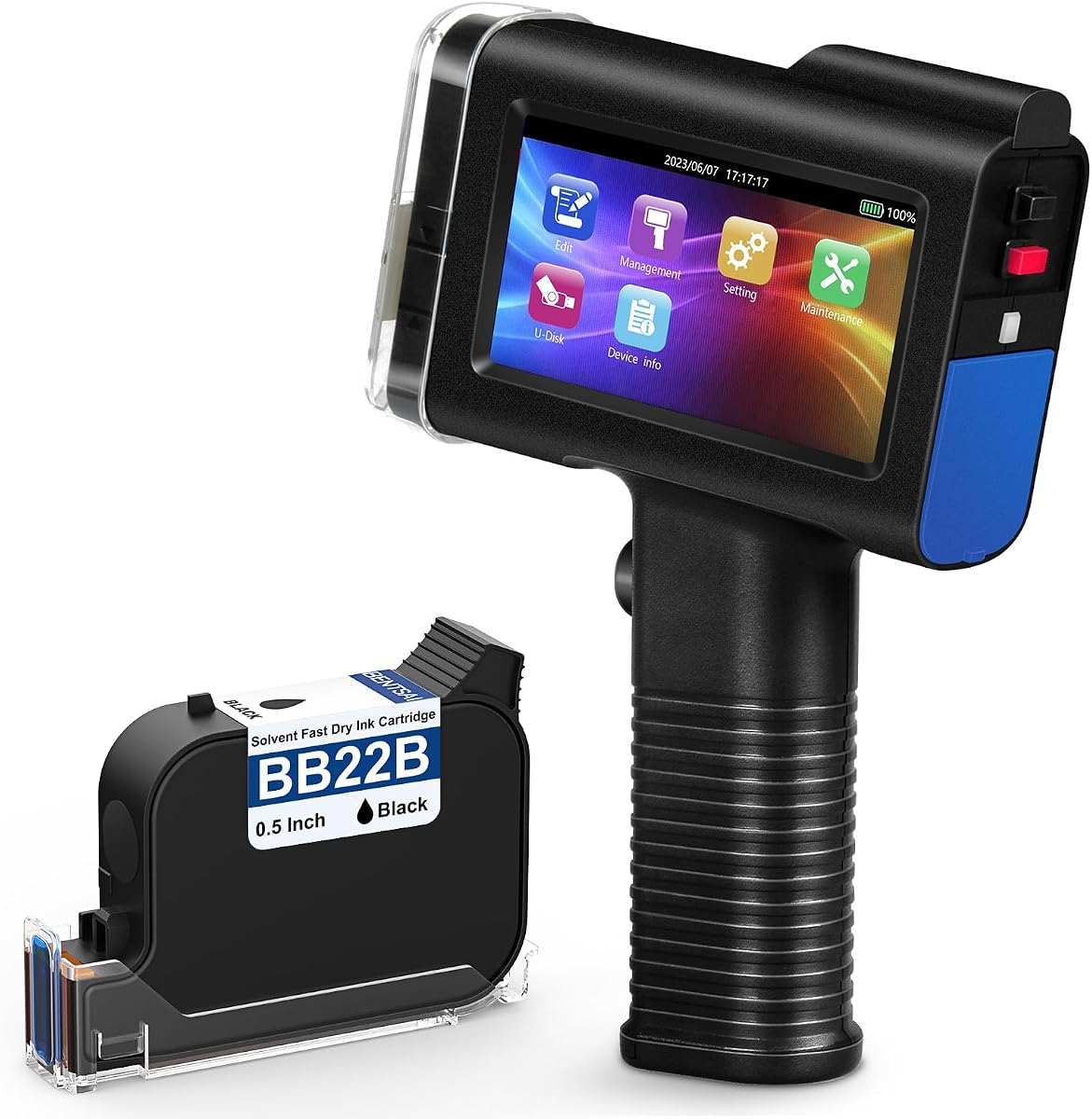
0.5 Inch Print Height Intelligent JC01 Handheld Inkjet Printer (Black)
4.2Editor score
Ultra-light 390g design
16 hours continuous operation
USB file import capability
This guide compares the top handheld inkjet printers for portable coding, marking, and labeling across various surfaces with detailed reviews and specs.
Handheld inkjet printers have revolutionized how businesses handle product coding and labeling. These portable devices allow you to print dates, batch numbers, and logos directly onto diverse materials without needing bulky machinery.
We evaluated ten leading models based on battery life, print quality, surface compatibility, and ease of use. Each product was assessed against real-world industrial requirements to ensure reliability in demanding environments.
Each pick highlights key strengths and potential trade-offs to help you decide. Remember that product availability and pricing can change quickly, so verify current details before making your final purchase decision.
4.2Editor score

4.7Editor score
4.4Editor score
This side-by-side comparison outlines the core specifications and capabilities of each handheld inkjet printer to help you identify the right tool for your specific marking needs.


This handheld inkjet printer stands out as the top choice for professionals needing reliable portability and performance. It holds a 4.7 rating and features a robust design suitable for diverse industrial environments.
We may earn a commission when you buy through this link, at no additional cost to you.
Its standout qualities include a 4.3 inch HD touchscreen that makes editing templates effortless. The 16 hour battery life ensures you can work through long shifts without interruption.
Trade-offs exist such as the need for proper ink storage to prevent drying. However, the self-locking cartridge mechanism minimizes this risk significantly during operation.
Buy this if you need a versatile coder for packaging or logistics. It balances ease of use with industrial durability effectively.
You can create and edit templates directly on the device screen without external software.
Support for 28 languages makes this device accessible for international teams.
We may earn a commission when you buy through this link, at no additional cost to you.
The JC01 offers a compelling value proposition for businesses prioritizing cost and portability. With a 4.2 rating, it delivers solid performance for everyday labeling tasks.
We may earn a commission when you buy through this link, at no additional cost to you.
Its lightweight design at 390g reduces fatigue during extended use. The included wrist strap adds a layer of safety against accidental drops.
While the interface is simpler than premium models, it covers essential needs well. The USB import function remains a key feature for quick updates.
Choose this model if budget constraints are primary. It proves you do not need to spend heavily for reliable inkjet coding.
The redesign focuses on reducing weight to minimize hand strain for workers.
Uploading logos via USB allows for rapid customization of print content.
We may earn a commission when you buy through this link, at no additional cost to you.
This Bentsai model is a top-tier choice for high-volume industrial marking. Its 4.4 rating reflects its robust build quality and advanced features.
We may earn a commission when you buy through this link, at no additional cost to you.
The 600 DPI resolution ensures crisp graphics and barcodes. With a yield of 2 million characters, it reduces maintenance needs for high throughput operations.
The ability to mount on conveyor lines adds significant value for production automation. The learning curve is minimal thanks to the intuitive touch interface.
Invest in this if quality and volume are critical. It serves as a long-term asset for manufacturing and packaging lines.
Mounting options allow seamless integration with existing conveyor systems.
Higher capacity cartridges mean fewer interruptions during long production shifts.
We may earn a commission when you buy through this link, at no additional cost to you.
The BT-HH6205BL excels when large print heights are required for visibility. Its 4.3 rating indicates strong performance in specific industrial applications.
We may earn a commission when you buy through this link, at no additional cost to you.
The adjustable print height up to 1 inch allows for bold, clear markings. The 5 roller system ensures stability even on uneven surfaces.
While slightly heavier, the ergonomic design mitigates fatigue. This tool is particularly useful for pallet marking or large crate labeling.
Select this model for applications needing prominent text. Its specialized capabilities make it a strong niche option.
Printing up to 1 inch high ensures text is readable from a distance.
The upgraded 5 roller system provides better stability during printing.
We may earn a commission when you buy through this link, at no additional cost to you.
The Phezer P15 is designed for users who want a simple offline experience. Its 4.1 rating reflects solid performance for basic labeling needs.
We may earn a commission when you buy through this link, at no additional cost to you.
It does not require a computer or app to function, which simplifies setup. The availability of seven ink colors adds creative flexibility.
While it lacks advanced features, it covers standard date and batch coding effectively. Its lightweight nature makes it easy to carry around.
Opt for this if simplicity is your main goal. It is a straightforward tool for small businesses.
No external connectivity is required for standard printing tasks.
Multiple ink options allow for color-coding different product lines.
We may earn a commission when you buy through this link, at no additional cost to you.
The MS-Z10 is an affordable option focusing on quick drying ink technology. With a 3.9 rating, it serves basic needs for small workshops.
We may earn a commission when you buy through this link, at no additional cost to you.
Its ink dries rapidly, reducing smudging risks on moving conveyor items. The included case helps protect the device during transport.
While it lacks some advanced customization, it covers standard batch and date coding well. The resolution options allow for clarity on diverse surfaces.
Consider this for low-budget DIY or light industrial use. It provides essential functions without complexity.
Rapid drying ink ensures marks remain crisp even on moving items.
The included case keeps the printer and accessories organized and safe.
We may earn a commission when you buy through this link, at no additional cost to you.
This printer is specifically noted for its waterproof ink capabilities. It maintains a 4.0 rating for reliability in challenging environments.
We may earn a commission when you buy through this link, at no additional cost to you.
The infrared aiming assist helps users position prints accurately on textured surfaces. Its self-locking cartridge reduces the risk of leaks.
While it offers standard features, the waterproof ink adds value for outdoor or wet storage conditions. It is a practical choice for durable labeling.
Choose this if water resistance is a priority. It ensures your codes remain legible in adverse conditions.
Infrared assist helps align prints accurately on uneven textures.
Ink resists water to ensure labels survive exposure to moisture.
We may earn a commission when you buy through this link, at no additional cost to you.
The XMINI stands out for its incredibly low weight. With a 4.5 rating, it offers high user satisfaction for those needing portability.
We may earn a commission when you buy through this link, at no additional cost to you.
Its 2.4 inch screen is smaller but functional for quick edits. The positioning plate is crucial for 360-degree printing on curved surfaces.
Calibration is required upon setup to ensure screen responsiveness. However, the lightweight design makes it easy to carry for long periods.
Perfect for users prioritizing weight reduction. It is an ideal solution for high-frequency handheld labeling.
Positioning plate enables accurate marking on rounded bottles and tubes.
Weighing just over half a pound minimizes hand fatigue effectively.
We may earn a commission when you buy through this link, at no additional cost to you.
The E12 Mini offers a unique detachable handle for versatile use. It holds a 4.7 rating, showing strong user approval for its design.
We may earn a commission when you buy through this link, at no additional cost to you.
In mini mode, it fits easily into a pocket for true mobility. The anti-clog nozzles ensure reliability during intermittent printing tasks.
The yield is lower than premium models but sufficient for small batches. Its compact footprint makes it easy to store when not in use.
Ideal for on-the-go professionals needing a pocket-friendly coder. It balances size with sufficient functionality.
Detach the handle to save space and carry it like a pen.
Nozzles are designed to prevent clogs during intermittent use.
We may earn a commission when you buy through this link, at no additional cost to you.
This nozzle gun is designed for quick, direct file uploads. It has a 4.5 rating reflecting its efficiency for routine labeling tasks.
We may earn a commission when you buy through this link, at no additional cost to you.
The ability to plug in a USB drive for data saves software setup time. The ergonomic grip and strap make it comfortable for long shifts.
It focuses on core functions like text and date printing without bloat. This simplicity makes it reliable for everyday warehouse use.
Pick this if you need a straightforward tool for batch coding. It delivers consistent results with minimal effort.
Direct USB connections allow rapid batch updates without extra software.
The design prioritizes hand comfort during frequent daily printing tasks.
We may earn a commission when you buy through this link, at no additional cost to you.
Selecting the right handheld inkjet printer involves assessing your specific operational requirements and environmental conditions.
Determine the maximum print height you need for visibility. Standard 0.5 inch models are suitable for most boxes, while 1 inch models better for larger pallets. Resolution affects barcode scannability, so ensure high DPI for complex codes.
Choose height based on label size and readability needs.
Look for models offering at least 16 hours of operation to cover full shifts. Built-in batteries should be rechargeable via standard adapters to minimize downtime.
Prioritize long battery life to avoid workflow interruptions.
Quick-drying and waterproof ink is essential for surfaces exposed to moisture or friction. Some models offer multiple colors or special UV ink for enhanced visibility.
Ensure the ink adheres well to your specific target material.
Check that the printer supports your materials like metal, plastic, or fabric. Curved surface capability is vital for bottles or rounded containers.
Verify surface compatibility before purchasing to avoid print failures.
Touchscreen interfaces simplify template editing and data changes. Models that allow direct file imports save time compared to manual entry.
Choose an intuitive interface to reduce training time for staff.
Lighter devices reduce fatigue during prolonged use. Consider ergonomic features like wrist straps or handles for safety and comfort.
Opt for a balanced weight to ensure operator comfort.
Reliable technical support and warranty terms are critical for industrial equipment. Check for manufacturer certifications and service availability.
Confirm warranty details to protect your investment long term.
Calculate the cost per character based on ink yield. While initial price matters, maintenance and consumable costs impact long-term value.
Balance upfront cost with ongoing operational expenses.
To start using your handheld inkjet printer, install the ink cartridge securely and power on the device. Calibrate the screen if required and enter your desired text or data template.
Clean the print head and rollers regularly to prevent clogs. Use the protective cap when the device is not in use to keep ink from drying out.
Store the printer in a cool, dry place away from direct sunlight. Regular updates to firmware and templates ensure consistent performance over time.
Most modern models feature built-in touchscreens that allow standalone operation without a computer. You can edit text and templates directly on the device. However, some models support USB or software updates for advanced data management.
Ink life varies by usage and font size. A standard 42ml cartridge can yield over 1 million characters depending on print density. Always cover the cartridge when not in use to maximize its lifespan.
Yes, many handheld inkjet printers include positioning plates or adjustable nozzles for curved surfaces. This feature is crucial for labeling bottles or pipes where flat contact is impossible.
High-quality models use quick-drying ink formulas that resist water and fading. Once dry, the prints are generally permanent on porous and non-porous surfaces.
Most devices support common image formats like JPG, PNG, and BMP. These allow you to import custom graphics and logos directly via USB for professional branding.
Always secure the protective cap immediately after each use. Store the device in a stable temperature environment to prevent ink drying issues inside the nozzles.
The top picks reviewed offer a range of options tailored to different operational needs. Whether you need portability or high-volume output, there is a suitable model available.
Prioritize features that align with your daily workflow to ensure efficiency. Battery life and ink durability are often the most critical factors for long-term satisfaction.
Always check the latest product details and pricing before purchasing to ensure you get the best value for your business investment.