
ARCTIC Case Fan Hub
4.7Editor score
10-fold PWM distribution
SATA power input
Compact black design
This guide compares the top fan control hub for PC options to help you manage cables, optimize airflow, and sync RGB lighting efficiently in your custom build.
Building a modern PC requires careful attention to cooling and aesthetics. A fan control hub for PC helps organize multiple fans and RGB lights into a single, manageable system. This ensures your system stays cool while keeping cables tidy and lighting synchronized.
We evaluated ten top-rated hubs based on port count, power delivery, and ease of use. Each option supports PWM fans and often ARGB lighting. We looked at mounting styles, cable management features, and compatibility with standard motherboard headers.
Each pick highlights key strengths and potential limitations to guide your choice. Prices and availability change frequently so verify current details before purchasing. This guide ensures you find the right hub for your specific case and cooling needs.
4.7Editor score
4.6Editor score

4.7Editor score
The following table provides a side-by-side comparison of all ten selected hubs. Review port counts, power inputs, and unique features to determine which model aligns best with your specific PC build requirements and cooling goals.


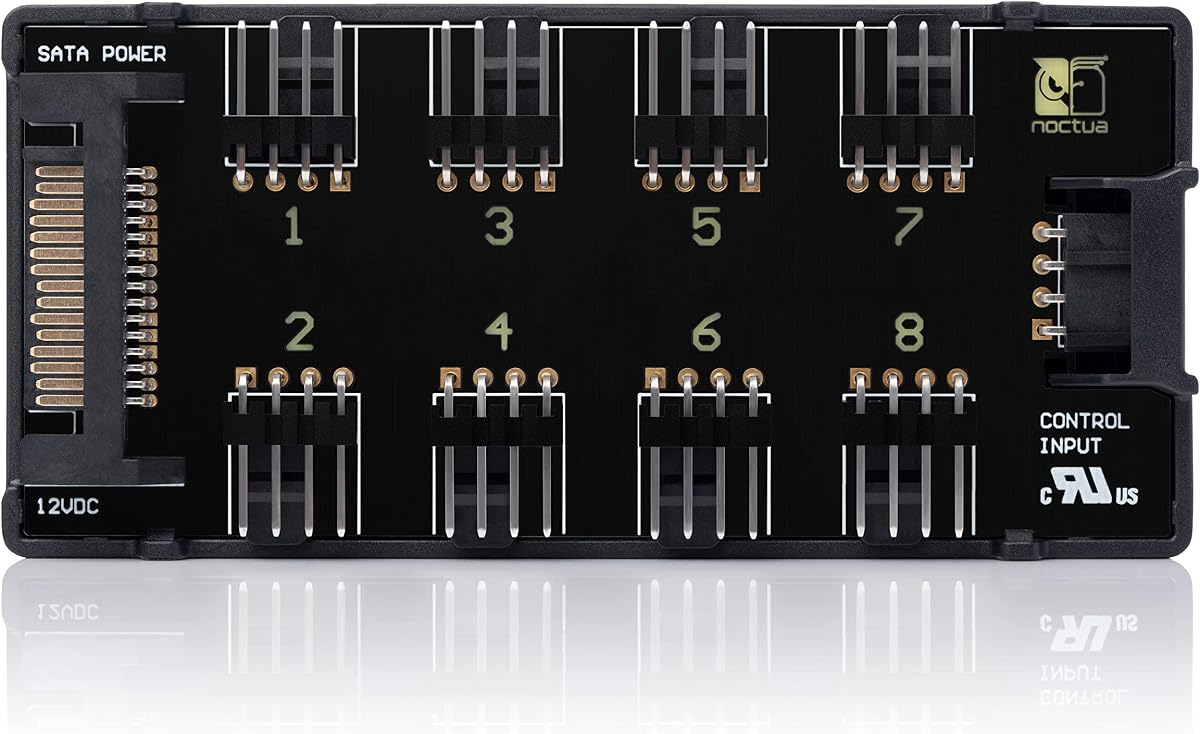
The Noctua NA-FH1 stands out as a premium fan hub with robust safety features. It supports eight PWM fans simultaneously and includes magnetic mounting for flexible installation. Users appreciate its reliability and adherence to strict safety certifications.
We may earn a commission when you buy through this link, at no additional cost to you.
Its design prioritizes safety with built-in fuses against overcurrent and short circuits. The hub allows simultaneous use of SATA power and 4-pin inputs for maximum flexibility. This ensures stable operation even under heavy cooling loads.
While the price is higher than budget options, the build quality and warranty justify the cost. It lacks individual fan control but provides excellent centralized management. This trade-off is acceptable for those prioritizing safety and stability.
Ideal for builders seeking a reliable and safe hub for complex setups. It ensures all fans run smoothly without risking motherboard headers. This hub delivers long-term performance for demanding thermal management needs.
The hub includes safety fuses that protect against overcurrent and short circuits ensuring hardware safety.
Simultaneous use of SATA and 4-pin inputs allows for versatile power delivery across different fan types.
We may earn a commission when you buy through this link, at no additional cost to you.
The ARCTIC Case Fan Hub offers exceptional value with ten PWM ports for under fifteen dollars. It simplifies cable management by connecting all fans through one header. This makes it perfect for users needing basic airflow expansion.
We may earn a commission when you buy through this link, at no additional cost to you.
Direct SATA power ensures stable operation without voltage loss or motherboard strain. The compact design fits easily in tight cases without obstructing airflow. Users find it easy to install with minimal configuration required.
It lacks lighting control which limits appeal for RGB builds. However its core function of fan distribution is flawless. The low cost makes it an accessible solution for budget-conscious builders.
This hub is ideal for cooling-focused builds where RGB is unnecessary. It ensures smooth fan operation and keeps internal cabling organized. A practical choice for standard system thermal management.
Priced very affordably this hub delivers essential fan distribution without unnecessary features.
Direct SATA connection ensures fans receive consistent power without stressing motherboard headers.
We may earn a commission when you buy through this link, at no additional cost to you.
The ARCTIC Fan Controller provides independent control for each of its ten ports. This allows precise tuning of airflow for specific zones in your system. It supports both Windows and Linux natively for broad compatibility.
We may earn a commission when you buy through this link, at no additional cost to you.
Each port can deliver up to two amps ensuring even high power fans run smoothly. Magnetic mounting offers versatile placement options without adhesive residue. This level of control is rare at this price point.
Users may need to install drivers on Linux systems for full functionality. The price reflects the advanced features and engineering quality. This is a worthy investment for advanced cooling strategies.
Recommended for builders who need granular control over fan speeds. It optimizes cooling performance and noise levels independently. This hub delivers premium flexibility for demanding thermal environments.
Individual PWM control allows users to tune each fan speed separately for optimal cooling.
Native driver support ensures compatibility with both Windows and Linux operating systems.
We may earn a commission when you buy through this link, at no additional cost to you.
This hub supports eight groups of ARGB fans alongside PWM fan control. It synchronizes lighting effects easily keeping cables neat and organized. Strong paste and magnetic suction offer flexible mounting options inside cases.
We may earn a commission when you buy through this link, at no additional cost to you.
It maintains stable output even under high loads thanks to direct SATA power. The hub expands lighting interfaces to synchronize ARGB lights across multiple devices. Users appreciate its ability to tidy complex RGB wiring.
Note that it does not support 12V RGB devices which is common limitation. Also it cannot adjust fan speeds or lighting directly. These constraints are minor for users seeking basic expansion.
A great choice for builds with significant RGB lighting requirements. It ensures lights stay synchronized and wires stay organized. This hub balances functionality with effective cable management.
Synchronize lighting effects across multiple ARGB devices easily with the built in hub.
Strong paste and magnetic suction provide versatile placement options within your case.
We may earn a commission when you buy through this link, at no additional cost to you.
Supporting twelve groups of fans this hub offers massive expansion for large cases. It handles both PWM fans and ARGB lighting simultaneously for clean setups. The white design complements light themed builds effectively.
We may earn a commission when you buy through this link, at no additional cost to you.
Direct SATA power ensures stable performance without voltage loss or throttling. It connects power and lighting interfaces neatly to reduce clutter. Users find it ideal for complex multi fan configurations.
It lacks individual speed control or RGB adjustment features. However it serves its purpose of expansion excellently. The price point is reasonable for the number of ports provided.
Ideal for large tower builds needing extensive fan and light support. It keeps cables organized and ensures consistent power delivery. This hub is a practical solution for scaling up cooling.
Twelve groups of fan support allows for massive cooling expansions in large cases.
Handles both PWM fan signals and ARGB lighting for a unified cable solution.
We may earn a commission when you buy through this link, at no additional cost to you.
This hub includes an RF remote for easy control of lighting and fans. The front facing RGB panel syncs visually with your setup. Magnetic mounting makes installation simple and adaptable to any case.
We may earn a commission when you buy through this link, at no additional cost to you.
It supports up to nine ports with stable power delivery via SATA. The kit includes all necessary cables and the remote for plug and play use. Users appreciate the convenience of remote operation.
The remote may be easily misplaced during cleaning or upgrades. It focuses on basic control rather than deep customization. However it offers great value for RGB focused builds.
Perfect for users wanting quick lighting changes without opening their PC. It simplifies control and enhances build aesthetics easily. This hub is a user-friendly choice for RGB enthusiasts.
Control lighting and fan settings with the included RF remote for easy access.
Front facing RGB panel provides a visual indicator of current lighting sync status.
We may earn a commission when you buy through this link, at no additional cost to you.
Offering ten ports at a low price this hub is ideal for budget builds. It supports up to ten fans with stable SATA power input. Installation is straightforward using the included double-sided sticker.
We may earn a commission when you buy through this link, at no additional cost to you.
It maintains stable output under high loads without overheating issues. The compact size ensures it fits neatly in tight cable management zones. Users find it reliable for basic fan distribution needs.
Lacks lighting control which limits it to cooling focused systems. Also SATA cables must be purchased separately which adds minor cost. These are minor trade-offs for the low price.
Recommended for budget builds needing maximum fan capacity. It ensures reliable airflow and simple cabling without high expense. A practical tool for standard PC cooling setups.
Affordable pricing makes this hub accessible for budget-conscious PC builders.
Small footprint allows for neat installation without obstructing airflow or cables.
We may earn a commission when you buy through this link, at no additional cost to you.
This hub supports both eight ARGB fans and eight PWM fans simultaneously. It delivers stable power through direct SATA connections ensuring smooth performance. The compact design fits neatly into standard cases.
We may earn a commission when you buy through this link, at no additional cost to you.
Installation is simple using the included double-sided sticker for placement. It synchronizes lighting effects across compatible devices easily. Users find it effective for maintaining clean internal wiring.
It does not allow speed or color adjustment directly. This limits flexibility compared to smarter controllers. However it serves well for straightforward expansion needs.
Great for midrange builds balancing cooling and lighting needs. It simplifies wiring and ensures consistent fan operation. This hub is a solid choice for general PC maintenance.
Simultaneous support for both ARGB fans and PWM fans offers versatile setup options.
Double-sided sticker installation makes mounting quick and secure within your case.
We may earn a commission when you buy through this link, at no additional cost to you.
This hub comes with an RF remote and chassis key for dual control options. It supports ten sets of ARGB fans and magnetic suction mounting. The small size keeps internal wiring tidy and organized.
We may earn a commission when you buy through this link, at no additional cost to you.
Direct SATA input ensures efficient and stable fan operation. It prevents stray currents and avoids voltage loss during use. Users appreciate the flexibility of having multiple control methods.
Remote batteries must be replaced occasionally which is a minor inconvenience. Also it does not support 12V RGB devices. Despite this it offers rich features for the price.
Ideal for those wanting multiple ways to control lighting. It simplifies management with remotes and keys. This hub delivers convenience and effective cable organization.
Both RF remote and chassis key control offer flexible access for adjustments.
Small size ensures the hub fits neatly without obstructing other components.
We may earn a commission when you buy through this link, at no additional cost to you.
This hub supports eight groups of fans with stable direct SATA power. It connects PWM and ARGB interfaces to keep cables organized. The compact form fits easily into most cases.
We may earn a commission when you buy through this link, at no additional cost to you.
It ensures synchronized lighting and fan speeds when connected properly. Installation uses strong double-sided stickers for secure placement. Users find it reliable for daily cooling tasks.
It lacks adjustment features for fan speeds or lighting. This limits control for advanced customization. However it is effective for basic expansion needs.
A solid choice for standard builds needing organized cabling. It ensures consistent performance without complexity. This hub offers straightforward and reliable control.
Direct SATA power ensures reliable and stable operation under any load.
Connects multiple interfaces to reduce clutter and keep internal wiring tidy.
We may earn a commission when you buy through this link, at no additional cost to you.
Selecting the right fan hub depends on your specific cooling and aesthetic needs. Consider port count, power requirements, and additional features to find the best fit for your build.
Determine how many fans you need to connect beyond your motherboard headers. Most hubs support between eight and ten ports allowing substantial expansion for airflow.
Choose a hub with at least one extra port to accommodate future upgrades without replacement.
Ensure the hub provides sufficient current per port. High power fans may require hubs rated for higher amperage to prevent underpowering and noise.
Hubs with SATA power input are preferred as they offer stable voltage directly from your supply.
Verify if your fans use PWM or ARGB signaling to select a compatible hub. Many hubs support both but some may lack specific connectors for RGB lighting.
If you plan to use lighting hubs ensure the hub includes ARGB headers and synchronization options.
Mounting flexibility helps you place the hub where it fits best in your case. Options like magnets or adhesives allow secure placement without screws.
Choose magnetic options for cases with steel panels and adhesive for non-conductive surfaces.
Some hubs offer remotes or chassis key controls for easy adjustments. Others support software control for granular fan tuning. Evaluate which features add value to your workflow.
Basic hubs may lack these extras but provide essential connectivity at a lower cost.
Look for hubs with built-in fuses or short circuit protection. These safety features protect your motherboard from potential power spikes or wiring errors.
Safety standards ensure reliable long-term operation and peace of mind.
Quality plastics and durable connectors ensure the hub withstands regular use. Check reviews for durability and stability under high loads to avoid overheating issues.
A sturdy build reduces the risk of loose connections and signal loss.
Check that the hub is compatible with your motherboard headers and OS. Some hubs may require drivers on Linux systems for full functionality.
Ensuring compatibility avoids setup issues and maximizes feature usage.
Start by connecting the SATA power cable from your PSU to the hub ensuring a secure fit. This provides stable voltage for all connected fans and lights.
Plug the motherboard header cable into the hub's input port to enable fan control signals. Ensure the red line aligns correctly with the motherboard header to avoid damage.
Attach fans to the output ports using proper orientation for airflow. Use the mounting options provided to secure the hub inside your case effectively.
Most basic hubs only expand the number of ports and pass the PWM signal from the motherboard. They do not adjust speed independently unless they feature specific software control or remote switches.
Yes most hubs require SATA power to handle multiple fans without overloading motherboard headers. This ensures stable voltage and prevents performance drops under load.
Many hubs support both PWM for fan speed and ARGB for lighting. Check product specs to ensure it has both connector types for simultaneous use.
Standard hubs support between eight and ten fans. High capacity models may offer more ports but consider total power draw before exceeding limits.
No hubs work with standard 4-pin PWM headers found on most motherboards. Ensure your header supports fan speed monitoring for accurate reporting.
Some hubs with software control require specific drivers on Linux systems. Always check OS compatibility before purchasing if using non-Windows operating systems.
Choosing the right fan hub ensures your PC stays cool and organized. The top picks offer various balances of price port count and extra features for different needs.
Prioritize safety certifications and power delivery when selecting a hub. These factors ensure long-term reliability and protect your components from electrical issues.
Always verify current prices and availability before purchasing. Prices change frequently so checking the latest listings ensures you get the best deal.