
CENMATE Aluminum 4 Bay Hard Drive Enclosure with Cooling Fan for 2.5"/3.5" SATA HDD/SSD with USB A/C 3.0
4.3Editor score
Up to 5Gbps transfer speed
Aluminum alloy with cooling fan
Compatible with Windows Mac Linux
Direct Attached Storage offers a reliable way to expand your computer capacity without network complexity. These enclosures connect directly via USB or Thunderbolt for fast file access and simple management across systems.
We evaluated ten leading DAS models based on transfer speeds, drive compatibility, cooling efficiency, and build quality. Our analysis focuses on real-world performance for backups, media editing, and long-term data preservation needs.
Each pick highlights key strengths and potential trade-offs for different workflows. Prices and availability fluctuate often, so verify current details before purchasing to ensure you get the best value for your storage goals.
4.3Editor score

4.2Editor score

3.5Editor score
As an Amazon Associate we earn from qualifying purchases.
This side-by-side comparison highlights key specs for each model. Use it to quickly identify bays, interface speeds, and RAID support before diving into detailed reviews below.


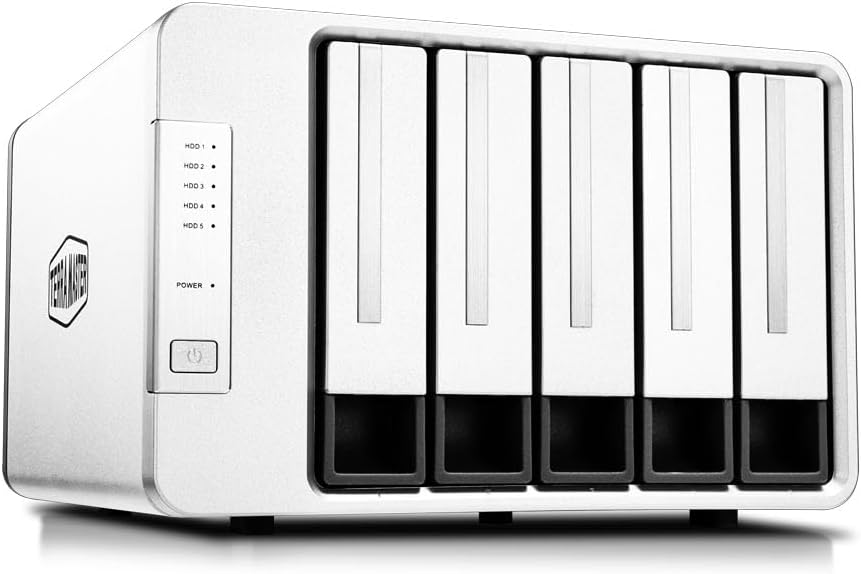


This four-bay DAS excels at speed and simplicity for desktop workflows. With a 4.2 rating, it delivers reliable 10Gbps transfers and hot-swap convenience without needing network configuration.
We may earn a commission when you buy through this link, at no additional cost to you.
The USB 3.2 Gen2 port supports drives up to 30TB each, totaling 120TB. Push-lock trays make swaps easy, and the noise-controlled fan keeps operation whisper-quiet in standby.
Trade-offs include no hardware RAID, so drive redundancy depends on your backup software. Noise can rise slightly under heavy load, but it remains acceptable for home offices.
Ideal for users needing quick, expandable capacity for media or backups. Its tool-free design and broad OS support make it a top choice for productivity.
Up to 10Gbps speeds ensure fast transfers of large files without bottlenecks.
Push-lock trays allow quick drive swaps without tools or screws for easy management.
We may earn a commission when you buy through this link, at no additional cost to you.
The TR-004 serves as a powerful DAS with built-in hardware RAID for redundancy. Rated 4.2 stars, it works seamlessly as external storage or QNAP NAS expansion with USB Type-C.
We may earn a commission when you buy through this link, at no additional cost to you.
RAID 0 1 and 5 protect data while boosting speed. Lockable bays secure drives, and the device includes a cable for USB-A adaptability across desktops and laptops.
It cannot host NAS apps or combine pools with your NAS. Compatibility depends on QTS 4.3.6 updates. Still, it offers solid protection for critical files.
Choose this if you already use QNAP NAS and need extra redundancy. The hardware RAID adds reliability beyond standard DAS setups.
RAID 0 1 and 5 modes provide data protection and speed options.
Expands QNAP NAS capacity while staying fully separate from the main system.
We may earn a commission when you buy through this link, at no additional cost to you.
This unique eight-bay enclosure blends HDD capacity with NVMe speed for tiered storage. With a 3.5 rating, it suits professionals managing hot and cold data efficiently on one device.
We may earn a commission when you buy through this link, at no additional cost to you.
Four slots hold HDDs up to 30TB each, while four M.2 NVMe slots add fast access. Push-lock trays and intelligent fans manage heat across different drive types automatically.
Mixed setups demand manual data placement planning. Users may find the hybrid logic complex, but the total 152TB space is unmatched at this price.
Best for editors needing both archival storage and quick project access. Its flexibility outweighs the learning curve for power users.
HDD and NVMe bays let you separate hot and cold data effectively.
Up to 152TB total space supports massive media libraries without multiple devices.
We may earn a commission when you buy through this link, at no additional cost to you.
A top-rated budget choice, this enclosure offers reliable storage expansion without breaking the bank. With 4.3 stars, it balances performance and cost for everyday backups and file access.
We may earn a commission when you buy through this link, at no additional cost to you.
The aluminum case keeps drives cool, and USB 3.0 provides up to 5Gbps. Hot-swappable bays and tool-free design simplify drive changes even without technical knowledge.
Speed caps at 5Gbps, so large 4K files may take longer than premium models. Fan noise can be noticeable but stays within reasonable levels for most environments.
Perfect for home users or small offices needing basic expandability. Its straightforward features and low price make it a smart starter DAS.
Aluminum housing dissipates heat efficiently for safer long-term drive operation.
No drivers required—just connect and start transferring files instantly.
We may earn a commission when you buy through this link, at no additional cost to you.
This five-bay dock supports massive expansion through independent per-bay power control. Rated 4.1 stars, it handles large SATA drives with high reliability for desktop storage needs.
We may earn a commission when you buy through this link, at no additional cost to you.
Each bay has its own ASMedia controller and power switch. A rear USB-C port allows daisy-chaining for even more ports or peripherals without overloading your system.
Internal power supply limits capacity under heavy loads. Also, it runs JBOD style only, so no RAID redundancy is built-in for data safety.
Recommended for users needing five drives without complex networking. The per-bay switches add useful control over drive states.
Each bay has a dedicated switch for selective power and safety.
Use the rear USB-C to add more docks or peripherals directly.
We may earn a commission when you buy through this link, at no additional cost to you.
Achieving a perfect 5.0 rating, this hybrid enclosure combines storage tiers with power-smart management. It excels at handling mixed workloads for professionals who need speed and capacity in one unit.
We may earn a commission when you buy through this link, at no additional cost to you.
TPM switches between Power Save and Active modes for efficiency. Speeds hit 1020MB/s on NVMe, speeding up edits, while HDD slots offer massive archival space up to 152TB.
It's pricier than pure DAS units and demands careful drive placement. However, its reliability and speed make it a premium pick for optimized workflows.
Best for creatives managing both daily assets and archives. The TPM feature adds extra value for energy efficiency and drive longevity.
TPM switches power modes to save energy while maintaining instant drive access.
Up to 1020MB/s read speeds accelerate 4K editing and large file transfers.
We may earn a commission when you buy through this link, at no additional cost to you.
A unique hardware RAID enclosure controlled by a physical knob for easy configuration. Rated 3.6 stars, it simplifies redundancy without needing software tools or network setups.
We may earn a commission when you buy through this link, at no additional cost to you.
RAID modes include 0, 1, 5, 10, and Single. Hot spare drives automatically replace failures in supported modes. Software like TPC Backupper helps schedule backups.
Transfer speed caps at 5Gbps, limiting large file throughput. Some users report reliability concerns over time. Still, the hardware control is intuitive.
Best for users wanting physical RAID control without NAS complexity. Ideal for backups where ease of setup matters most.
Switch RAID modes instantly with a rear physical knob instead of software.
RAID 1, 5, and 10 support hot spares for automatic drive recovery.
We may earn a commission when you buy through this link, at no additional cost to you.
This dock stands out with HDMI video output for direct monitor connection. With 4.0 rating, it offers 10Gbps speeds plus 4K display capability in a single portable unit.
We may earn a commission when you buy through this link, at no additional cost to you.
Temperature-controlled fans activate at 48°C to protect drives. USB-C ports allow daisy-chaining, while individual switches let you swap drives without shutdown.
HDMI only works if the host USB-C supports DisplayPort video. Otherwise, it functions as a standard DAS. Setup is straightforward once verified.
Ideal for users needing storage plus a second screen for work. It merges docking and storage into one efficient setup.
Connect directly to a monitor for 4K display without an extra dock.
Dual fans ensure optimal temperatures even during long file transfers.
We may earn a commission when you buy through this link, at no additional cost to you.
The ORICO 5-bay model uses magnetic chips for a tool-free cover, making drives quick to access. With a 4.0 rating, it supports up to 110TB total for large personal archives.
We may earn a commission when you buy through this link, at no additional cost to you.
It transfers 1GB files in roughly three seconds via USB 3.1 Gen1. The fan cools drives, and honeycomb panels improve airflow. Indicator lights show drive status clearly.
Linux users may face compatibility limits where drives aren't all readable at once. Otherwise, it's stable for home and small office backups.
Best for users who value speed in access and setup. It's a straightforward option for basic expansion needs.
No tools required to open the case thanks to magnetic chip design.
Drives are recognized in about three seconds for fast access.
We may earn a commission when you buy through this link, at no additional cost to you.
A compact dual-bay unit ideal for small expansions or QNAP NAS users. Rated 4.0, it provides hardware RAID support and USB Type-C connectivity in a small footprint.
We may earn a commission when you buy through this link, at no additional cost to you.
RAID 0 and 1 offer flexibility for speed or redundancy. Lockable bays secure drives, and the included cable ensures easy connection across systems.
It supports fewer drives than larger models, so capacity is limited. But it's great for adding a few terabytes without clutter.
Best for those needing simple redundancy or NAS expansion. Its size and RAID features make it reliable for basic needs.
Small dual-bay size fits easily in any workspace or rack.
Expands QNAP NAS storage without needing complex network configuration.
We may earn a commission when you buy through this link, at no additional cost to you.
Choosing the right Direct Attached Storage requires balancing capacity, speed, and features for your specific needs. This guide breaks down essential factors to consider.
USB 3.2 Gen2 delivers 10Gbps, while 3.0 offers 5Gbps. Check your ports to match transfer needs.
Higher speed reduces wait time for large media or backup tasks.
Two to eight bays exist. Pick based on how many drives you want to hold at once.
More bays mean more space but higher cost and power use.
Some models offer hardware RAID for redundancy; others are JBOD. Decide if you need data protection.
RAID protects data but costs drive space and adds complexity.
Passive cooling is quieter, while active fans handle more heat. Look for adjustable fan controls.
Good cooling prevents drive overheating and extends their lifespan.
Ensure support for Windows, macOS, or Linux. Some models need formatting for cross-platform use.
Check for driverless plug-and-play support to avoid setup issues.
Tool-free trays make swaps easy without screws. Push-lock or magnetic designs add convenience.
This feature simplifies drive changes for frequent access needs.
External adapters offer stability; internal supplies reduce clutter. Consider cable management.
Stable power avoids drive failures and ensures consistent performance.
Aluminum cases dissipate heat better than plastic. Look for robust construction and warranties.
Durability ensures long-term reliability in busy work environments.
Connect the DAS directly to your computer via the provided USB or Thunderbolt cable. Allow the system to recognize the drives automatically before opening files or folders.
Regularly check drive health through built-in monitoring tools to prevent data loss. Keep the enclosure clean and well-ventilated to avoid overheating during long sessions.
Avoid moving the unit while drives are spinning to protect the mechanical parts. Schedule periodic backups of critical data to maintain redundancy across different media.
Direct Attached Storage refers to external storage devices connected directly to a computer via USB or Thunderbolt. It does not rely on a network like NAS, offering faster access and simpler setup for single-user systems.
Most DAS units are plug-and-play and do not need extra drivers. They work with Windows, macOS, and Linux out of the box, though formatting might be required for cross-platform use.
Yes, most enclosures support both HDDs and SSDs. Ensure the drive size matches the bay dimensions, and use high-quality SSDs to maximize transfer speeds and reliability.
RAID is optional but useful for data protection. If your files are critical, choose a model with hardware RAID 1 or 5 for redundancy and easier recovery in case of failure.
Depends on the model. Some support two bays, others five or eight. Select a unit matching your total capacity needs and available desk space.
Yes, most DAS units support hot-swapping and tool-free tray designs. This allows you to add or replace drives easily without powering down the entire system.
Most modern DAS units work with macOS and Linux. Verify compatibility details in the specs, as some may require formatting or have limited RAID options on non-Windows systems.
Use reliable backup software alongside your DAS. Combine hardware RAID if available and keep offline or cloud copies for extra security against loss or corruption.
The TERRAMASTER D4-320 leads as our top pick for overall value and speed, offering reliable performance for most users seeking expandable storage.
Consider your need for RAID or hybrid drive support before buying. Smaller models like the QNAP TR-002 suit limited needs, while the D8 Hybrid fits pro workflows.
Always check current prices and availability before purchasing. Storage needs change fast, so pick a model that grows with your digital projects.