
XPPen StarG640
4.3Editor score
Battery-free stylus pen
6×4 inch active area
Compatible with Windows Mac
Finding the right digital signature pad for PC can transform how you handle documents and contracts. A good device ensures accuracy, speed, and legal compliance while reducing paper waste significantly.
We compared ten leading models based on features, compatibility, and user feedback. Our list covers budget-friendly options to enterprise-grade solutions for various signing needs.
Each pick highlights key strengths and ideal use cases for your workflow. Prices and availability change frequently so check current listings before making a final purchase decision today.
4.3Editor score

4.0Editor score

4.4Editor score
As an Amazon Associate we earn from qualifying purchases.
Here is a side-by-side comparison of all ten products to help you see differences in size, features, and compatibility at a quick glance.

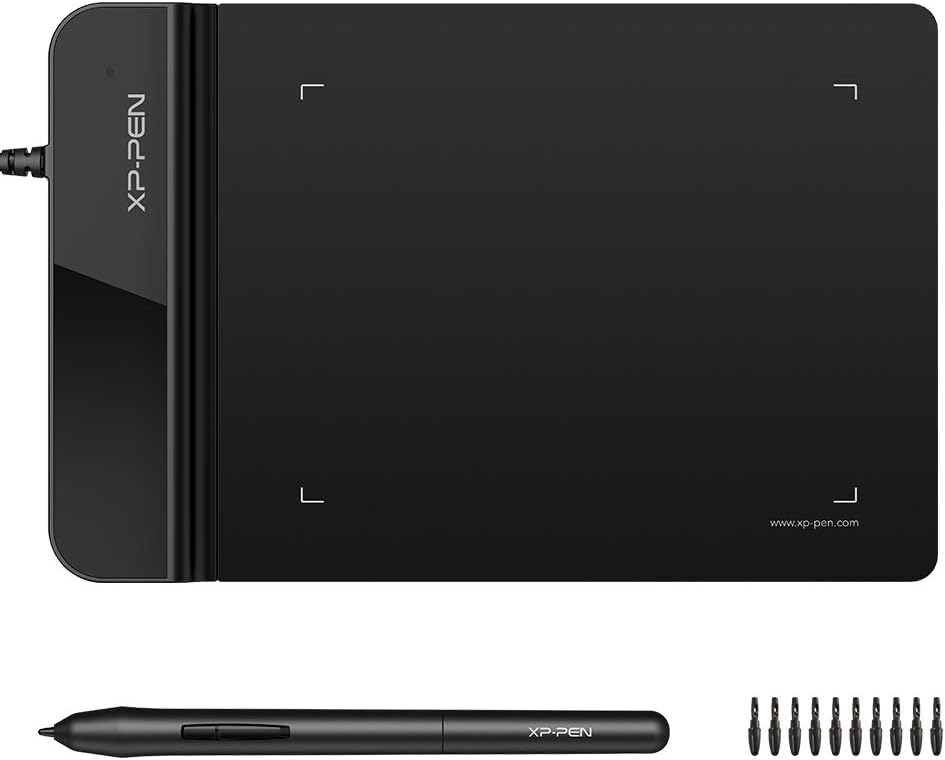


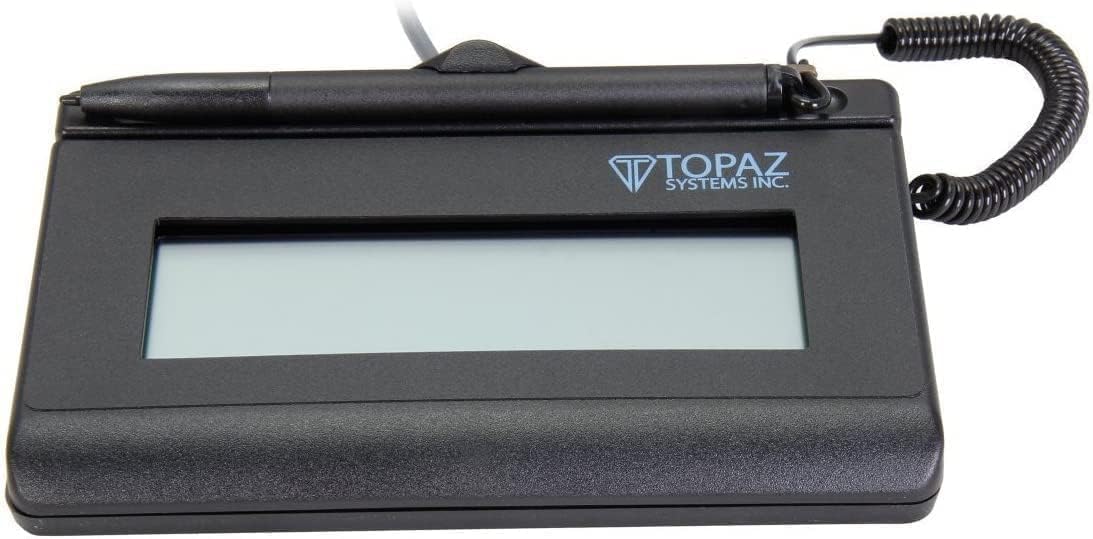

The XPPen StarG640 is an affordable digital signature pad for PC that delivers reliable performance for everyday tasks. With a 4.3 rating it stands out for its battery-free stylus and compact design making it ideal for budget conscious buyers.
We may earn a commission when you buy through this link, at no additional cost to you.
Its 6×4 inch active area provides enough space for clear signatures while the battery-free pen ensures uninterrupted use without charging. The tablet works seamlessly with Microsoft Office apps like Word and OneNote allowing precise visual presentation of handwritten notes.
While the active area is smaller than some professional models the portability and cost make it a strong choice for remote work and online education. Drivers are required but installation is straightforward for most Windows and Mac systems.
Buy this if you need an entry-level digital signature pad for PC that balances price and function. It is perfect for students freelancers and small teams needing quick e-signatures without heavy investment.
The advanced PN01 stylus does not require charging allowing constant uninterrupted use for drawing and signing tasks efficiently.
It works seamlessly with Chromebook devices enabling collaboration on Google Jamboard and quick notes with Google Keep.
We may earn a commission when you buy through this link, at no additional cost to you.
The PenPower ePaper SignPad earns Editor's Choice for its robust e-signature features and seamless integration with common file formats. It allows instant signature sending with timestamps adding credibility and traceability to digital documents effectively.
We may earn a commission when you buy through this link, at no additional cost to you.
Designed for paperless offices it supports PDF Word Excel and image files making it versatile for contracts and internal approvals. Smart sticky notes let users jot memos and upload them to Outlook Calendar aiding organized scheduling.
Although it costs more than basic tablets the built-in timestamp and compatibility with tools like Slack and Zoom justify the investment for business use. Enterprise integration requires custom SDK services which may add complexity for some users.
Choose this for its balance of usability and professional features. It suits teams needing quick secure signing with traceable timestamps without printing physical documents regularly.
Every signature includes a timestamp and printed name enhancing credibility and traceability ideal for business legal use cases.
Sketch workflows and wireframes in real time supporting fast-moving teams that need visual brainstorming and idea sharing.
We may earn a commission when you buy through this link, at no additional cost to you.
The Topaz T-LBK462-BSB-R is a premium digital signature pad for PC known for high-quality biometric and forensic capture. Its rugged signing area ensures long life while the LCD display allows custom messages for client interactions.
We may earn a commission when you buy through this link, at no additional cost to you.
Virtual serial via USB interface provides reliable connectivity and the small size supports portability for mobile business needs. This model is ideal for settings requiring secure legally binding signatures with traceable data.
As a renewed item it offers premium features at a potential value though condition may vary. The biometric capture adds a layer of security important for legal and financial document handling.
Invest in this for its durability and advanced capture tech. It suits professionals needing trusted signature verification without compromising on device longevity and customizability.
High-quality biometric and forensic capture ensures secure legally binding signatures suitable for sensitive business transactions.
The signing area is built rugged for long life reducing wear and tear from frequent daily use in offices.
We may earn a commission when you buy through this link, at no additional cost to you.
The Topaz T-S460-HSB-R offers reliable signature capture with a non-backlit design and high-quality techniques. Its 4.4 rating reflects user satisfaction with cost efficiency and straightforward USB connectivity for PC setups.
We may earn a commission when you buy through this link, at no additional cost to you.
This model displays the signature on the computer screen which helps verify accuracy before finalizing documents. The non-backlit screen reduces power needs and simplifies the build for long-term use in static offices.
While it lacks advanced display features it excels in basic capture performance. The compatibility with other Topaz models allows flexible upgrades if needs grow over time.
Pick this for a dependable cost-effective solution. It is best for small businesses needing simple accurate digital signature capture without extra frills or complexity.
This model series shows the signature on the computer screen allowing quick verification before document completion.
Designed as a cost efficient solution it delivers high-quality capture without expensive features or high price tags.
We may earn a commission when you buy through this link, at no additional cost to you.
The XPPen G430S is a compact digital signature pad for PC with an ultrathin design and high pressure sensitivity. With an 8192 level pen it offers fluid control though the small 4×3 area may limit large signatures.
We may earn a commission when you buy through this link, at no additional cost to you.
Its battery-free stylus ensures uninterrupted work and it supports both right and left hand users for flexibility. While designed for OSU gaming it works well for e-signatures online teaching and remote work tasks.
Mac users need to confirm port compatibility as it uses micro USB to USB-A which may require an adapter. Drivers must be installed carefully to avoid conflicts with other tablet software.
Choose this for ultra-portability on a budget. It suits individuals needing a lightweight tool for occasional digital signatures and creative tasks on the go.
8192 levels of pen pressure provide groundbreaking control and fluidity expanding creative output during signing.
Designed for both hand users allowing easy setting changes to remove limitations and match personal preferences.
We may earn a commission when you buy through this link, at no additional cost to you.
The Wacom STU500 provides a durable digital signature pad for PC with a monochrome LCD and hardened glass signing surface. Its EMR technology ensures a maintenance-free pen which reduces long-term upkeep and replacement costs.
We may earn a commission when you buy through this link, at no additional cost to you.
The 640 x 480 resolution offers room for soft keys and clear text display even in bright lighting. The reflective TFT technology provides high contrast viewing without backlighting extending the device lifetime.
Though it has a lower rating it remains reliable for public counters and day-to-day use. The large screen allows flexible display of images text or menu buttons for interactive signing.
Consider this for public facing counters needing sturdy reliable capture. It suits environments where scratch resistance and clear viewing are priorities over advanced features.
Wacom patented EMR technology provides a maintenance-free electronic pen reducing ongoing costs and replacements.
The signing surface is extremely durable and highly resistant to scratches ensuring longevity in busy settings.
We may earn a commission when you buy through this link, at no additional cost to you.
The Topaz T-LBK462-BSB-R features a backlit LCD signature capture pad with rugged durability and biometric support. Its 4.0 rating highlights consistent performance for secure and customizable signing workflows in businesses.
We may earn a commission when you buy through this link, at no additional cost to you.
The backlit LCD improves visibility in varying lighting conditions while the rugged area ensures long life under frequent use. USB or virtual serial interface offers flexibility depending on system requirements.
Small size and weight support portability for field work. High-quality biometric and forensic capture adds security layers suitable for legal and financial document signing needs.
Select this for secure portable signing with clear display. It fits teams needing reliable biometric capture with customizable messages and strong build quality.
The backlit LCD display enhances visibility in different lighting settings allowing clear viewing during signing.
High-quality biometric and forensic capture ensures secure signing suitable for sensitive business legal use.
We may earn a commission when you buy through this link, at no additional cost to you.
The Topaz T-S460-HSB-R Pack provides three signature pads in one purchase for multi-device needs. With a 4.3 rating it suits businesses requiring multiple points of signature capture for efficient workflow.
We may earn a commission when you buy through this link, at no additional cost to you.
Designed for business use the modern style fits office settings while PC compatibility ensures easy integration. Ambidextrous hand orientation allows flexible use by different staff members.
Buying a pack reduces per-unit cost and simplifies procurement for teams. Each pad delivers standard reliable signature capture suitable for internal approvals and customer documents.
Choose this for teams needing multiple devices at once. It simplifies setup for offices requiring consistent signature capture across several workstations or departments.
A pack of 3 units reduces procurement hassle and per-unit cost for businesses needing multiple devices.
Recommended for business use with modern style and PC compatibility fitting standard office workflows.
We may earn a commission when you buy through this link, at no additional cost to you.
The Topaz SigLite T-LBK460 earns a high 4.9 rating with its 3rd-generation touch-screen signing surface and backlit LCD display. This renewed unit offers cost efficiency with modern features suitable for diverse signing needs.
We may earn a commission when you buy through this link, at no additional cost to you.
Small size and weight support portability while the LCD display allows customizable messages and clear text. High-quality biometric and forensic capture ensures secure signatures for business and legal contexts.
The monochrome printer output is efficient for standard documents. As a renewed product it provides premium capabilities at a potential discount though condition should be verified.
Invest in this for reliable touch-based signing. It suits businesses needing secure portable signature capture with modern touch response and customizable display options.
A 3rd-generation touch-screen signing surface offers improved responsiveness and cost efficiency for regular use.
Small size and weight ensure portability making it easy to move between workstations or travel with.
We may earn a commission when you buy through this link, at no additional cost to you.
The Topaz T-L460-HSB-R stands out with a 2-year factory warranty and included software ensuring long-term value. Its 4.8 rating reflects customer confidence in the HID USB interface and reliable signature capture.
We may earn a commission when you buy through this link, at no additional cost to you.
The SIGLITE LCD 1X5 display offers clear visibility for signatures and text. Included software simplifies setup and integration with common document systems for efficient workflows.
High cost is offset by warranty support and software bundle making it a safe choice for businesses prioritizing stability. The HID interface ensures plug-and-play compatibility with many PCs.
Choose this for peace of mind and support. It suits organizations needing secure supported digital signature capture with ready-to-use software and warranty backing.
The 2-year factory warranty provides long-term protection and support for businesses investing in reliable hardware.
Software included simplifies setup and integration ensuring users can start capturing signatures quickly.
We may earn a commission when you buy through this link, at no additional cost to you.
Choosing the right digital signature pad for PC depends on specific workflow needs budget and required security features. This guide breaks down key factors to consider.
Most digital signature pads for PC use USB or virtual serial interfaces. Ensure your system supports the connection type and drivers are available for your operating system to avoid compatibility issues.
Look for HID USB or plug-and-play options for easiest setup.
Some pads have LCD displays allowing custom messages or signature preview while others rely on screen capture. Displays enhance client interaction but may increase cost and power needs.
Choose a display if you need visual feedback or text prompts during signing.
Active area determines how much space you have to sign. Larger areas allow more natural handwriting but reduce portability. Consider your signature size and desk space when choosing.
A 6×4 inch area is often sufficient for most standard signatures.
Battery-free styluses require no charging and reduce downtime but need compatible tech like EMR. Battery powered pens may offer extra features but add maintenance and charging cycles.
Battery-free options are generally better for uninterrupted professional use.
High-quality capture ensures signatures are clear and legally binding. Look for pressure sensitivity and biometric features if security is critical for your documents and compliance needs.
Biometric capture adds an extra layer of verification and security.
If you work remotely or travel often choose a slim lightweight model. Portability matters for field signing but may compromise on active area size or display features.
Thin profiles under 3mm improve ease of transport in bags.
Ensure the pad works with your document software like Word PDF readers or CRM tools. Some come with included software while others require custom integration.
Check vendor support lists for confirmed application compatibility before buying.
A solid warranty protects against defects and downtime. Look for multi-year coverage and accessible support for troubleshooting driver issues or hardware failures.
Prioritize brands offering clear warranty terms and responsive help desks.
Install drivers from the manufacturer before connecting the pad. Ensure compatibility with your OS and close other drawing apps to avoid conflicts during installation.
Clean the signing surface gently with a soft cloth to avoid scratches. Avoid harsh chemicals that may damage the coating or display and store the device in a dry place.
Use the stylus with moderate pressure to prolong sensor life. Replace nibs if they wear down and restart the computer if signature capture seems unresponsive.
Yes when used properly with proper consent and record keeping. Many countries accept them as legally binding if supported by compliant software and verification steps.
Some pads come with software while others work with standard apps. Always verify compatibility with your document tools and install required drivers.
Most work with PCs but some support Mac or Chromebook. Check system requirements and driver support for your specific device before purchase.
Signatures are usually saved as files or embedded in documents. Use secure storage and encryption to protect sensitive signing data and client information.
It captures additional data like pressure and movement for extra verification. This helps prevent fraud and adds a layer of security to signed documents.
Many pads support ambidextrous use or have adjustable settings. Check device options to ensure comfortable signing for both right and left handed users.
Most function offline but syncing may need internet. Check if your workflow requires online document sharing or cloud storage integration.
Try different USB ports reinstall drivers and restart your computer. Check device manager for conflicts and ensure firmware is up to date.
The best digital signature pads for PC range from affordable creative tablets to secure enterprise models. Top picks like the XPPen StarG640 Topaz T-LBK462 and T-S460-HSB-R offer strong balance.
Prioritize compatibility capture quality and security features that fit your workflow. Consider portability and warranty support if you need reliable long-term use in various settings.
Prices and availability vary so review current listings before buying. Keep your security needs and device compatibility in mind to find the right tool for professional signing.