
Behringer X AIR XR18
4.6Editor score
Tablet controlled mixing
Integrated Wi-Fi module
18 x 18 USB interface
This comprehensive guide compares the top 10 digital mixing consoles for 2026, evaluating their features, sound quality, and connectivity options.
Digital mixing consoles have revolutionized the way audio professionals handle live sound and recording sessions. These advanced devices offer unprecedented control over audio signals, allowing engineers to manipulate sound with precision and ease. Whether you are managing a large venue or a small studio, choosing the right console is crucial for achieving professional results.
To compile this list, we analyzed specifications, user feedback, and industry standards across a wide range of models. We focused on key aspects such as channel count, preamp quality, connectivity options, and ease of use. Our goal is to provide you with a clear understanding of how each console performs in real-world scenarios.
Each pick in this guide highlights specific strengths and ideal use cases to help you make an informed decision. Please note that product availability and pricing can change frequently due to market conditions. Always verify the latest details before making a purchase to ensure you get the best value for your investment.
4.6Editor score

4.7Editor score

4.2Editor score
The following table provides a side-by-side comparison of all ten digital mixing consoles featured in this guide. This overview helps you quickly identify the key specifications and capabilities of each model to determine which one aligns best with your specific audio production needs and budget constraints.




The Behringer X32 stands out as a top contender in the world of digital mixing consoles. With a high user rating, it offers a blend of professional features and affordability that appeals to a wide audience. Its standout qualities include high-quality preamps and a versatile I/O configuration suitable for both studio and live applications.
We may earn a commission when you buy through this link, at no additional cost to you.
This console provides 40 input channels and 25 buses, allowing for complex routing and mixing scenarios. The MIDAS-designed preamps ensure audiophile sound quality, which is crucial for capturing the nuances of musical performances. Additionally, the motorized faders offer instant overview and powerful scene management capabilities.
While the X32 is powerful, it may present a steeper learning curve for beginners due to its extensive feature set. The physical size is also larger than compact alternatives, which might be a consideration for smaller setups. However, these trade-offs are acceptable given the professional-grade performance it delivers.
Engineers and producers looking for a reliable workhorse for serious audio production will find this console an excellent choice. It is particularly well-suited for live sound reinforcement and recording studios that require detailed control over multiple audio sources. We highly recommend it for those seeking a comprehensive mixing solution.
The MIDAS-designed preamps deliver clear and detailed audio capture, ensuring that every instrument and voice is represented accurately in the mix.
With numerous XLR and line outputs, along with digital capabilities, this console integrates seamlessly into various audio setups and recording environments.
We may earn a commission when you buy through this link, at no additional cost to you.
The Yamaha DM3 is an ultracompact digital mixing console that brings renowned Yamaha sound quality to smaller venues and studios. It features a 96kHz sample rate for high-fidelity audio processing. The intuitive 9-inch touchscreen makes navigation easy, even for those new to digital mixing consoles.
We may earn a commission when you buy through this link, at no additional cost to you.
With 22 channels and 16 professional preamps, this console handles a variety of audio sources effectively. The inclusion of a best18x18 USB audio interface allows for direct recording and playback, enhancing its utility for content creators. The compact size makes it ideal for portable setups.
While it offers excellent sound quality, the channel count is lower than larger models, which might limit its use in complex productions. The I/O options are also somewhat limited compared to full-sized consoles. These constraints are acceptable for users who prioritize portability and ease of use.
This console is perfect for small bands, churches, and corporate presentations where space is at a premium. It delivers professional results without the bulk of traditional mixing boards. We recommend it for users who need a reliable and compact solution for their audio needs.
The 96kHz sample rate ensures that audio is captured and processed with exceptional detail and clarity, suitable for professional recording tasks.
The large 9-inch touchscreen provides an intuitive interface for adjusting settings, making it easier to manage complex mixes quickly.
We may earn a commission when you buy through this link, at no additional cost to you.
The Behringer WING is a full stereo digital mixing console designed for large-scale productions and professional environments. With 48 channels and 28 buses, it offers unparalleled flexibility for complex audio routing. The MIDAS PRO preamps ensure top-tier sound quality across all inputs.
We may earn a commission when you buy through this link, at no additional cost to you.
This console features 24 motorized faders and a large capacitive touch screen for precise control. The AES50 SuperMAC technology provides ultra-low jitter and latency, which is critical for live sound applications. The touch-sensitive channel editing section allows for quick adjustments without losing focus.
The high price point and complexity of setup may be daunting for casual users or small venues. It requires a dedicated engineer to manage its full potential effectively. However, for large productions, these factors are justified by the performance and reliability it offers.
This console is best suited for touring sound companies, large venues, and professional recording studios. It handles intricate mixing tasks with ease and provides the tools needed for high-end production. We recommend it for users who demand the highest level of control and quality.
AES50 SuperMAC technology ensures reliable and fast data transmission, crucial for maintaining sync in large audio systems.
The MIDAS PRO preamps deliver the clarity and detail expected in professional audio environments, enhancing the overall mix quality.
We may earn a commission when you buy through this link, at no additional cost to you.
The Yamaha MGX12 has achieved a perfect rating from users, highlighting its exceptional performance and value. It is a versatile compact mixer with a 4.3-inch touchscreen and tactile faders. The USB HDMI interface allows for 4K video capture and pass-through, making it ideal for streaming.
We may earn a commission when you buy through this link, at no additional cost to you.
It includes a comprehensive software bundle with Cubase Al and WaveLab Cast LE, which enhances its utility for content creators. The built-in DSP processor ensures professional sound quality without external gear. Features like Auto Gain and Scene Recall simplify the mixing process significantly.
The limited channel count might restrict its use in larger setups, and the display is smaller than some competitors. However, for smaller productions and streaming, these limitations are minimal. The included software adds significant value for users starting their content creation journey.
This console is perfect for streamers, podcasters, and small venue operators. It offers a complete solution for audio and video production in a single device. We highly recommend it for anyone looking for a reliable and feature-rich compact mixer.
The USB HDMI interface supports 4K video capture, allowing users to record high-quality streams directly from the console.
Included software like Cubase Al provides powerful tools for recording and editing, enhancing the mixer's value for creators.
We may earn a commission when you buy through this link, at no additional cost to you.
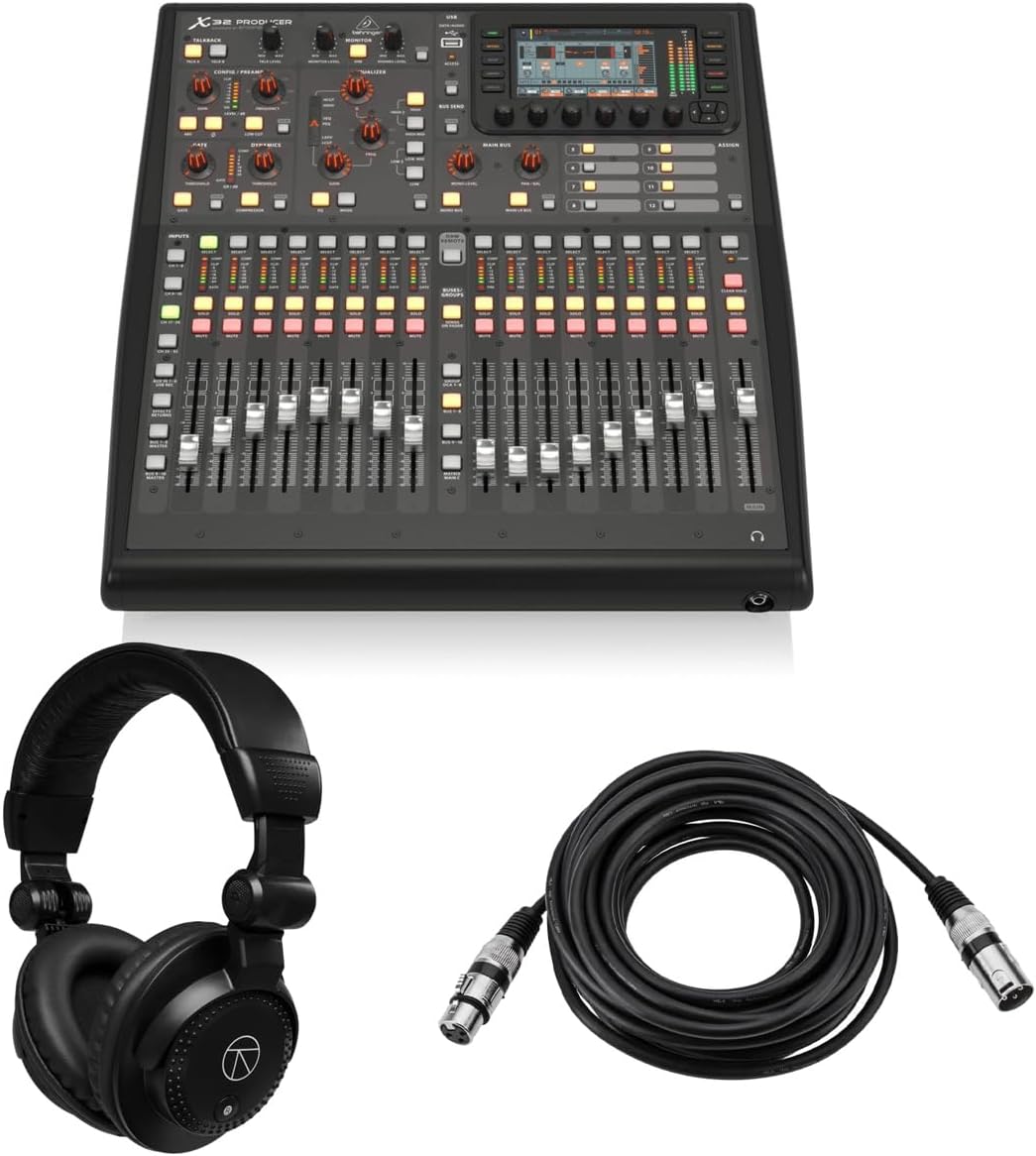
The X32 Producer is a rack-mountable digital mixing console that has earned a perfect user rating for its reliability and performance. It features 40 input channels and 25 buses, providing extensive mixing capabilities in a compact form. The bundle includes essential accessories like headphones and cables.
We may earn a commission when you buy through this link, at no additional cost to you.
With a 114 dB dynamic range and MIDAS preamps, it delivers pristine audio quality for professional applications. The 17 motorized faders and recall scenes offer powerful control and quick setup. It is designed for demanding environments, ensuring consistent performance for live and studio use.
While it offers great performance, it requires dedicated rack space and has fewer faders than the full X32 model. These factors are acceptable given the cost savings and bundle value. Users should be prepared to install it in a rack for optimal use.
This console is ideal for studios, broadcast setups, and mobile rigs where space is limited. It provides a robust solution without compromising on sound quality. We recommend it for users who need a reliable and efficient mixing console in a rack format.
The rack-mountable design allows for easy integration into existing audio racks, saving space and organizing equipment neatly.
Included headphones and microphone cables add immediate value, allowing users to start mixing right out of the box.
We may earn a commission when you buy through this link, at no additional cost to you.
The X32 Compact is designed for users who need professional features in a smaller package. It retains the core capabilities of the X32 with 40 input channels and 25 buses. Its compact footprint makes it easier to transport and fit into smaller stages or studios.
We may earn a commission when you buy through this link, at no additional cost to you.
It includes 16 MIDAS-designed preamps and 17 motorized faders, offering high-quality sound and control. The LCD Scribble Strips provide intuitive channel distinction, simplifying the mixing process. It is built to withstand the demands of live and studio applications.
Compared to the full X32, it has fewer preamps and requires external I/O expanders for larger setups. However, for smaller productions, these differences are negligible. The compact design is a significant advantage for mobile engineers and smaller venues.
This console is perfect for mobile sound engineers, small churches, and corporate AV setups. It delivers professional performance in a portable format. We recommend it for users who need reliability and quality without the bulk of a full-sized console.
The smaller footprint reduces transport costs and setup time, making it ideal for mobile sound engineers.
LCD Scribble Strips offer clear labeling, reducing the time spent identifying channels during a live show.
We may earn a commission when you buy through this link, at no additional cost to you.
The PreSonus StudioLive Classic 16.0.2 is a classic digital mixer that has been used in many professional settings. It features 16 channel inputs and Class A XMAX preamps known for their clarity. The USB 2.0 interface allows for recording all channels directly.
We may earn a commission when you buy through this link, at no additional cost to you.
Fat Channel signal processing on all channels and buses provides powerful dynamics control. The 31-band graphic EQ on the main bus ensures precise tuning of the overall sound. Scene and individual settings can be stored and recalled for quick changes.
While it is a solid mixer, it has an older interface design compared to newer models, which might affect ease of use. The user rating is lower, potentially due to these limitations. However, it remains a reliable choice for those familiar with its workflow.
This console is best suited for small bands and recording studios that appreciate its specific workflow. It offers a balance of analog feel and digital capabilities. We recommend it for users who value its specific feature set over modern touchscreens.
The Fat Channel EQ and dynamics provide precise control over each signal, essential for a professional mix.
With included software like Studio One Artist, recording and editing become a seamless part of the workflow.
We may earn a commission when you buy through this link, at no additional cost to you.
The X AIR XR18 is an 18-channel digital mixer designed for tablet control via Wi-Fi. It features 16 MIDAS-designed preamps for audiophile sound quality. The integrated router eliminates the need for external routers, making setup straightforward.
We may earn a commission when you buy through this link, at no additional cost to you.
Users can mix from iOS or Android devices, offering incredible flexibility for different mixing positions. The bidirectional USB interface allows for direct recording on connected devices. Its compact size makes it perfect for portable applications and small venues.
It lacks a built-in screen, meaning you must rely on a tablet or computer to control it. This might be inconvenient for users without compatible devices. However, the flexibility and sound quality it offers at this price point are hard to beat.
This mixer is ideal for mobile DJs, small live streams, and podcasters on a budget. It brings professional features to users who want mobility and simplicity. We recommend it as the best budget option for tablet-based mixing.
Controlling the mixer from a tablet allows you to stand anywhere in the venue, optimizing your monitoring experience.
The built-in Wi-Fi module simplifies setup by creating a direct connection to your control device.
We may earn a commission when you buy through this link, at no additional cost to you.
The Allen & Heath Qu-5 offers exceptional audio quality with 96kHz XCVI FPGA processing. It features up to 38 inputs and 12 configurable mixes for efficient operation. The 7-inch capacitive touchscreen provides intuitive workflow and control.
We may earn a commission when you buy through this link, at no additional cost to you.
Integrated recording and effects include 6 multi-FX engines and USB-C multitrack recording. Extensive connectivity includes SLink expansion for linking multiple units. Remote control apps for Windows, macOS, iOS, and Android enhance its versatility for various environments.
Lack of rating data makes it harder to gauge user satisfaction, though professional specs are strong. The high complexity may be daunting for casual users. It is best suited for those who need advanced features and high-resolution processing.
This console is best for professional audio installers, live sound engineers, and recording studios. It offers the power needed for demanding production environments. We recommend it for users who require high-fidelity audio and flexible routing.
96kHz FPGA processing ensures minimal latency and maximum audio clarity for professional applications.
Apps for multiple platforms allow for flexible remote mixing, adapting to different workflow preferences.
We may earn a commission when you buy through this link, at no additional cost to you.
The QSC TouchMix-16 is a compact digital mixer designed for ease of use. It features 20 full function inputs and outputs for Aux. The 4-band parametric EQ and built-in compressor on all channels provide robust sound control.
We may earn a commission when you buy through this link, at no additional cost to you.
Includes a carrying bag for transport protection, making it ideal for mobile use. TRS Aux outs can drive wired in-ear monitors directly, which is useful for live performers. Its simple design allows users to get started quickly.
While it is user-friendly, the bus routing is simpler than high-end models, limiting complex setups. It is designed more for simplicity than advanced control. These trade-offs are acceptable for users prioritizing convenience and portability.
This mixer is perfect for small bands, presenters, and mobile DJs who need quick setup. The included bag adds value for transport. We recommend it for users who need a straightforward mixing solution without learning a complex system.
The included carrying bag ensures your mixer is protected during transport, extending its lifespan.
TRS Aux outs driving in-ear monitors allow performers to have personalized mix control.
We may earn a commission when you buy through this link, at no additional cost to you.
Selecting the right digital mixing console involves understanding your specific audio production needs. Consider factors like input count, sound quality, and ease of use to find a model that fits your workflow and budget.
The number of input channels determines how many microphones and instruments you can connect simultaneously. Consider future expansion needs when choosing between models with 16, 32, or 48 channels.
Ensure the console has enough outputs for your monitors and main speakers to avoid buying additional hardware later.
Preamps are the front-end of your mixer and significantly impact sound quality. Look for consoles with high-quality preamps to ensure clean signal amplification with minimal noise.
High-quality preamps like MIDAS or XMAX designs offer better dynamic range and clarity for critical listening.
Modern consoles offer various connection methods including USB, Ethernet, and AES50. Verify compatibility with your existing equipment to ensure seamless integration.
USB audio interfaces allow for direct computer recording which is essential for many modern streaming and studio setups.
The interface includes screens and controls that you interact with. Touchscreens offer intuitive access to complex settings but can be challenging if you prefer physical faders.
Choose a console with controls that match your workflow to reduce setup time and minimize errors during performance.
If you plan to move the mixer frequently, consider its weight and physical footprint. Compact consoles are easier to transport but may have fewer features.
Ensure the build quality is robust enough to withstand the rigors of live events or frequent travel.
Integrated DSP and effects like reverb and compression add value without requiring external gear. Check if the console includes the effects you need for your style.
Compatibility with DAW software can streamline your recording workflow by allowing direct integration with production tools.
Set a budget that reflects your needs and the frequency of use. Entry-level models offer great value for beginners while professional units justify higher costs with durability.
Consider long-term costs such as accessories and software updates when evaluating the total cost of ownership.
Manufacturer support is crucial for troubleshooting and updates. Look for brands with a reputation for reliable customer service and community forums.
A strong warranty protects your investment against defects and ensures you have access to repair services if needed.
To use your digital mixer, connect your sources like microphones and instruments to the input channels. Set the gain levels carefully to optimize signal quality without clipping. Use the EQ and effects to shape the sound to your preference before sending it to the main bus.
Save your mix settings in scenes or snapshots to recall them quickly for different events or songs. Use motorized faders to manage volume levels smoothly during live performances. Regularly update the firmware to ensure you have the latest features and stability improvements.
Protect your console by storing it in a dry and cool environment when not in use. Use dust covers to prevent debris from entering the fader slots and buttons. Clean the surface with a soft cloth to avoid damaging the touchscreen or display during operation.
Digital mixers offer more features in a compact size and allow for saving and recalling scenes instantly. They provide better signal processing options and connectivity to computers for recording.
Yes, most digital mixers include USB audio interfaces that connect directly to your computer. This allows you to record multiple tracks simultaneously for podcasting or music production.
A small band usually needs around 16 to 24 channels to accommodate vocals, instruments, and playback. Compact digital mixers often provide this range while saving space.
Some mixers use companion software for control but many have built-in interfaces. Ensure you check system requirements if you plan to use external control apps or editing tools.
Learning curve varies but most have intuitive layouts. Online tutorials and user manuals can help you master features quickly without prior experience.
Many digital consoles support expansion boxes or remote I/O units. This allows you to add more inputs or outputs without replacing the main unit.
We reviewed ten top-rated digital mixing consoles that cater to a range of needs and budgets. The Behringer X32 stands out for its versatility while the Yamaha DM3 offers compact convenience.
Prioritize features that align with your production goals whether it is sound quality portability or ease of use. Consider your long-term needs to ensure the console will grow with your skills.
Prices and availability may change so always verify the current details before making a purchase. This guide provides a strong foundation to help you choose the right tool for your audio projects.