
TP-Link AC1200 WiFi Extender Dual Band 5GHz/2.4GHz (RE315)
4.2Editor score
Dual band 1200Mbps throughput
Covers up to 1500 sq ft
Includes Fast Ethernet port
This guide compares the top cheap WiFi extender models for coverage and value helping you choose the best budget friendly option for your home network needs.
Finding a reliable WiFi extender does not have to break the bank. Affordable options now deliver strong signal boosts and wide coverage for most homes. This guide helps you pick a cheap WiFi extender that truly works.
We evaluated ten top rated models based on coverage area, speed potential, ease of setup, and real world performance. Our analysis focuses on how each unit handles dead zones and supports multiple devices without lag or dropouts.
Each pick shows key specs, pros, cons, and ideal use cases for different households. Keep in mind that availability and offers can shift quickly so verify current stock before buying your next network booster.
4.2Editor score

4.3Editor score

The following table provides a side by side view of all ten models included in this review. Compare their coverage claims, device capacity, and key features to find the right match for your space.


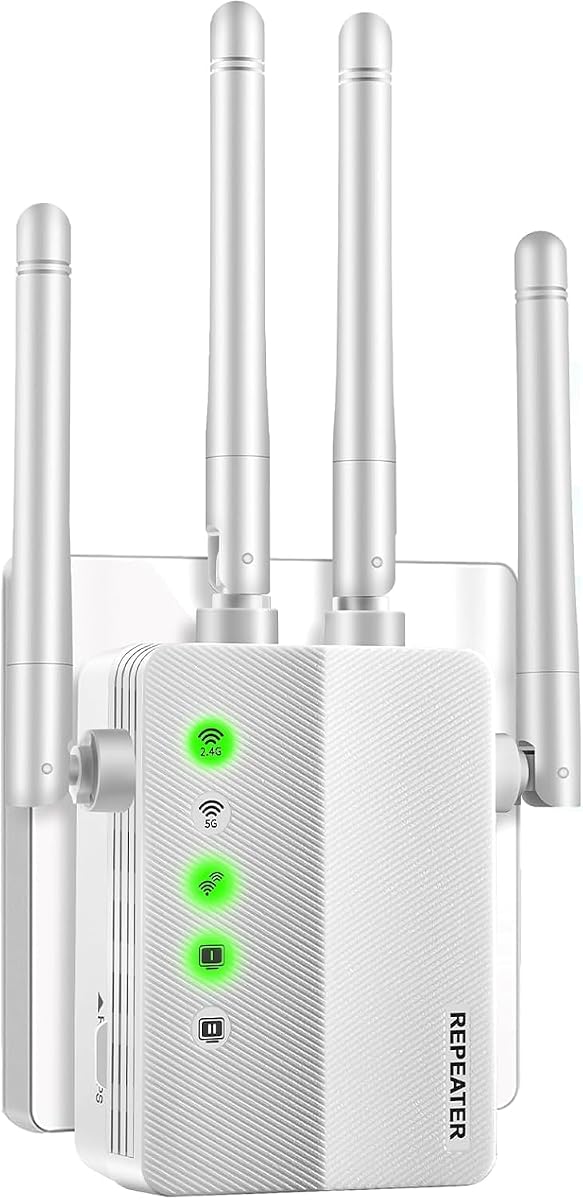


The TP-Link AC1200 RE315 stands out as the top budget choice for most households. With a 4.2 star rating and dual band support, it effectively eliminates dead zones while keeping costs low.
We may earn a commission when you buy through this link, at no additional cost to you.
Its Adaptive Path Selection ensures your devices stay connected to the strongest signal as you move. The 1500 sq ft coverage is ideal for apartments and small homes needing extra reach.
While it does not boost original internet speed, the improved reliability prevents buffering during calls and streaming. The included Ethernet port adds flexibility for stationary devices like smart TVs.
Buy this if you need a dependable, easy setup extender that works with nearly any router. It offers excellent value for everyday users who want solid performance without overspending.
This feature automatically connects devices to the strongest available signal, reducing dropouts during movement.
Designed with Secure-by-Design principles, it pairs with most routers and supports up to 32 devices simultaneously.
We may earn a commission when you buy through this link, at no additional cost to you.
This extender delivers exceptional coverage for larger properties with its 3600 sq ft range and four high gain antennas. It holds a rare 4.9 star rating, indicating strong user satisfaction.
We may earn a commission when you buy through this link, at no additional cost to you.
The ability to handle up to 80 devices makes it perfect for smart homes filled with cameras, bulbs, and voice assistants. Its performance remains stable even through concrete walls and multiple floors.
Streaming in HD and gaming experience minimal stutter thanks to the dual band performance. The WPS button allows for nearly instant connection without complex configuration steps.
Consider this model if you have a sprawling home or many connected gadgets. It balances affordability with impressive reach and capacity for heavy usage scenarios.
The high gain antennas are designed to push signals through obstacles, ensuring coverage on all levels.
With 80 device support, it handles modern smart home ecosystems without slowing down or dropping connections.
We may earn a commission when you buy through this link, at no additional cost to you.
Claiming up to 5000 sq ft coverage, this unit offers the highest theoretical range in this lineup. It is designed for large spaces and supports up to 45 devices with dual band speeds.
We may earn a commission when you buy through this link, at no additional cost to you.
The 1-tap setup and Alexa compatibility simplify initial configuration. You can switch between AP and Repeater modes to fit either wireless expansion or wired network conversion needs.
While the 3.7 rating suggests some users may find setup or signal strength inconsistent, the price point remains attractive. The 300Mbps per band speeds support HD streaming and video calls well.
Opt for this if you need maximum coverage on a tight budget. It is a strong contender for rural homes or properties where signal travel distance is the primary challenge.
Dual band technology provides 300Mbps on both 2.4GHz and 5GHz, balancing range and speed for various tasks.
Supports WEP and WPA/WPA2 protocols to keep unauthorized users off your network and protect data.
We may earn a commission when you buy through this link, at no additional cost to you.
The TP-Link RE550 offers the highest speed potential at 1900Mbps total bandwidth, making it ideal for power users. With 4.3 stars, it is praised for consistent performance and reliable connections.
We may earn a commission when you buy through this link, at no additional cost to you.
Its Gigabit Ethernet port ensures wired devices get full speed without bottlenecks. The three adjustable antennas optimize coverage for homes up to 2100 sq ft with minimal dead spots.
Smart Adaptive Roaming keeps devices connected to the best signal automatically, which is vital for seamless video calls or large file transfers across rooms.
Choose this if you want premium performance and plan to keep your network for years. It justifies the cost with superior hardware and broad router compatibility.
This port supports full wired speeds for devices like gaming consoles or PCs, ensuring low latency and high throughput.
Devices switch between bands seamlessly as you move, maintaining a strong connection without manual intervention.
We may earn a commission when you buy through this link, at no additional cost to you.
This compact extender features a space saving wall plug design that avoids the need for extra cables or adapters. It carries an impressive 4.8 star rating for its simplicity and effectiveness.
We may earn a commission when you buy through this link, at no additional cost to you.
Coverage reaches up to 3000 sq ft, which is generous for its size. The 1200Mbps dual band speeds support multiple activities like browsing and streaming at once.
Its small form factor makes it perfect for travel or guest rooms. Security is handled via WEP and WPA/WPA2 protocols to prevent unauthorized access effectively.
Buy this if you need a discreet, easy solution for moderate coverage. It is excellent for travelers or users who prioritize a clean setup over advanced features.
The compact plug design fits neatly into outlets without blocking the second socket, ideal for hotel rooms or offices.
Supports most wireless routers and gateways while using robust encryption to keep your private data safe.
We may earn a commission when you buy through this link, at no additional cost to you.
The TP-Link RE220 is designed for users seeking a streamlined network using OneMesh technology. It delivers 44% more bandwidth than single band extenders, supporting up to 30 devices comfortably.
We may earn a commission when you buy through this link, at no additional cost to you.
With 1200 sq ft coverage, it works well in apartments or as a supplement to existing networks. The OneMesh feature allows for unified network names when paired with TP-Link routers.
This model provides a balance of cost and functionality. The Ethernet port is useful for devices needing a stable wired link without additional hardware costs.
Opt for this if you already own a TP-Link router or need a simple budget friendly booster. It is reliable for basic coverage needs and straightforward setup.
Seamlessly integrates with compatible routers to create a single network name for better roaming and simplified management.
Delivers up to 44% more bandwidth than standard single band models, improving overall throughput for common tasks.
We may earn a commission when you buy through this link, at no additional cost to you.
This unit offers a rare two year warranty, providing peace of mind for long term use. Its design supports both indoor and outdoor environments, making it versatile for garages or patios.
We may earn a commission when you buy through this link, at no additional cost to you.
The 5000 sq ft coverage claim suits large spaces, though actual performance depends on signal quality. It supports up to 45 devices and includes an Ethernet port for wired connections.
Setup is marketed as one minute with LED indicators to guide placement. The new chip is designed to enhance signal strength and stability in challenging conditions.
Choose this if warranty coverage and flexibility matter most to you. It offers a good safety net for budget buyers who need adaptable network expansion.
A two year warranty provides reassurance that the manufacturer stands behind the product quality and reliability.
Designed to work in varied environments, this extender can be placed in garages or covered outdoor areas effectively.
We may earn a commission when you buy through this link, at no additional cost to you.
With support for up to 80 devices and a 4.5 star rating, this extender stands out for capacity and reliability. The 10000 sq ft coverage is suitable for very large estates or office spaces.
We may earn a commission when you buy through this link, at no additional cost to you.
Smart signal lights help you find the optimal location quickly, ensuring the best possible connection during setup. The WPS button enables fast connection without complex navigation.
It handles multiple IoT devices like cameras and smart speakers well, making it a solid choice for tech heavy households. The design is simple and intuitive for most users.
Pick this if you have many gadgets to connect and need wide coverage. It balances high capacity with a user friendly interface and strong performance ratings.
Integrated lights indicate signal strength, helping you place the extender in the perfect spot for maximum reach.
Supports up to 80 devices simultaneously, preventing bottlenecks in homes with dozens of connected gadgets.
We may earn a commission when you buy through this link, at no additional cost to you.
NETGEAR remains a trusted name in networking, and the EX6120 brings that reliability to budget buyers. With up to 1.2 Gbps speeds, it supports smooth HD streaming and browsing.
We may earn a commission when you buy through this link, at no additional cost to you.
It supports WPA3 security, which is rare in this price range and ensures better protection for connected devices. The Nighthawk app provides guided setup for easier installation.
The coverage reaches 1500 sq ft, which is sufficient for small to medium homes. The Fast Ethernet port may limit wired speeds but keeps costs down effectively.
Buy this if brand trust and security features are priorities. It is a solid mid choice option with good speed capabilities and modern security protocols.
Advanced encryption protects your network from threats, offering better safety than older WPA2 standards.
The Nighthawk app simplifies configuration with step by step guidance, ensuring you get the best placement.
We may earn a commission when you buy through this link, at no additional cost to you.
This model offers WiFi 6 technology with AX3000 speeds, positioning it as the most future proof option in the lineup. Its four high gain antennas support claims of up to 26399 sq ft coverage.
We may earn a commission when you buy through this link, at no additional cost to you.
Support for 165 plus devices makes it ideal for smart offices or large estates with many IoT gadgets. The 3000Mbps speed ensures smooth 4K streaming and rapid downloads simultaneously.
While new products may lack user ratings, the specs suggest high performance potential. The Ethernet port provides flexibility for wired devices needing consistent high speed connections.
Consider this if you want to invest in long term network upgrades. It offers the best specs for speed and capacity among all budget friendly models reviewed.
AX3000 speeds enable better performance in congested networks, reducing lag for multiple users.
With support for over 165 devices, it handles complex smart homes without slowing down the network.
We may earn a commission when you buy through this link, at no additional cost to you.
Selecting the right extender requires weighing several key factors. This guide walks you through what to prioritize when shopping for a budget friendly network booster.
The primary goal of an extender is to cover dead zones. Look for claims matching your home size, typically 1200 to 3000 sq ft for apartments and 3000 to 5000 sq ft for houses.
Prioritize models with adjustable antennas or multiple antennas for better reach through walls and floors.
Dual band extenders separate traffic into 2.4GHz and 5GHz bands. This reduces congestion and maintains speeds for streaming or gaming. Aim for at least 1200Mbps total throughput.
Remember that extenders improve signal reliability but do not increase your ISP speed. Check if the model supports Gigabit Ethernet for wired devices.
Modern homes have many connected gadgets. Ensure the extender can handle 30 to 50 devices without dropping connections. High capacity models support over 80 devices for busy networks.
If you use many smart home devices, choose a unit with strong device management features to avoid slowdowns.
Most extenders work with any router, but mesh compatibility matters for seamless roaming. Check if the unit supports EasyMesh or OneMesh if you have a compatible system.
Look for WPS buttons or mobile app setups to reduce installation time. Plug and play designs are easier to manage for non technical users.
Security is critical when expanding your network. Choose models that support WPA2 or WPA3 encryption to protect against unauthorized access and data theft.
Advanced security features like network isolation add an extra layer of protection for sensitive devices.
Ethernet ports allow wired connections for TVs or consoles. A Gigabit port ensures no speed loss on these devices. Fast Ethernet ports are cheaper but limit wired speeds.
Check if the device supports AP mode if you need to convert a wired connection into a wireless hotspot in another room.
Established brands like TP-Link and NETGEAR often offer better warranties and support. Reviews can highlight real world reliability beyond marketing claims.
A longer warranty period provides assurance for long term use. Check customer service availability if issues arise after setup.
Wall plug designs save space and avoid cable clutter but may have less antenna range. Desktop models with external antennas offer better coverage for larger rooms.
Consider the physical size and how it fits into your outlet. Ensure it does not block adjacent sockets when installed.
For optimal performance, place the extender halfway between your router and the dead zone. Use the signal indicator lights or app to find the best location.
Update firmware regularly via the app to maintain security and performance. This prevents vulnerabilities and ensures compatibility with newer devices.
Keep the vents clean from dust to prevent overheating. If the unit runs hot, improve airflow or move it to a cooler spot.
No, extenders do not increase your ISP speed. They improve signal strength and coverage, which can stabilize connections and reduce buffering. Actual speeds depend on your plan and router capabilities.
Most extenders are universal and work with any standard router or access point. However, mesh specific features may only apply to branded systems like TP-Link OneMesh or Eero.
Budget models typically handle 20 to 50 devices. High capacity units support 80 or more. For smart homes with many gadgets, choose a model with higher device limits to avoid congestion.
Repeater mode extends wireless signals from your router. AP mode converts a wired connection into a wireless hotspot. Choose based on whether you are connecting wirelessly or via Ethernet.
Many modern extenders allow browser based or WPS setup. Apps can simplify the process and provide better diagnostics. Check the product description for supported methods.
Position the extender away from microwaves and large metal objects. Dual band models reduce interference by splitting traffic across frequencies. Ensure firmware is updated for optimal channel selection.
Yes, you can use multiple extenders, but ensure they are on different channels to avoid self interference. Mesh systems handle this better, but separate units require careful placement.
If using Fast Ethernet, wired devices may be limited to 100Mbps. Gigabit ports prevent this. Also, check for firmware issues or overcrowding on the wireless side affecting the backhaul.
We reviewed ten reliable options ranging from compact plug ins to high capacity boosters. The TP-Link RE315 offers the best value for most users, while the RE550 suits those needing higher speed.
Prioritize coverage area and device capacity to match your home size. Ensure the unit supports modern security and setup methods for ease of use and long term reliability.
Prices and stock change regularly, so verify current offers before purchase. Use the comparison table to find the model that fits your budget and performance needs.