
2-Pack 11.8in ARGB Extension Cable
4.5Editor score
Affordable two pack value
Extends lighting reach easily
Compatible with LED strips
Discover the top ARGB Splitter Cables for PC builds. This guide compares ten reliable models for 5V 3-pin headers to help you sync LED lights and fans
Building a custom PC often requires connecting multiple lighting devices to a single motherboard header. ARGB splitter cables solve this problem by allowing you to chain fans and strips together. Choosing the right splitter ensures stable signals and consistent color across your entire setup.
We analyzed ten top-rated products based on user feedback and technical specifications. Our comparison focuses on compatibility, build quality, and ease of installation. Each option is designed to work with standard 5V 3-pin addressable RGB headers found on modern motherboards.
Each pick in this list highlights specific strengths for different build scenarios. You will find options for simple extensions and complex multi-zone lighting setups. Prices can change frequently, so please check the current listings before making your final purchase decision.
4.5Editor score

4.6Editor score

4.9Editor score
The following table provides a side-by-side view of all ten models reviewed in this guide. You can quickly compare their lengths, connector types, and included accessories to find the best fit for your specific PC build needs and motherboard layout.


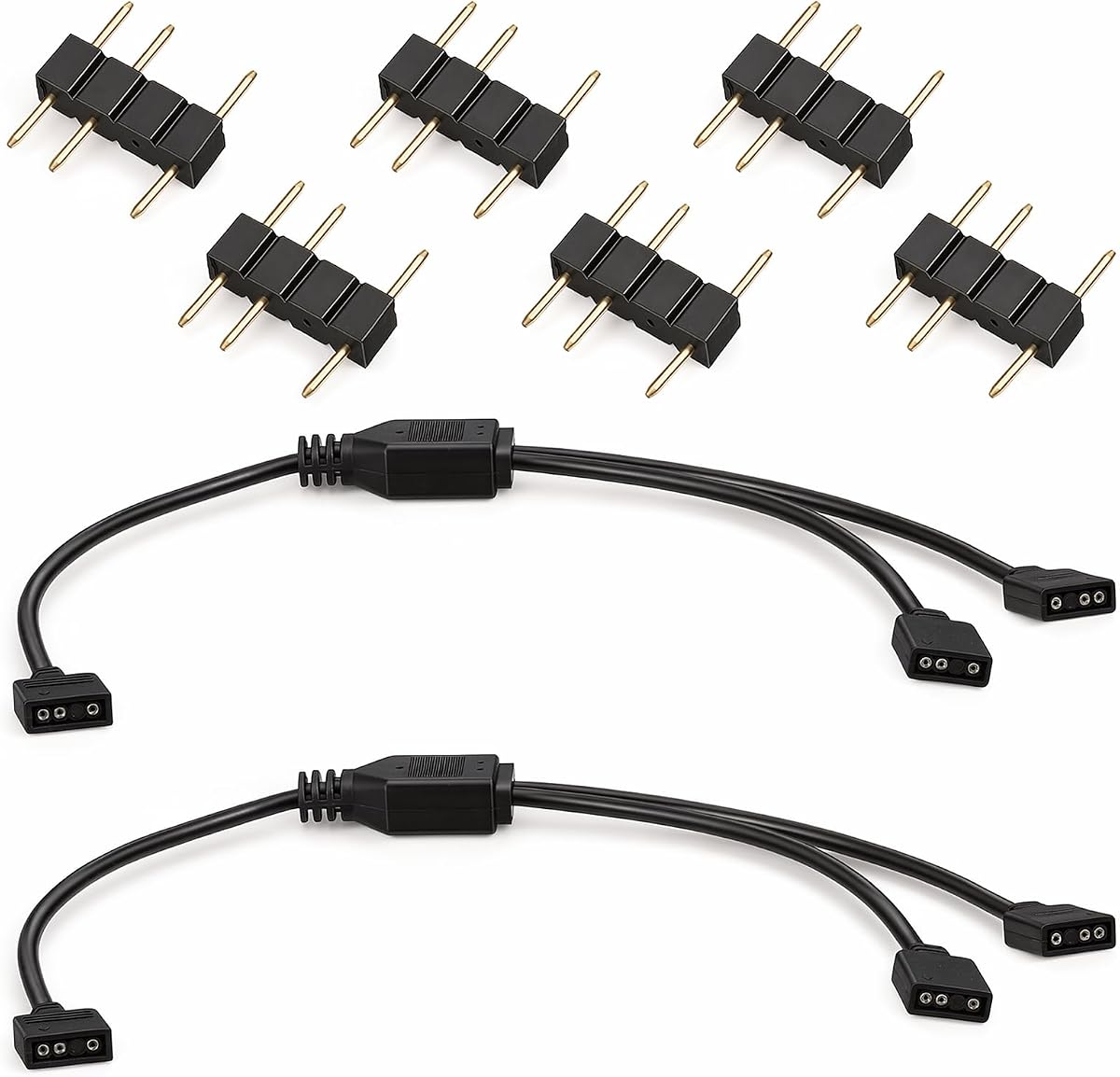


This 1-to-3 splitter cable is a top choice for PC builders looking to expand their lighting setup. It holds a strong rating from users who appreciate its reliability and ease of use. The package includes two cables and multiple connectors to get you started immediately.
We may earn a commission when you buy through this link, at no additional cost to you.
The cables are designed specifically for 5V 3-pin addressable RGB headers found on modern motherboards. They allow you to connect fans and LED strips without soldering or special tools. The arrow markers ensure correct polarity alignment which prevents damage to your components.
One trade-off is that these cables do not support 12V 4-pin RGB headers. You must verify your motherboard specifications before purchasing. However for this limitation is standard for ARGB products and ensures safe operation for addressable lighting systems.
Buy this option if you need a dependable way to chain multiple devices to a single header. It offers a balance of quality and value that fits most standard PC build scenarios effectively.
The connectors feature a friction-lock design that keeps plugs secure during installation and vibration.
Use one splitter for case fans and another for CPU coolers to create distinct lighting zones.
We may earn a commission when you buy through this link, at no additional cost to you.
These white ARGB splitter cables are ideal for builders who prioritize aesthetics in their PC cases. The white color helps them blend seamlessly with white motherboards and cases. Users report that the soft PVC material is flexible and easy to route.
We may earn a commission when you buy through this link, at no additional cost to you.
The cables support 5V 3-pin headers and allow you to split one signal to two devices. They come with enough connectors to handle immediate needs. The copper cores ensure that your lights stay synchronized without flickering or color shifts.
While the white color looks great it can show dust more easily than black cables. You may need to clean them occasionally to maintain their appearance. Additionally the 1-to-2 split is less versatile than 1-to-3 options for larger builds.
Choose this set if you are building a white themed PC and want matching components. The quality is solid and the color adds a nice touch to your final build.
The white jacket matches white LED fans and coolers for a unified look.
New copper wrapping protects the wires from dust and damage over time.
We may earn a commission when you buy through this link, at no additional cost to you.
This cable stands out for its safety features designed to protect your hardware. It comes with insulating protective caps for unused pins which prevent accidental shorts. This is a crucial feature for beginners who might leave extra pins exposed.
We may earn a commission when you buy through this link, at no additional cost to you.
The length is approximately 13 inches which provides enough reach for most standard cases. It functions as a 1-to-2 splitter for addressing RGB devices. The simple design helps solve problems when you lack enough headers on your motherboard.
Since it only includes one cable you might need to buy extra if you have many devices. Also you must remember to remove the caps before plugging into devices. This is a minor step but necessary for functionality.
Opt for this cable if safety is your top priority and you want to avoid accidental damage. It is practical and solves the header shortage issue effectively with added protection.
Protective caps cover unused needles to prevent bending or contact with metal chassis parts.
The size allows for flexible cable management without taking up too much space.
We may earn a commission when you buy through this link, at no additional cost to you.
This splitter allows you to connect up to five devices to one header which is rare in the market. It is perfect for users with multiple fans or long LED strips who need extensive lighting zones. The cables are built with genuine copper for better transmission.
We may earn a commission when you buy through this link, at no additional cost to you.
The length is 19.6 inches which gives you more room to route cables inside the case. You get two packs and twelve connectors so you have plenty of parts for a complex setup. This reduces the need to buy extra items separately.
Be aware that chaining too many devices can lead to signal degradation. Ensure your motherboard header is strong enough to drive all the lights. It works best when devices are distributed fairly evenly across the splitter.
Buy this if you need maximum connectivity for a large system with many lighting components. It saves space on the motherboard and keeps your build organized with high capacity.
One header can control up to five fans or light strips simultaneously.
Durable plastic and copper cores ensure reliability over years of use.
We may earn a commission when you buy through this link, at no additional cost to you.
This option has a perfect rating from customers who value simplicity and performance. It offers a 1-to-3 split which covers most needs for fans and small strips. The package includes two cables so you can split multiple headers if needed.
We may earn a commission when you buy through this link, at no additional cost to you.
The male connectors are ready to use and install without tools. You just align the arrows and plug them in to save time. The length is 11.8 inches which fits standard PC cases easily.
One limitation is that it is strictly for 5V 3-pin headers. If your motherboard only has 12V RGB headers this will not work. But for modern boards this is the standard and ensures compatibility with addressable devices.
Choose this for a highly rated and cost effective solution that just works. It is a safe bet for most standard ARGB setups without extra fees.
No soldering or tools are needed to connect your components quickly.
Getting two cables in one pack offers better value than single buys.
We may earn a commission when you buy through this link, at no additional cost to you.
These cables are primarily designed for extending connections rather than splitting signals. They allow you to move fans or lights further from the motherboard header. This is useful for cases where the header is in a hard to reach spot.
We may earn a commission when you buy through this link, at no additional cost to you.
The 1-to-1 design means it extends one connection to one device. It syncs ARGB fans and LED series perfectly without loss. You get two cables and four connectors which is sufficient for basic extension tasks.
Since it does not split signals you cannot daisy chain multiple devices with one cable. You will need a separate splitter if you want to reduce header usage. This makes it less versatile but very specific for extension needs.
Buy this if you need to reach a distant fan or strip without bending cables. It provides a clean extension solution that maintains signal quality well.
Moves components further from the motherboard to improve airflow and management.
Maintains a direct link between source and device for stability.
We may earn a commission when you buy through this link, at no additional cost to you.
This set is great for connecting fans specifically as it ensures consistent power and data. The pure copper cores help maintain color accuracy across devices. Users give it a perfect rating for reliability and straightforward installation.
We may earn a commission when you buy through this link, at no additional cost to you.
It works as both a splitter and an extension cable. You can split one header to two fans or extend one fan cable to a new spot. The arrows on connectors make polarity alignment simple and foolproof.
It is strictly limited to 5V addressable RGB headers. If you use older 12V systems you cannot use these. This constraint is standard for addressable lighting but limits compatibility with non addressable strips.
Use this if you need a reliable split for two fans or a simple extension. The quality is high and it gets the job done without issues.
Pure copper cores reduce resistance for better power delivery to LEDs.
Allows linking of additional 5V devices easily.
We may earn a commission when you buy through this link, at no additional cost to you.
This bulk pack offers three cables which is excellent for larger cases with many fans. You get enough connectors to handle all three splits at once. It supports 1-to-3 expansion allowing you to control multiple lights from one header.
We may earn a commission when you buy through this link, at no additional cost to you.
The cables allow you to expand and connect ARGB strips or fans easily. Installation requires no welding or tools so it is fast to set up. The package meets various needs for complex lighting zones.
Since it is a basic pack the cable quality is functional rather than premium. It does not have braided sleeves which might look less refined in high end builds. But it works perfectly for internal components you do not see.
Buy this for a complete solution for multi zone lighting in one go. It saves money and reduces the need to hunt for individual cables later.
Create separate lighting zones for fans and strips with included splitters.
No soldering required makes installation convenient for beginners.
We may earn a commission when you buy through this link, at no additional cost to you.
This option emphasizes stable signal transmission with anti-interference design. It ensures consistent colors and animations even with multiple devices. The soft PVC outer sheath is durable and resistant to aging over time.
We may earn a commission when you buy through this link, at no additional cost to you.
You get two cables and eight connectors which is generous for the price. The length is 11.8 inches which fits standard cases. The arrows ensure correct installation so you do not worry about polarity errors.
The sheath is soft which is great for cable management but may not be as rigid as braided options. This is a minor trade-off for flexibility. It keeps your build tidy without being too stiff.
Choose this if you want reliable performance without electronic noise affecting your lights. It is a solid and stable choice for any ARGB system.
Pure copper core wires ensure anti-interference transmission for consistent effects.
Soft PVC sheath allows easy routing around other components.
We may earn a commission when you buy through this link, at no additional cost to you.
This is the premium option with braided sleeves and gold contacts for best quality. It reduces electromagnetic interference and improves color accuracy significantly. The four pack allows for complex custom configurations without buying extra items.
We may earn a commission when you buy through this link, at no additional cost to you.
The gold plated contacts ensure stable data transmission across devices. You can support up to twelve devices in total with this bundle. This makes it perfect for extensive lighting setups that need reliability and style.
It is more expensive than basic options but you pay for better materials and durability. The braided sleeves also look better when routing visible cables. This is a worthwhile investment for a high-end build.
Buy this if you want the best quality and durability for your lighting system. It offers superior engineering and style for demanding builds.
Oxygen-free copper wiring delivers stable transmission without flickering.
Braided sleeves add a high-end look to your cable management.
We may earn a commission when you buy through this link, at no additional cost to you.
Choosing the right splitter depends on understanding your motherboard headers and lighting needs. This guide breaks down the key factors to ensure safe and effective installation.
Always check your motherboard manual to confirm if you have a 5V 3-pin ARGB header or a 12V 4-pin RGB header. Using the wrong splitter can damage your motherboard or lights.
Ensure the splitter matches your header type to avoid electrical issues.
Decide how many devices you need to connect from one header. Some splitters split 1-to-2 while others split 1-to-5.
Choose a capacity that matches the number of fans or strips you plan to control.
Measure the distance from your motherboard header to your components. Standard lengths are around 12 inches but some are longer.
Select a length that reaches without stretching or creating clutter.
Look for female-to-female connectors if you need to extend, or male-to-female for splitting. Most splitters include male connectors for the motherboard side.
Verify connector shapes match your specific fans or strips.
Cables with copper cores transmit signals better than aluminum ones. Braided jackets are more durable than PVC sleeves.
Invest in better materials for long-term reliability.
Check how many male connectors come with the cables. Some packs include extra connectors which saves cost.
Ensure you have enough connectors for all your devices.
Look for arrows or colored wires to help you align pins correctly. Incorrect polarity can stop lights from working.
Always match the arrow on the cable to the motherboard marker.
Start by turning off your computer and unplugging the power supply. This ensures safety while you connect the cables to avoid any electrical damage.
Plug the male connector into the motherboard header ensuring the arrow aligns with the +5V mark. Then plug your fans or strips into the female ends on the splitter.
Secure the cables with zip ties to avoid loose wires touching fans. Check connections occasionally to ensure they remain tight and undamaged.
No. ARGB splitters are designed for 5V 3-pin headers. Using them with 12V 4-pin headers will damage your components. Always verify your header voltage first.
No. The splitters are passive hardware that pass signals from the motherboard. You only need software like Aura Sync or RGB Fusion to control the colors.
Most splitters support 2 to 5 devices. Connecting too many can cause voltage drop or signal loss. Check the splitter specifications for its limit.
The arrow indicates the +5V pin direction. You must align this arrow with the +5V pin on your motherboard or fan. Incorrect alignment stops the lights from working.
Yes, as long as they are rated for the voltage and amperage. Good quality copper cables provide safe transmission without overheating during normal operation.
You can chain them but this increases risk of signal loss. It is better to use one splitter per header to ensure stable performance and avoid voltage drops.
We found that the 1-to-3 ARGB Splitter Cable stands out as the top choice for most users due to its reliability and value. It balances quality and functionality perfectly for standard PC builds.
When choosing, prioritize compatibility with your motherboard headers and cable length needs. High quality copper cores and included connectors add significant value to your purchase.
Prices and availability change frequently so please check the latest listings before buying. This guide helps you make an informed decision for your lighting setup.