
Protectli Vault FW4B
4.6Editor score
Compact fanless design
Intel Quad Core CPU
Four Gigabit Ethernet ports
Discover the top firewall appliances for secure networking. This guide compares performance, features, and reliability to help you choose the best network
Modern networks require robust protection against evolving digital threats. Firewall appliances provide dedicated hardware security that integrates seamlessly with your infrastructure. They offer superior throughput and advanced threat detection compared to software solutions running on general purpose servers.
We evaluated ten leading models based on throughput, port density, and management features. Our analysis focuses on real world performance metrics and enterprise grade security capabilities. Each unit was assessed for compatibility with popular operating systems and ease of deployment.
Every recommendation highlights specific strengths for different deployment scenarios. Read through to find the ideal device for your unique network needs. Keep in mind that hardware availability and pricing can fluctuate over time so verify details before purchasing.
4.6Editor score

4.4Editor score
4.5Editor score
This table provides a side-by-side comparison of the top ten firewall appliances available today. It highlights key specifications and capabilities to help you make an informed decision for your network security needs.


The Protectli Vault FW4B stands out as a highly capable firewall micro appliance for budget conscious users. It carries a strong rating for its robust hardware configuration and silent fanless operation. This device is perfect for those who prefer to install their own network operating system.
We may earn a commission when you buy through this link, at no additional cost to you.
Its Intel Quad Core Celeron processor delivers solid performance for home labs and small offices. The inclusion of AES-NI hardware acceleration ensures efficient encryption handling. With four Gigabit Ethernet ports and ample USB connectivity, it offers versatile networking options.
A minor trade-off is that no operating system comes pre-installed. You must install software like pfSense or OPNsense yourself. This adds a setup step but allows complete control over your network configuration and software choices.
Buy this unit if you want reliable hardware without paying for proprietary software licenses. It is ideal for enthusiasts and small businesses needing a cost effective secure gateway. The US based support adds extra peace of mind for users.
The four Gigabit Ethernet ports allow for extensive LAN segmentation and DMZ setup without additional switches.
Hardware is tested with popular open-source solutions like pfSense ensuring broad software support and flexibility.
We may earn a commission when you buy through this link, at no additional cost to you.
The FortiGate-60F is a top choice for businesses needing high density connectivity and strong security. It features ten Gigabit Ethernet ports providing flexibility for various network segments. Its powerful system on chip acceleration delivers impressive throughput for secure networks.
We may earn a commission when you buy through this link, at no additional cost to you.
Security features include industry leading SSL inspection and SD-WAN functionality. The device leverages AI powered FortiGuard Labs for continuous threat intelligence. This ensures both known and unknown threats are identified and mitigated effectively across all traffic.
Management is simplified through a user friendly console with Zero Touch Integration. However note that this appliance only does not include a security subscription. You will need to purchase separate service to activate full protection features and firmware updates.
This unit is best suited for medium sized businesses requiring enterprise grade security. The robust hardware and advanced threat protection justify the investment. It offers a balance of performance and manageability for growing network environments.
Ten GE RJ45 ports including WAN DMZ and internal connections offer broad flexibility for diverse networking needs.
Continuous threat intelligence from FortiGuard Labs enhances defense against advanced threats across all network traffic.
We may earn a commission when you buy through this link, at no additional cost to you.
The Protectli Vault FW4C offers premium performance with its Intel J3710 processor and 2.5 Gigabit ports. It is designed for users who need faster networking speeds without sacrificing a compact form factor. The unit remains silent and fanless for quiet environments.
We may earn a commission when you buy through this link, at no additional cost to you.
Hardware specifications include 4GB of RAM and AES-NI support for efficient encryption. It is fully compatible with popular open source software solutions like pfSense and OPNsense. This allows users to customize their security stack according to specific requirements.
The only drawback is the modest 32GB SSD capacity which may limit log storage. Also like the FW4B it requires manual installation of the operating system. These are minor issues given the high speed networking capabilities it provides.
Choose this appliance if you want 2.5G networking in a small silent package. It is ideal for tech enthusiasts and small offices with high bandwidth needs. The US based support ensures you have help if needed.
Four 2.5 Gigabit Ethernet NIC ports deliver significantly faster throughput compared to standard Gigabit interfaces.
The compact fanless design ensures quiet operation while maintaining high performance for demanding network tasks.
We may earn a commission when you buy through this link, at no additional cost to you.
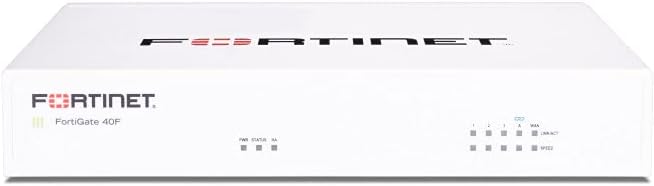
The FortiGate-40F is designed for small to mid-sized businesses and branch offices. Its compact fanless desktop form factor minimizes space usage while ensuring quiet operation. It provides essential connectivity and flexibility for various network configurations.
We may earn a commission when you buy through this link, at no additional cost to you.
Security performance is high with purpose-built security processor technology. It offers up to 1 Gbps IPS throughput and strong SSL encrypted traffic protection. Integration with Fortinet's AI-powered FortiGuard Labs ensures comprehensive threat mitigation.
The user-friendly management console provides visibility and automation capabilities. Zero Touch Integration with Fortinet's Security Fabric simplifies deployment. However the appliance only version does not include a subscription for security services and firmware updates.
This model is perfect for smaller networks needing reliable security without bulk. It balances performance and manageability well for enterprise branches. Verify subscription needs before purchasing to ensure full protection.
Compact design fits easily in small offices while maintaining robust security and connectivity options.
FortiGuard Labs integration identifies and mitigates threats across network traffic effectively.
We may earn a commission when you buy through this link, at no additional cost to you.
The Ubiquiti Unifi Security Appliance integrates powerful firewall performance with the Unifi ecosystem. It supports VLANs and provides QoS for enterprise VoIP needs. The device offers a convenient way to secure networks managed by Unifi controllers.
We may earn a commission when you buy through this link, at no additional cost to you.
With three Gigabit Ethernet ports it covers essential WAN LAN and OPT connections. It includes a VPN server for secure remote communications. The wall mountable or desktop design allows flexible placement in various environments.
While it lacks extensive port density it excels in ease of use. The management is streamlined through the Unifi Controller. However it is best suited for users already invested in the Ubiquiti hardware lineup.
Buy this if you need a simple secure gateway for a Unifi managed network. It delivers reliable security with minimal configuration effort. Troubleshooting steps are clearly outlined in the manual.
Integration with Unifi Controller simplifies management and visibility across your entire network infrastructure.
Built-in VPN server ensures secure communications for remote users accessing your network resources.
We may earn a commission when you buy through this link, at no additional cost to you.
The SonicWall TZ280 delivers up to 2.5 Gbps firewall inspection with its RFDPI engine. It features a mix of Ethernet and SFP ports for flexible connectivity options. This appliance is built for small business and branch environments needing robust security.
We may earn a commission when you buy through this link, at no additional cost to you.
Security capabilities include intrusion prevention gateway anti-malware and TLS SSL decryption. With an active service subscription it offers multi-engine sandboxing and content filtering. The device supports Zero Trust Network Access for enhanced remote worker protection.
Management can be done on-box or via cloud Network Security Manager. Zero Touch deploy simplifies initial setup significantly. However note that security services and firmware updates are not included without a separate subscription.
Choose this if you need high speed inspection and advanced threat prevention. The SD-WAN support ensures secure and efficient distributed site connectivity. Verify subscription requirements to enable full security features.
Patented Reassembly-Free Deep Packet Inspection engine drives superior performance and threat prevention.
Manage on-box or via cloud Network Security Manager for flexible deployment and visibility.
We may earn a commission when you buy through this link, at no additional cost to you.
The Netgate 1100 comes pre-loaded with pfSense+ software for quick setup. It delivers near gigabit routing with solid firewall throughput for home or small business use. Technical support and hardware warranty are included for peace of mind.
We may earn a commission when you buy through this link, at no additional cost to you.
Its compact form factor allows silent operation on a desktop or wall mount. Three 1GbE switched ports provide separate WAN LAN and OPT connections. The device is also ideal for protecting AI workloads and data effectively.
Free help with setup is available 24/7 through the Technical Assistance Center. While throughput is lower than high-end models it suits modest network needs. Note that adult signature is required for delivery to ensure secure hand-off.
This unit is perfect for users wanting immediate pfSense functionality without config hassle. It balances performance support and reliability well. Check shipping details as adult signature is mandatory for this item.
Pre-installed software and expert support allow you to get up and running fast.
Designed to protect AI workloads and data with robust firewall capabilities.
We may earn a commission when you buy through this link, at no additional cost to you.
The FORTINET FG-100E is a network security appliance designed for robust protection. It protects against known exploits malware and malicious websites effectively. The device detects unknown attacks and identifies thousands of applications for better control.
We may earn a commission when you buy through this link, at no additional cost to you.
Security features are comprehensive ensuring deep visibility into network traffic. This capability helps mitigate both known and unknown threats efficiently. It is suitable for environments requiring strict application control and threat prevention.
The appliance focuses on core security functions without extra hardware details. Performance is implied through strong detection metrics and threat mitigation. Note that full features usually require an active service subscription from Fortinet.
Buy this if you need reliable threat detection and application visibility. It adds a strong layer of security for your network edge. Ensure you plan for any necessary service subscriptions.
Identifies unknown attacks and protects against known exploits and malicious websites.
Identifies thousands of applications allowing for granular network control and policy enforcement.
We may earn a commission when you buy through this link, at no additional cost to you.
The Palo Alto PA-220 is an 8-port Next Generation Firewall Security Appliance. It brings advanced threat prevention capabilities in a compact form factor. This device is designed for environments needing multi-port connectivity and robust security.
We may earn a commission when you buy through this link, at no additional cost to you.
Palo Alto is known for reliable Next-Gen Firewall technology. The eight port configuration offers flexibility for various network segmentation needs. Its compact design allows it to fit into small spaces or racks.
Listing details are limited but the product promises advanced threat prevention. Ensure compatibility with your existing network tools before purchasing. Subscription support may be required to activate full security services.
This unit is suitable for small networks needing multi-port firewall access. It combines brand reliability with practical connectivity. Verify service requirements to ensure full protection.
Delivers advanced threat prevention capabilities in a compact form for secure networks.
Eight port connectivity supports diverse network configurations and segmentation.
We may earn a commission when you buy through this link, at no additional cost to you.
The FortiGate-60F bundle includes the firewall appliance plus 1 year of FortiCare and FortiGuard UTP. This complete package ensures secured against advanced online threats with comprehensive web filtering. It is tailored for medium-sized businesses needing robust security.
We may earn a commission when you buy through this link, at no additional cost to you.
Unified Threat Protection includes anti-botnet technologies and advanced filtering. FortiCare Premium ensures high-quality support and service continuity for your business. This bundle simplifies procurement by combining hardware and security services.
While the initial investment is higher you gain immediate protection. Advanced filtering technologies safeguard against sophisticated threats effectively. Without this bundle you would need to purchase subscriptions separately later.
Choose this bundle for a seamless setup with guaranteed security services. It is ideal for businesses ready to deploy without extra configuration steps. Verify that the services match your ongoing network security needs.
Includes appliance with 1 year of UTP and Premium support for immediate deployment.
FortiCare Premium ensures high-quality support and service continuity for your business operations.
We may earn a commission when you buy through this link, at no additional cost to you.
Selecting the right firewall appliance involves evaluating performance, features, and ease of use. This guide outlines key factors to consider for your network security needs.
Throughput determines how much traffic your firewall can process without slowing down your network. Look for IPS and threat protection throughput ratings that match your internet speed. Higher throughput ensures smooth performance even with security features enabled.
Prioritize models that meet or exceed your maximum bandwidth needs. This prevents bottlenecks during peak usage times.
The number and type of ports affect how you can segment and connect your network. Ensure there are enough Ethernet ports for WAN LAN and DMZ connections. SFP ports may be useful for fiber optic links in some environments.
Choose a unit with enough physical ports to avoid adding unnecessary switches later.
Advanced security capabilities like intrusion prevention antivirus and URL filtering are critical for modern threats. Check if the device supports deep packet inspection and SSL decryption. These features ensure encrypted traffic is inspected for hidden threats.
Verify that the firmware includes regular updates and threat intelligence feeds for ongoing protection.
Many appliances allow you to install your preferred network operating system. If you prefer open-source solutions like pfSense verify hardware compatibility. Others come preloaded with proprietary systems that offer different management interfaces.
Select a device that aligns with your technical skills and software preferences.
A user-friendly interface simplifies configuration monitoring and troubleshooting. Look for cloud management options if you manage multiple sites remotely. Zero touch deployment can significantly reduce setup time and effort.
Ensure the management tools are intuitive enough for your team to use effectively.
The physical form factor should match where you plan to install the device. Fanless models are ideal for quiet offices or home labs. Rack-mounted units fit better in server closets with standard equipment.
Consider mounting options like desktop or wall mount based on your space limitations.
Security services like firmware updates and threat feeds often require separate subscriptions. Check if warranty and technical support are included with the purchase. Good support ensures you have help during setup or troubleshooting.
Factor in the long-term cost of necessary subscriptions when evaluating the total price.
Compare the total cost of ownership including hardware and required services. Some models offer high performance at a lower upfront cost but need expensive licenses. Others bundle services which may be more cost effective for businesses.
Balance initial investment against the features and protection levels you actually need.
First connect the WAN port to your modem and LAN ports to your network devices. Ensure the power supply matches your local voltage requirements before plugging in. If the device does not include an OS install the software from the manufacturer's site.
Next configure basic network settings like IP addresses and firewall rules using the management console. Update the firmware to the latest version immediately to protect against vulnerabilities. Regularly review logs to monitor traffic and detect potential security issues.
Keep the appliance in a well-ventilated area to prevent overheating and hardware failure. Dust the vents occasionally with compressed air to maintain cooling efficiency. Schedule routine maintenance windows to apply security patches and review policies.
A firewall appliance is a dedicated hardware device designed to secure network traffic. It acts as a barrier between your internal network and the internet filtering packets based on rules. Unlike software firewalls it offers higher performance and reliability for enterprise use.
Most advanced security features like antivirus and URL filtering require a subscription. While basic routing works without one full protection depends on active services. Check the product details to see if services are included or sold separately.
Many appliances like those from Protectli support open-source OS options like pfSense. Others come with proprietary software that is optimized for the hardware. Verify compatibility lists before buying if you plan to install custom software.
Match the firewall's IPS throughput to your internet speed and network size. For example a gigabit connection needs a device with at least 1 Gbps IPS capacity. This ensures security processing does not become a bottleneck for your data.
Setup difficulty varies by model and software. Some come preloaded for easy deployment while others require manual OS installation. Many include guides and support to help you configure security policies effectively.
Install the firewall between your modem and internal network devices like switches or routers. Place it in a secure and well-ventilated area to prevent physical access and overheating. This ensures all traffic is inspected before reaching your internal systems.
We reviewed ten top firewall appliances ranging from budget options to enterprise grade units. Each offers unique strengths in performance connectivity and security features. Whether you need 2.5G ports or comprehensive threat protection there is a model for your needs.
Prioritize throughput and security features that match your specific network size. Don't forget to account for service subscriptions and management interfaces. Choosing a reliable unit ensures your network stays secure against modern threats.
Prices and availability can change so verify details before buying. Check current stock and any promotional bundles that might save costs. A well-chosen firewall appliance is a critical investment for your digital security.