
Logitech H390 Wired Headset
4.4Editor score
Digital stereo sound
Rotating noise canceling mic
Plug-and-play USB-A
Comfortable padded ear cushions
Discover the top 10 headsets for call centers in October 2026, comparing noise cancellation, comfort, battery life, and connectivity for professional use.
Finding the right headset for call center work is essential for maintaining productivity and comfort during long shifts. A good device should offer clear audio, effective noise cancellation, and a comfortable fit that lasts all day without causing fatigue or strain on the ears.
This guide compares ten highly rated headsets based on user feedback, technical specifications, and real-world performance in busy office environments. We evaluated features like microphone quality, battery longevity, connectivity options, and overall build quality to help you make an informed decision.
Each pick highlights specific strengths and ideal use cases so you can match the product to your specific work environment. Keep in mind that product availability and pricing may change over time, so verify details before purchasing to ensure you get the best value.
4.4Editor score
4.9Editor score

4.7Editor score
This table provides a side-by-side comparison of all ten products featured in this guide. Review the key specifications and features to quickly identify which headset aligns best with your call center requirements and budget constraints.


This headset stands out for its advanced noise cancellation capabilities, making it ideal for busy call center environments. With a solid 4.3 rating, users appreciate its ability to isolate voice from background distractions effectively.
We may earn a commission when you buy through this link, at no additional cost to you.
The Hybrid ANC blocks out ambient office noise while ENC ensures your voice is heard clearly. The physical flip-to-mute switch adds reliability compared to software toggles. USB dongle provides a stable connection for computers without Bluetooth.
While the Bluetooth 5.4 is robust, the dongle restricts compatibility with certain phones or landline systems. The battery life is impressive, but the mute function only works on active calls, which may confuse some users initially.
For professionals prioritizing audio clarity and comfort during long shifts, this headset delivers exceptional value. It balances premium features with a practical design suitable for hybrid office setups.
The combination of ANC and ENC ensures that both you and your callers remain focused without interruptions from surrounding sounds.
Flipping the microphone boom to mute is faster and more intuitive than searching for buttons during urgent calls.
We may earn a commission when you buy through this link, at no additional cost to you.
The Logitech H390 is a trusted choice for budget-conscious teams needing reliable audio without complex setups. Its 4.4 rating reflects consistent performance across various devices including Chromebooks and PCs.
We may earn a commission when you buy through this link, at no additional cost to you.
Digital stereo drivers provide clear sound for calls and meetings. The rotating boom mic minimizes background noise, while in-line controls allow quick adjustments. Padded ear cushions ensure comfort during standard shifts.
As a wired model, it lacks wireless flexibility but guarantees zero latency. The cable length may limit movement around large desks. Still, it avoids pairing issues common with Bluetooth models.
This headset is perfect for fixed workstations where cost-effectiveness and simplicity are paramount. It delivers professional-grade audio quality at an entry-level price point.
No drivers are needed; simply plug the USB-A connector into any computer to start working immediately.
The rotating boom arm helps direct the mic closer to your mouth while filtering out distant chatter.
We may earn a commission when you buy through this link, at no additional cost to you.
This wireless headset excels in versatility, allowing you to connect to both a laptop and smartphone simultaneously. With a 4.6 rating, it is a favorite among multitaskers who manage calls across different platforms.
We may earn a commission when you buy through this link, at no additional cost to you.
ENC blocks out distractions while the dedicated USB dongle ensures stable audio on non-Bluetooth PCs. Memory foam earcups provide long-lasting comfort. The 40-hour battery ensures you won't run out during a full work week.
The mute function only works during calls, which requires slight awareness. The dongle must be removed when not in use to save power. These minor steps do not detract from its overall reliability.
Ideal for hybrid workers, this headset bridges the gap between mobile and desktop communications efficiently. Its battery life and dual pairing make it a robust tool for dynamic work environments.
Charge fully in just two hours and enjoy up to 40 hours of talk time for uninterrupted productivity.
Switch between devices easily using the included adapter for desktops or Bluetooth for laptops and phones.
We may earn a commission when you buy through this link, at no additional cost to you.
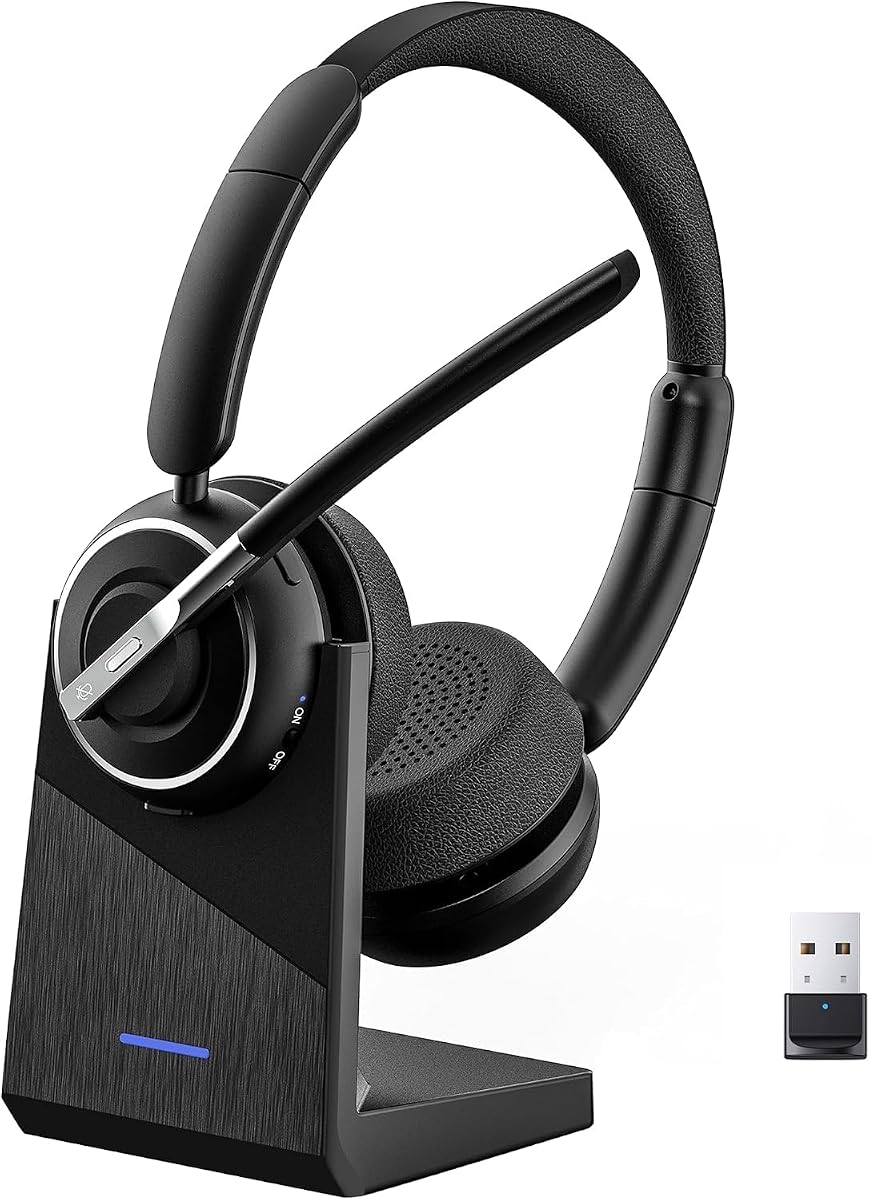
With a stellar 4.9 rating, the PrancyBt headset sets a high standard for audio quality and comfort. Users praise its state-of-the-art noise filtering, which delivers crisp audio even in noisy offices.
We may earn a commission when you buy through this link, at no additional cost to you.
The immersive stereo sound enhances both calls and leisure music. Rotatable earcups allow ergonomic positioning to fit any head shape. The one-click mute offers immediate privacy for confidential discussions.
The dongle compatibility is limited to Windows, which may exclude Mac users. Charging requires powering off the device, which is a small inconvenience. These minor points are outweighed by its overall performance.
For those seeking top-tier reliability and sound quality, this headset is a standout choice. Its premium features make it suitable for demanding daily call center tasks.
Well-balanced sound with powerful bass makes music and meetings equally enjoyable throughout the day.
99.9 percent of surrounding interference is filtered out so your voice stays clear during video conferences.
We may earn a commission when you buy through this link, at no additional cost to you.
The JIAMQISHI USB headset focuses on comfort and versatility with dual connection options. Rated 4.2, it suits users who need flexibility in how they connect to their workstation devices.
We may earn a commission when you buy through this link, at no additional cost to you.
Unidirectional microphone picks up your voice clearly while blocking background noise. The 40mm driver delivers enhanced sound for music and calls. Soft protein memory foam prevents heat build-up during long wear.
The cable length allows some movement, but it is still wired. The indicator light helps you track status easily. Compatibility with Mac and PC makes it a universal choice for shared offices.
This headset is ideal for users needing an ergonomic and reliable solution without wireless complexity. Its dual connections ensure it works with various devices effortlessly.
Choose between USB for digital clarity or 3.5mm for analog compatibility with different systems.
High-level breathable materials prevent sweat and ensure ears stay cool even after hours of use.
We may earn a commission when you buy through this link, at no additional cost to you.
With up to 65 hours of talk time, the Waxop headset is unmatched in endurance for busy schedules. Its 4.6 rating highlights reliability for professionals needing long shifts without charging interruptions.
We may earn a commission when you buy through this link, at no additional cost to you.
AI noise cancellation reduces unwanted sounds significantly. The charging base keeps your workspace organized and includes a slot for the dongle. A 49-foot range offers more freedom of movement than competitors.
The headset may feel slightly heavier due to the larger battery, but soft cushions mitigate fatigue. Packaging may vary, but performance remains identical. These factors are minor trade-offs for the extended battery.
For teams prioritizing battery longevity and connectivity range, this headset is an excellent investment. Its base and design ensure consistent performance throughout the workweek.
The included charging base keeps the dongle secure and prevents loss of important accessories.
Move freely up to 49 feet away from your device while maintaining stable audio quality.
We may earn a commission when you buy through this link, at no additional cost to you.
This headset offers exceptional ergonomic design with a reversible ear hook and rotating mic. Rated 4.5, it adapts to left or right ear preferences comfortably for all-day wear without pressure.
We may earn a commission when you buy through this link, at no additional cost to you.
AI noise cancellation filters distractions effectively. The base stores the headset securely. USB-C charging supports both wired and dock options for flexibility. Controls are responsive for quick muting or volume changes.
Without a dongle, some desktops may rely on Bluetooth. Ensuring a stable connection is key for best results. Still, the comfort and battery make it a strong contender for hybrid roles.
Ideal for users who value physical comfort and adaptability. Its design ensures you stay focused on calls without physical distractions.
Adjust the mic and ear hook to suit your natural head position for maximum comfort.
USB-C compatibility means you can charge with standard cables found anywhere in the office.
We may earn a commission when you buy through this link, at no additional cost to you.
Designed primarily for mobile calls, this headset supports Siri and dual device connections. With a 4.4 rating, it appeals to field workers or those prioritizing mobile over desktop usage.
We may earn a commission when you buy through this link, at no additional cost to you.
Directional mic provides clear sound in noisy environments like cars. The anti-slip pad ensures it stays secure. Voice prompts for battery status and mute help manage calls without looking at the device.
PC integration is less robust than dedicated models. Battery life is solid but lower than top-tier office options. Still, its portability makes it great for travel.
This headset is best for users on the go who need reliable hands-free calling. Its compact design complements a dynamic lifestyle effectively.
Dual device connections allow you to answer calls on your phone while connected to a tablet.
One-key controls let you answer or mute without touching your phone during busy tasks.
We may earn a commission when you buy through this link, at no additional cost to you.
Weighing only 102 grams, this headset offers unparalleled lightness for comfort. With a 4.7 rating, users love the auto reconnect feature that saves time during back-to-back meetings.
We may earn a commission when you buy through this link, at no additional cost to you.
AI noise separation filters background sound effectively. The physical toggle switch makes powering on intuitive. Mute works across platforms via the dongle. A charging dock keeps the desk clutter-free.
Single ear design may limit immersion for some users. MFB controls are phone specific. These are acceptable trade-offs for the weight and convenience benefits provided.
This is a premium choice for those needing a barely-there feel. Its design ensures focus remains on conversation rather than the device.
Toggle the switch and the headset automatically reconnects to your paired device instantly.
Intelligent AI separates your voice from pets, traffic, and office chatter seamlessly.
We may earn a commission when you buy through this link, at no additional cost to you.
This headset offers versatile charging with both USB-C and wireless base options. With a 4.7 rating, it appeals to users wanting flexibility in how they power their device during busy weeks.
We may earn a commission when you buy through this link, at no additional cost to you.
ENC filters noise effectively. Auto reconnect simplifies daily use. The base stores the dongle for desktop users. Lightweight design with soft earmuffs ensures all-day comfort.
MFB controls are limited to phones, so computer functions require software. Still, the battery life of 80 hours music is impressive. These minor steps are manageable for most workflows.
For tech-savvy teams, this headset offers modern charging and connectivity. Its design balances convenience with reliable audio performance.
Drop the headset on the base for a charge without needing to plug in cables manually.
Connect to two Bluetooth devices simultaneously to manage calls and media seamlessly.
We may earn a commission when you buy through this link, at no additional cost to you.
Selecting the right headset involves balancing audio quality, comfort, and features tailored to your specific work environment. This section breaks down the critical factors to consider.
Call centers are often noisy environments where background distractions can hinder communication. Look for headsets with Active Noise Cancellation (ANC) to block ambient sounds and Environmental Noise Cancellation (ENC) for the microphone to ensure your voice is heard clearly. High-quality noise cancellation reduces the need to repeat yourself and improves call quality.
Prioritize headsets with dedicated ANC and ENC features for professional audio in busy offices.
Decide between wired and wireless based on your workflow. Wireless headsets offer freedom of movement and often support dual device pairing, allowing you to switch between a PC and phone. Wired options guarantee zero latency and are generally cheaper. USB dongles provide stable connections for computers without built-in Bluetooth.
Choose wireless for mobility or wired for stable, simple setups without battery concerns.
Battery life is critical for all-day shifts. Aim for at least 35 hours of talk time to ensure you do not run out during a workday. Fast charging capabilities reduce downtime. Charging bases add convenience by keeping the headset organized and ready to use.
Select a model with sufficient battery to last your entire shift plus extra for safety.
Comfort prevents fatigue during long calls. Look for adjustable headbands, soft ear cushions like memory foam or protein leather, and lightweight designs. Rotatable microphones and earcups help fit the headset naturally to your head. Weight should be minimal to reduce neck strain.
Focus on ergonomic designs with breathable materials for extended wear without discomfort.
A clear microphone ensures clients understand you. Boom mics are generally better than inline ones. Physical mute buttons or flip-to-mute features are faster and more reliable than software toggles. This ensures privacy when discussing confidential information.
Opt for a dedicated mute mechanism to quickly silence the mic when needed.
Ensure the headset works seamlessly with platforms like Zoom, Microsoft Teams, and Webex. Some dongles unlock specific features like mute control on PC. Check compatibility with your operating system, whether Windows, Mac, or Chromebook, to avoid pairing issues.
Verify software compatibility before purchasing to ensure full feature integration with your tools.
Durability matters for professional use. Look for sturdy build quality and warranties covering defects. A global warranty indicates the manufacturer stands by their product. Read reviews about long-term performance to gauge reliability over time.
Choose a brand with a solid warranty to protect your investment against defects.
Always start by charging your wireless headset fully before first use. Use the included USB dongle or Bluetooth to pair with your device. Check that your microphone is positioned correctly near your mouth for optimal sound capture.
Clean the ear cushions regularly with a dry cloth to prevent bacteria buildup and sweat. Avoid exposing the headset to extreme heat or moisture to extend its lifespan. Store it on a charging base or safe place when not in use.
Keep firmware updated if applicable by checking the manufacturer website. If you experience audio issues, try switching to a different USB port or re-pairing Bluetooth. Regular maintenance ensures consistent performance over time.
Wireless headsets offer greater freedom of movement and often include dual device pairing, which is beneficial for multitasking. However, wired options ensure zero latency and do not require charging. The best choice depends on your need for mobility versus simplicity.
Most professional wireless headsets provide between 35 to 65 hours of talk time on a single charge. Some models even offer up to 80 hours of music playback. This ensures the device lasts through your entire workweek without needing frequent recharging.
ANC (Active Noise Cancellation) blocks background noise for you to hear clearly, while ENC (Environmental Noise Cancellation) filters out background noise from your microphone so callers hear you better. Both are valuable for ensuring clear communication in noisy environments.
Most modern headsets connect via USB or Bluetooth to computers and smartphones. They are generally not compatible with traditional landline phones unless using a specialized adapter. Always check product specs to confirm compatibility with your desk phone setup.
Many headsets feature a physical mute button or a flip-to-mute boom that instantly silences the mic. This is faster than navigating software menus. Physical controls reduce the risk of awkward moments where you forget to mute yourself.
Most models in this guide are designed for all-day comfort with breathable cushions and adjustable headbands. However, comfort is subjective. If you wear glasses or have sensitive ears, look for lightweight models with soft memory foam padding.
Choosing the right headset for call center work significantly impacts your productivity and comfort. The PrancyBt model stands out for high ratings, while the Logitech H390 offers exceptional value for budget-conscious teams.
Prioritize noise cancellation and battery life if you spend most of your day on calls. Features like dual connectivity and physical mute buttons add practical convenience that can streamline your daily workflow.
Remember that availability and pricing may change over time. Always check current product details and reviews before purchasing to ensure you select the best option for your specific needs.