
SteelSeries Nimbus+
4.0Editor score
Apple licensed wireless connectivity
50 plus hour battery life
Clickable joysticks included
This guide compares the top gaming controllers for Apple TV to help you find the best wireless option for iOS games, streaming, and console-quality play at
Finding the right gaming controller for Apple TV transforms your living room into a true entertainment hub. With Apple Arcade and cloud gaming services growing, having a responsive and comfortable input device is essential for enjoying titles on the big screen without lag or connectivity issues.
We evaluated ten top-rated controllers based on compatibility, battery life, build quality, and special features like motion controls and programmable buttons. Our analysis focuses on models that officially support tvOS and offer seamless Bluetooth pairing with Apple devices for the smoothest experience possible.
Each pick in this list highlights specific strengths such as budget value, premium ergonomics, or retro styling. Prices and availability change frequently so please check the current listings before making a final decision to ensure you get the best deal available today.
4.0Editor score

4.7Editor score

4.4Editor score
This side-by-side comparison highlights the key specifications and capabilities of each controller to help you quickly identify which model fits your specific gaming needs and budget constraints.

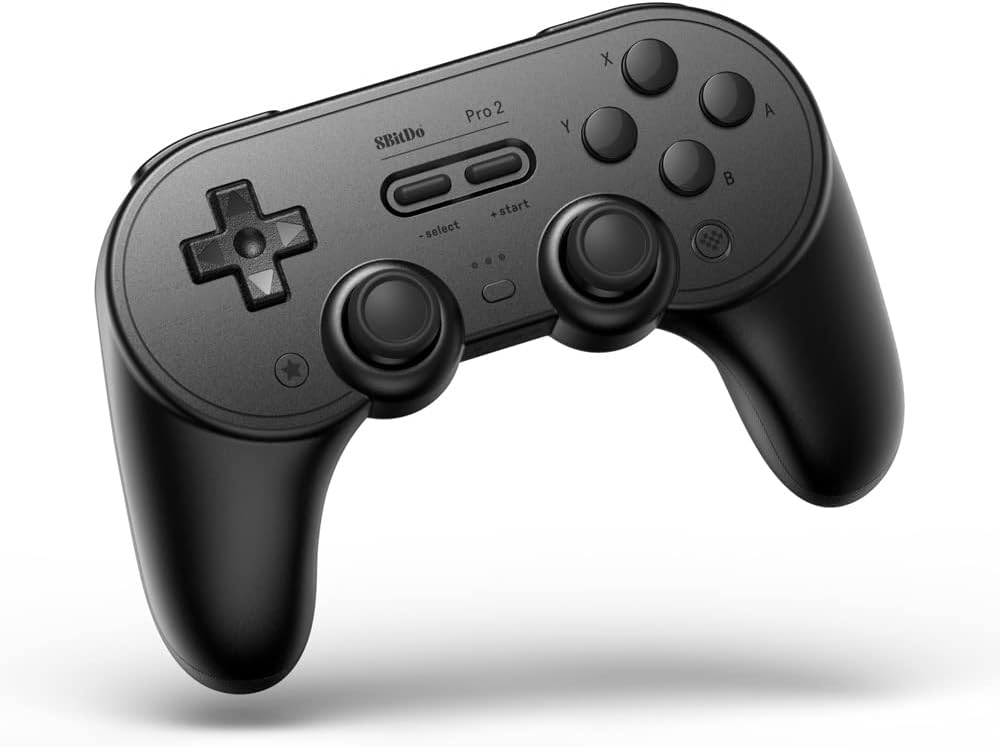


The 8BitDo SN30 Pro stands out as the premier choice for retro enthusiasts and modern gamers alike who want a controller that feels classic but performs with modern precision. With an impressive 4.7 star rating from users, this controller has earned its place as a top pick for Apple TV due to its official support and seamless Bluetooth integration.
We may earn a commission when you buy through this link, at no additional cost to you.
Its standout feature is the upgrade to Hall Effect joysticks which eliminate drift and provide higher precision during gameplay. The SN30 Pro also includes a full button set with clickable joysticks, rumble vibration, and motion controls ensuring you have all the inputs needed for complex games. The compact design makes it easy to carry anywhere while the rechargeable battery supports up to 18 hours of play.
While the retro shape is stylish it may feel smaller to those used to standard gamepad sizes. Additionally there is no built-in kickstand which might be missed for hands-free viewing. However these trade-offs are minor compared to the overall build quality and performance provided by this device.
If you value design and functionality equally the SN30 Pro is the ideal pick for your Apple TV setup. It bridges the gap between nostalgia and modern gaming requirements perfectly making it a must-have for any serious gamer looking for reliability and style.
Hall Effect joysticks use magnetic sensing to prevent stick drift ensuring consistent and accurate movement throughout the lifespan of the controller.
The SN30 Pro combines a classic design with modern features like Bluetooth 5.0 USB-C charging and official Apple TV compatibility for a versatile gaming experience.
We may earn a commission when you buy through this link, at no additional cost to you.
The SteelSeries Nimbus+ is designed specifically for the Apple ecosystem making it the best premium option for users who want guaranteed compatibility and performance. Its official Apple license ensures it works flawlessly with iOS iPadOS and tvOS devices without needing extra drivers or configuration steps.
We may earn a commission when you buy through this link, at no additional cost to you.
One of its most impressive features is the built-in rechargeable battery that allows for 50 plus hours of play on a single charge. This means you can game for weeks without worrying about recharging. The tactile D-Pad buttons offer a clicky feel for fast feedback and the clickable joysticks add extra input options for games that require L3 or R3 inputs.
Despite its high quality the Nimbus+ comes at a higher price point compared to generic controllers. It also lacks back buttons which some competitive gamers prefer for additional shortcuts. However for most casual and console gamers the comfort and reliability of this controller make up for these omissions.
For those seeking a controller that is purpose-built for Apple TV the Nimbus+ delivers unmatched peace of mind. Its longevity and official support make it a worthy investment for anyone looking to elevate their gaming experience on Apple hardware.
Official Apple licensing ensures optimal connection stability and full feature support across all tvOS and iOS games without compatibility issues.
With a battery life exceeding 50 hours the Nimbus+ allows for marathon gaming sessions without frequent interruptions for recharging.
We may earn a commission when you buy through this link, at no additional cost to you.
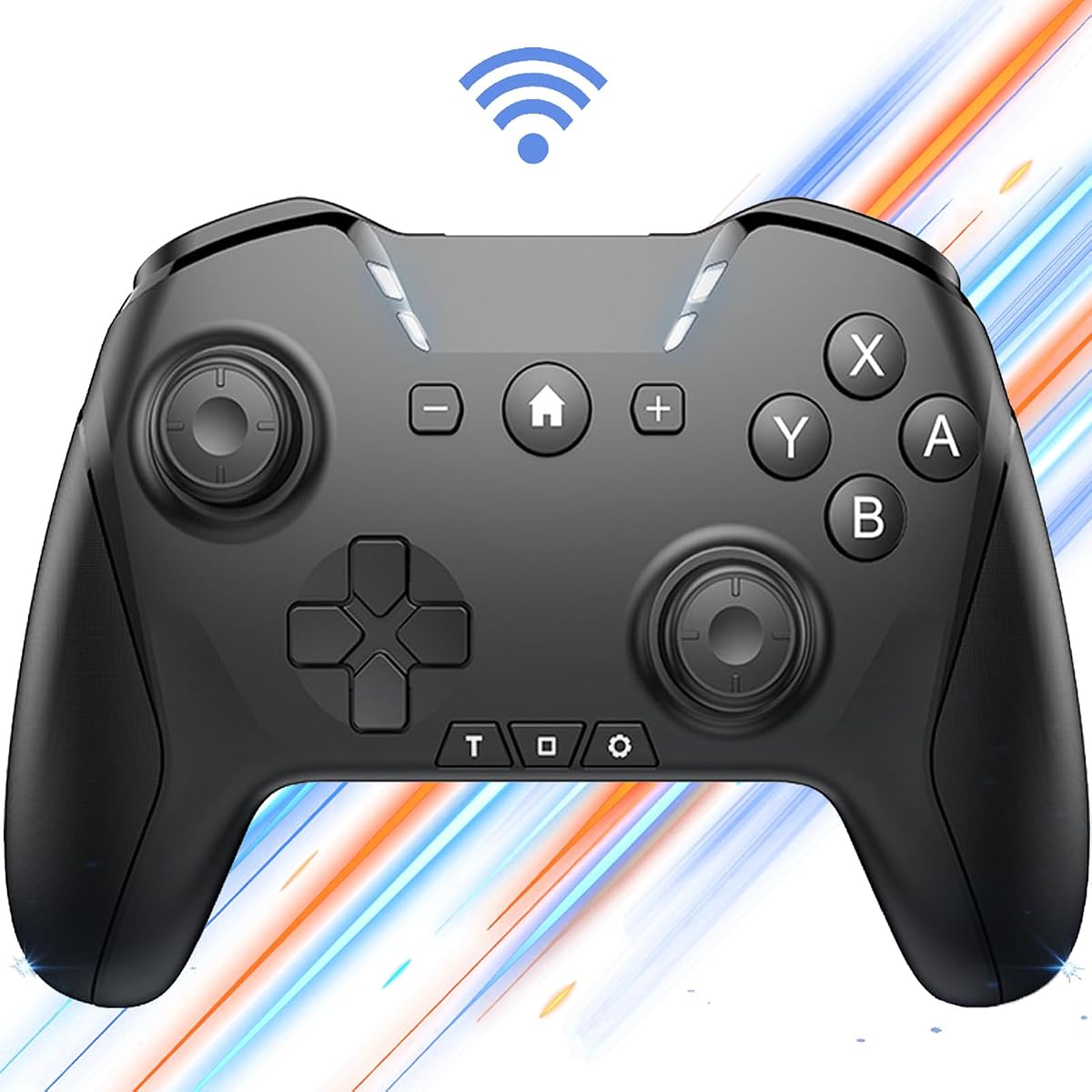
The VOYEE Switch Controller offers an exceptional value for gamers who want premium features without the premium price tag. With a 4.4 star rating and a price under $20 it provides a compelling alternative to more expensive branded controllers while maintaining solid performance and build quality.
We may earn a commission when you buy through this link, at no additional cost to you.
It features customizable RGB lighting with four modes including solid and breathing effects that add a cool aesthetic to your setup. The controller also supports programmable M1 and M2 buttons allowing you to map complex actions for competitive advantage. Plus the one-key wake-up function ensures your console stays active and ready for action.
The main drawback is that enabling RGB lighting can reduce the overall battery life which typically lasts 10 to 15 hours. Additionally setting up advanced macros might require software interaction on PC or mobile which adds a layer of complexity. Despite this the core functionality remains robust and user-friendly.
If you are looking for a budget-friendly controller that does not compromise on essential features the VOYEE is an excellent choice. It is perfect for casual gamers or as a spare controller for multiplayer sessions where cost is a primary concern.
The VOYEE controller includes multiple RGB lighting modes that let you personalize your gaming setup with solid breathing or strobe effects.
Programmable M1 and M2 buttons allow you to simplify complex moves and execute repetitive tasks with a single press for easier gameplay.
We may earn a commission when you buy through this link, at no additional cost to you.
This Switch Pro Controller is a versatile choice for gamers who play across multiple platforms including Apple TV Switch PC and mobile devices. It is designed to adapt to various gaming habits offering a robust feature set that includes macros turbo functions and 6-axis motion control.
We may earn a commission when you buy through this link, at no additional cost to you.
The controller boasts a 650mAh battery that supports up to 15 hours of playtime making it suitable for long gaming sessions. Its programmable operation feature lets you create custom button combinations for up to 30 seconds which is useful for complex game sequences. The wake-up function further enhances convenience by letting you power on your console directly from the controller.
Some users may find the button layout slightly different from standard layouts requiring an adjustment period. The weight of the controller is also on the heavier side which might cause fatigue during extended use. However these issues are minor given the broad compatibility and feature richness it offers.
For users who need a single controller for all their devices this model is highly practical. It balances performance and versatility effectively making it a strong contender for those who prioritize flexibility over brand exclusivity.
This controller supports a wide range of platforms including iOS Android PC Switch and Apple TV ensuring you only need one device for all your games.
You can program loop operations with customizable intervals and long-presses to automate repetitive actions and simplify complex game sequences.
We may earn a commission when you buy through this link, at no additional cost to you.
The SteelSeries Nimbus+ Renewed offers the same premium features as the new model but at a more accessible price point. It has been professionally inspected tested and cleaned to meet Amazon Renewed quality standards ensuring it functions like new while being more environmentally friendly.
We may earn a commission when you buy through this link, at no additional cost to you.
Despite its refurbished status the controller maintains the core benefits of the Nimbus+ series including official compatibility with Apple TV and iOS devices. It provides a stable wireless connection for responsive gameplay and features analog sticks and triggers for precise control during intense gaming sessions.
The rating for renewed items is often lower due to cosmetic wear or shorter warranties compared to new products. Some units may show signs of previous use which does not affect performance but might matter to collectors. However for pure functionality it remains a reliable choice.
If you are budget-conscious but still want a high-quality Apple-friendly controller the renewed Nimbus+ is worth considering. It delivers premium performance at a reduced cost making it a smart buy for practical gamers.
Amazon Renewed products undergo rigorous testing to ensure they meet high standards for performance and reliability before being sold to customers.
Choosing a renewed controller reduces electronic waste and extends the lifecycle of high-quality gaming hardware in a responsible way.
We may earn a commission when you buy through this link, at no additional cost to you.
The 8BitDo Pro 2 is renowned for its extensive customization options and robust build quality making it a favorite among power users. It supports official Apple TV compatibility and features two dedicated back buttons which provide extra inputs for advanced gameplay techniques.
We may earn a commission when you buy through this link, at no additional cost to you.
Its Ultimate Software suite allows for deep customization including remapping buttons and switching profiles on the fly. This flexibility is ideal for gamers who play multiple titles with different control schemes. The battery life is solid at 20 hours ensuring you can play for long periods without interruption.
The controller can feel somewhat bulky for users with smaller hands which might impact comfort during prolonged sessions. Additionally the software features are more robust on PC than on mobile which could limit some customization features for Apple users. Yet the hardware quality remains top-tier.
For those who value control and customization the 8BitDo Pro 2 is a standout choice. It offers a professional-grade experience that rivals major brand controllers while maintaining broad compatibility across platforms including Apple TV.
The Ultimate Software tool enables remapping and profile switching so you can tailor controls to specific games for an optimized experience.
Enhanced grip options and back buttons provide better control and more input flexibility for demanding gaming scenarios.
We may earn a commission when you buy through this link, at no additional cost to you.
The standard version of the SteelSeries Nimbus+ offers the same core benefits as other models in its family including official Apple licensing and high-quality construction. It is designed to pair seamlessly with Apple devices ensuring a smooth setup and reliable wireless connection for games.
We may earn a commission when you buy through this link, at no additional cost to you.
Features include a rechargeable battery that supports long gaming sessions and tactile D-Pad buttons that offer precise and responsive feedback. The shape is comfortable for most hand sizes allowing for extended play without strain. The wireless connectivity ensures a stable connection without noticeable lag during gameplay.
While it lacks the back buttons found on some competitors the Nimbus+ makes up for it with reliable performance and comfort. The price is higher than generic controllers but justified by the build quality and official support. It is a safe and premium choice for Apple users.
If you prefer a well-established brand and premium feel the standard Nimbus+ is a reliable option. It delivers consistent performance and durability that justifies the investment for serious Apple TV gamers.
The wireless connection on the Nimbus+ is stable and low-latency ensuring smooth gameplay without dropouts on Apple TV and iOS devices.
The controller's shape is designed for comfort allowing you to play for extended periods without hand fatigue or discomfort.
We may earn a commission when you buy through this link, at no additional cost to you.
The AceGamer Aurora II stands out for its use of Hall Effect joysticks which reduce drift and improve accuracy. This feature combined with a large 1000mAh battery makes it a powerful option for users seeking precision and longevity in a controller for Apple TV and other platforms.
We may earn a commission when you buy through this link, at no additional cost to you.
It supports both Bluetooth and 2.4G wireless connections the latter offering a stable low-latency experience when using the included receiver. The programmable back buttons allow for custom combos and shortcuts while the RGB lighting adds a modern aesthetic. The battery life is excellent ensuring minimal downtime.
Connecting via 2.4G requires a specific pairing process which can be slightly complex for non-tech-savvy users. Also since it is not officially Apple licensed compatibility might be less seamless than branded options. However Bluetooth mode works well for most iOS and tvOS games.
For those who prioritize hardware features like Hall Effect sticks and large batteries the Aurora II is a strong contender. It offers high-end specs at a mid-range price making it a great choice for tech-savvy gamers.
Hall Effect sensors use magnetic field detection to eliminate stick drift ensuring smooth and accurate analog input for a longer lifespan.
Choose between Bluetooth for mobile devices or 2.4G via USB for a stable low-latency connection ideal for competitive gaming on PC and TV.
We may earn a commission when you buy through this link, at no additional cost to you.
The Official Luna Wireless Controller is designed for cloud gaming but works seamlessly on Apple TV via Bluetooth. It features Amazon's Cloud Direct technology which connects directly to game servers for minimal latency making it ideal for streaming games smoothly on the big screen.
We may earn a commission when you buy through this link, at no additional cost to you.
It offers offset thumbsticks and easy-access bumpers providing a comfortable and precise feel for action games. The controller supports multi-device connectivity allowing you to switch screens and resume games easily. Its design is standard and ergonomic fitting well in most hands during extended play.
While it is optimized for Luna it may lack some motion features found in dedicated gaming controllers. Also cloud gaming requires a strong internet connection which is outside the controller's control. However for compatible services it offers top-tier responsiveness.
If you use Amazon Luna or other cloud services on Apple TV this controller is a perfect match. It ensures that your input is captured instantly providing a lag-free experience that enhances cloud gaming quality.
Cloud Direct technology connects the controller directly to game servers reducing latency for a more responsive and realistic cloud gaming experience.
Seamless screen switching lets you pause on one device and resume on another without losing progress in your game session.
We may earn a commission when you buy through this link, at no additional cost to you.
The GMBACK Wireless Switch 2 Pro Controller is unique for its loop macro function which allows you to record and replay complex sequences. This makes it especially useful for grinding repetitive tasks in games while playing on Apple TV or other supported platforms.
We may earn a commission when you buy through this link, at no additional cost to you.
It includes a 6-axis gyro sensor for precise motion controls and adjustable turbo levels to suit different game genres. The 800mAh battery supports up to 20 hours of play ensuring you stay in the game for long periods. RGB lighting and remappable buttons add further customization.
The macro feature requires initial setup which may be tricky for casual users. Without official Apple certification some features might work best on Switch or PC. However the Bluetooth connection works well on iOS and Apple TV for most basic controls.
For gamers who love automation and advanced customization this controller is a standout. It offers powerful features that enhance productivity and gameplay efficiency making it a great tool for dedicated players who enjoy optimizing their setup.
Record up to 30 seconds of button presses and triggers to automate repetitive actions like farming or grinding with a single press.
Adjust turbo speeds and vibration intensity to personalize your controller experience and adapt to different game genres and preferences.
We may earn a commission when you buy through this link, at no additional cost to you.
Choosing the right controller for Apple TV involves considering several key factors that impact compatibility performance and comfort during extended gaming sessions.
Ensure the controller explicitly supports tvOS or is Apple MFi certified. Controllers with official Apple licenses like the SteelSeries Nimbus+ will work without pairing issues and support all Apple Arcade titles out of the box. Generic Bluetooth controllers may work but could lack support for motion controls or specific APIs.
Always check product descriptions for mention of Apple TV compatibility before purchasing to avoid connectivity headaches.
Gaming sessions can last hours so look for controllers with at least 15 hours of battery life. Rechargeable controllers with USB-C ports are convenient and reduce ongoing costs. Models like the SteelSeries Nimbus+ offer over 50 hours which means you rarely need to plug in.
Prioritize long battery life to ensure uninterrupted gameplay without constant recharging interruptions.
The controller should fit comfortably in your hands for long periods without causing fatigue. Look for textured grips and ergonomic shapes that reduce strain on your thumbs and wrists. High-quality materials ensure durability and consistent performance over time.
Choose a design that feels natural in your hand to maintain comfort during extended gaming sessions.
Many Apple Arcade games benefit from motion controls and 6-axis gyro sensors. Controllers like the GMBACK and 8BitDo SN30 Pro support these features enhancing the experience in racing or flight games. Verify if your preferred titles require motion input before selecting a static controller.
Ensure your chosen controller includes gyro support if you plan to play motion-heavy titles.
Bluetooth is the standard for Apple TV but some controllers also offer 2.4G wireless via a USB receiver for lower latency. A wired USB option can be useful for charging while playing. Multiple connectivity options provide flexibility if you switch between devices frequently.
Select a controller with diverse connectivity options to ensure stable connections across your devices.
Advanced gamers may want programmable buttons macros or turbo functions to simplify complex actions. Controllers like the VOYEE and Switch Pro Controller offer these features. Consider if you need customization or if standard controls suffice for your gaming style.
Evaluate whether extra features like macros are necessary for your specific games and preferences.
Controllers range from budget-friendly options around $20 to premium models over $40. Consider what features you truly need and balance cost against performance. Renewed options can also offer premium quality at lower prices if you are comfortable with refurbished goods.
Set a budget that reflects your priorities without overspending on unnecessary features.
Extras like RGB lighting wake-up functions and interchangeable parts can enhance the experience. Check if these align with your preferences. Some controllers offer home buttons that wake the console directly which is very convenient for Apple TV usage.
Look for small conveniences like wake-up buttons that improve daily usability on Apple TV.
To pair your controller with Apple TV turn on Bluetooth on your Apple TV device and enter pairing mode on the controller by holding the designated button for a few seconds. Once the device appears in your list select it to establish the connection and test input responsiveness.
Keep your controller clean by wiping it with a dry soft cloth after use to remove sweat and oils. Store it in a cool dry place away from direct sunlight to prevent battery degradation and avoid placing heavy objects on the joysticks to prevent wear and tear.
Not all Bluetooth controllers work seamlessly with Apple TV. Controllers that are Apple MFi certified or explicitly mention tvOS support like the SteelSeries Nimbus+ are guaranteed to function correctly. Generic controllers may connect but often lack full feature support such as motion controls or proper button mapping.
Most modern controllers include a USB-C or micro-USB cable for charging. Simply connect the controller to a power source or your Apple TV via USB and allow it to charge fully before use. Some models also support charging while playing which ensures you never run out of power mid-game.
The average battery life for compatible controllers ranges from 15 to 50 hours depending on the model. Premium options like the SteelSeries Nimbus+ offer extended life while budget models typically provide 15 to 20 hours. Always check specifications before purchasing to meet your gaming needs.
Yes many Switch controllers including the official Joy-Cons and third-party options like the 8BitDo SN30 Pro support Apple TV via Bluetooth. Ensure the controller firmware is updated and the model explicitly lists tvOS compatibility to avoid connection issues during setup or gameplay.
Motion controls are not supported on all controllers for Apple TV. Only controllers with built-in gyro sensors like the GMBACK or Switch Pro support motion input. Check product details for 6-axis motion support if you plan to play titles that rely on physical movement.
To reset a controller typically hold the pairing button for 5 to 10 seconds until the LED blinks rapidly. Then forget the device from your Apple TV Bluetooth settings and re-pair it as a new device. This often resolves connection glitches and firmware hiccups.
Most Apple-compatible controllers work plug-and-play without extra software. However models with advanced customization like the 8BitDo Pro 2 may benefit from companion apps on PC or mobile for remapping buttons. For basic gameplay on Apple TV no additional software is usually needed.
Controller lag on Apple TV can result from low battery or interference from other wireless devices. Ensure your controller is fully charged and keep it close to the Apple TV. Using a controller with a dedicated receiver or ensuring Bluetooth firmware is updated can reduce latency.
The 8BitDo SN30 Pro SteelSeries Nimbus+ and VOYEE Switch Controller represent the top choices for Apple TV users depending on budget and feature priorities. Each offers unique strengths from retro styling to official licensing and affordable customization options.
When deciding prioritize compatibility and battery life to ensure a smooth gaming experience. Consider ergonomics and extra features like motion controls if you play a variety of genres. Your ideal controller should enhance gameplay without causing fatigue or technical issues.
Prices and availability change frequently so check current listings before making a purchase. With the right controller your Apple TV can transform into a powerful gaming console that delivers immersive and responsive gameplay for all your favorite titles.