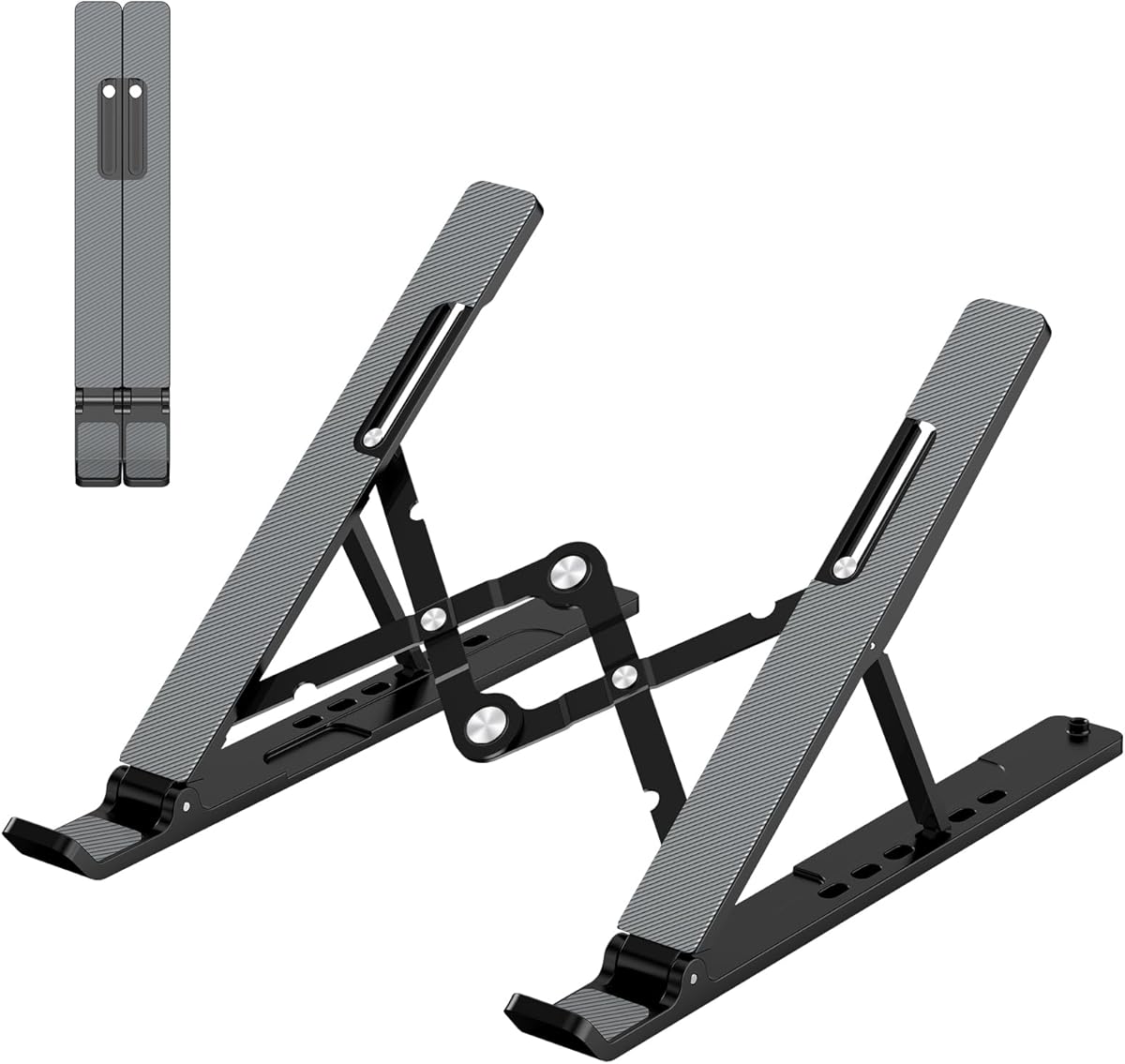
Adjustable Laptop Stand Portable Riser
4.5Editor score
Lightweight and foldable design
Six-level height adjustment
Forward-tilt angle for airflow
Keeping your laptop cool is essential for maintaining performance and extending device life. A good laptop stand for ventilation elevates your device to promote airflow and reduce heat buildup during intensive tasks.
We evaluated ten highly rated stands based on their cooling design, build quality, ergonomic benefits, and compatibility. Our analysis focuses on how effectively each model facilitates air circulation beneath your laptop.
Each pick highlights key features and real-world usability to help you decide. Note that product availability and pricing can change frequently, so verify details before purchasing your preferred model.
4.5Editor score

4.7Editor score

4.8Editor score
As an Amazon Associate we earn from qualifying purchases.
The following table provides a side-by-side comparison of all ten products including their key specifications and unique features to help you make an informed decision.

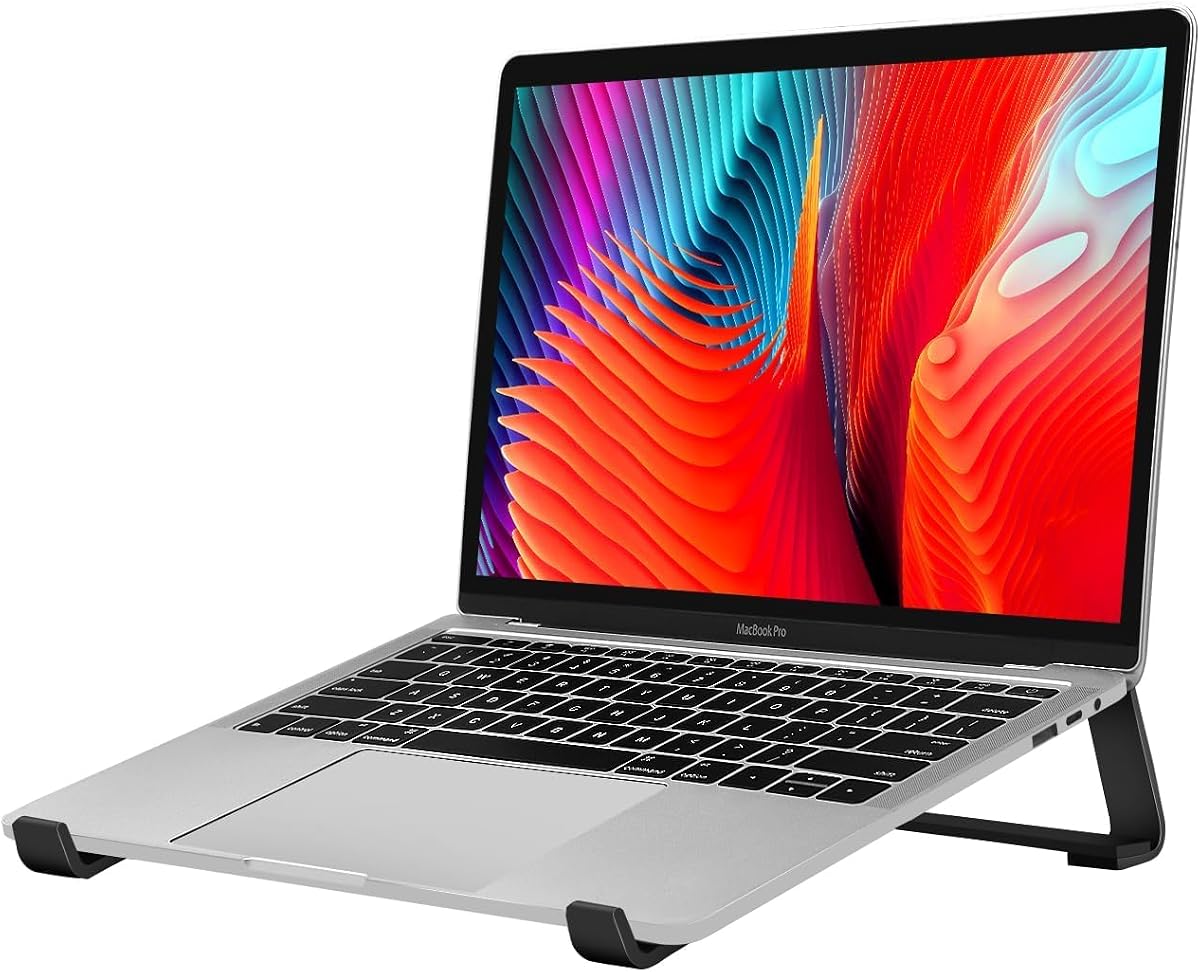


The Nulaxy Ergonomic Adjustable Laptop Stand stands out as our top choice due to its robust dual-rod design and advanced heat-vent panel. It holds a 4.7 rating and delivers exceptional stability even with heavy devices up to 22 pounds.
We may earn a commission when you buy through this link, at no additional cost to you.
Its geometric heat-vent design on the upper panel provides superior airflow compared to standard solid stands which prevents thermal throttling during intensive tasks. The dual-foldable design allows it to collapse completely flat for easy transport in a backpack or briefcase.
While it is slightly heavier than single-hinge models the added weight ensures a wobble-free typing experience. The price is higher than budget options but the durability and cooling performance justify the investment for daily professionals.
This stand is ideal for users who need a reliable workstation for long hours of typing or gaming. Its ability to support large 16-inch laptops while keeping them cool makes it a versatile choice for diverse work environments.
The unique geometric heat-vent design ensures continuous heat dissipation which keeps your laptop running cooler during demanding tasks like video editing or gaming.
Unlike standard single-hinge stands the dual-support rod mechanism perfectly distributes weight to ensure a wobble-free experience even with devices up to 22 pounds.
We may earn a commission when you buy through this link, at no additional cost to you.
The Adjustable Laptop Stand Portable Riser offers an excellent balance of affordability and functionality for users seeking basic ventilation. It holds a 4.5 rating and weighs only 0.49 pounds making it ideal for frequent travelers.
We may earn a commission when you buy through this link, at no additional cost to you.
Its forward-tilt angle and open design facilitate greater ventilation and airflow to cool your laptop during operation. The six-level height adjustment allows you to find a comfortable eye level which helps reduce neck fatigue and back pain.
A minor trade-off is that the support bars must be inserted at the same level to ensure balance. While it lacks heavy-duty robustness of premium models it provides sufficient stability for standard typing tasks on a desk.
This stand is perfect for students or casual users who want to improve airflow without spending much. Its compact folded size fits easily into a bag so you can maintain a ergonomic setup anywhere.
Weighing under half a pound and folding to less than one inch thick this stand is easy to carry anywhere for business trips or remote work.
The adjustable height settings help fix posture and reduce eye strain by elevating your laptop to a more comfortable viewing angle.
We may earn a commission when you buy through this link, at no additional cost to you.
The BESIGN LS03 Aluminum Laptop Stand is the top premium pick thanks to its high-quality aluminum alloy construction and exceptional stability. It holds a 4.8 rating and features a detachable design that is easy to assemble in three steps.
We may earn a commission when you buy through this link, at no additional cost to you.
The open aluminum design provides good ventilation and airflow to prevent your laptop from overheating during extended use. It elevates your laptop by six inches to a perfect viewing level which helps reduce neck and shoulder pain while working.
Unlike adjustable models this stand has a fixed angle which may not suit everyone but ensures rigid support. The rubber on the holder hands sticks tightly to prevent scratches and ensure your laptop stays stable on the stand.
This stand is ideal for professionals who prioritize build quality and durability over portability. Its sleek design and solid performance make it a great addition to a permanent desk setup.
The detachable design allows you to assemble it very easily in three steps and disassemble it if you need to store it or move it.
Made of premium aluminum alloy the stand supports up to 8.8 lbs with no worry of wobble providing a reliable surface for typing.
We may earn a commission when you buy through this link, at no additional cost to you.
The Tonmom Laptop Stand for Desk offers a versatile solution with seven levels of height adjustment to suit various user preferences. It holds a 4.5 rating and features a triangle support design that enhances stability during use.
We may earn a commission when you buy through this link, at no additional cost to you.
The forward-tilt angle and open design offer greater ventilation and more airflow to cool your laptop during operation. Its smooth edges ensure they never hurt your hands while the large anti-slip silicone pads secure your device in place.
Although it is slightly heavier than some ultra-light options the added weight contributes to its stability. The compatibility with laptops from 10 to 15.6 inches makes it a reliable choice for most common models.
This stand is a strong candidate for home office users who need adjustability and solid support. Its ability to reduce neck fatigue and improve posture makes it valuable for long work sessions.
With seven height levels you can elevate your notebook from 2.78 to 6.5 inches to find the perfect eye level for your setup.
The large anti-slip silicone pads and smooth edges protect your device from scratches and ensure your hands remain comfortable during use.
We may earn a commission when you buy through this link, at no additional cost to you.
The Thibault Aluminum Laptop Stand is designed for simplicity and strength with a robust aluminum alloy construction. It holds a 4.6 rating and offers effortless assembly so you can set it up within moments.
We may earn a commission when you buy through this link, at no additional cost to you.
The tilted ventilated stand allows efficient airflow beneath your laptop keeping your device cool and performing at its best. Soft rubber pads protect your desk and laptop from scratches while providing a stable typing experience.
While it lacks height adjustment the fixed design offers a consistent ergonomic solution. Its compatibility with laptops from 13 to 17.3 inches ensures it fits a wide range of devices including larger gaming models.
This stand is perfect for users who want a durable and easy-to-use solution for their permanent desk. Its minimalist design fits seamlessly into any home or office environment.
Say goodbye to complicated instructions as this stand is designed for quick and easy assembly to get you up and running fast.
Raising your laptop allows efficient airflow beneath it right where the exhaust fans are located to keep your device cool during use.
We may earn a commission when you buy through this link, at no additional cost to you.
The Amazon Basics Laptop Stand offers reliable quality and functionality for everyday use. It holds a 4.6 rating and features a hollow design that promotes airflow and heat dissipation to keep your laptop cool.
We may earn a commission when you buy through this link, at no additional cost to you.
Crafted from lightweight rust-resistant aluminum it supports laptops up to 15.6 inches with up to seven inches of height adjustment. Non-slip silicone pads and protective hooks securely hold your laptop during use.
While it has a load capacity of 11 lbs larger or heavier devices may affect stability. For best results use it on a flat solid surface and avoid excessive downward pressure during typing.
This stand is ideal for users who trust the Amazon Basics brand and need a simple adjustable solution. Its portability and space-saving design make it great for work travel and daily use.
Designed to support laptops from 10 to 15.6 inches including popular models like MacBook and Dell XPS for everyday use.
The open hollow design promotes airflow and heat dissipation helping keep your laptop cool during extended or intensive tasks.
We may earn a commission when you buy through this link, at no additional cost to you.
The HUANUO Monitor Riser is a sturdy solution for those needing extra desk space and cooling. It holds a 4.8 rating and features a perforated hole design that performs well for airflow to keep devices cool.
We may earn a commission when you buy through this link, at no additional cost to you.
Solid steel construction allows it to hold up to 44 lbs without wobble making it suitable for heavier monitors and laptops. The space beneath the stand frees up room for keyboards and other accessories to reduce clutter.
This riser is not portable and is best suited for a fixed office setup. The easy assembly requires only two minutes to connect legs with the platform providing a quick setup process.
Ideal for users who need a heavy-duty stand to organize their workspace this model provides both stability and cooling. Its large storage space helps maintain a clean and efficient desk environment.
Free up more space on your desk by placing papers and cables underneath the stand to make your desk clutter-free.
The solid steel construction and large steel plate ensure stability and support for most flat panel monitors and notebooks.
We may earn a commission when you buy through this link, at no additional cost to you.
The WALI Computer Monitor Stand is designed for durability and ventilation with a large sturdy platform. It holds a 4.7 rating and features vented holes that prevent overheating to keep your device running cool.
We may earn a commission when you buy through this link, at no additional cost to you.
With a maximum support weight of up to 44 lbs this stand can handle heavy monitors and laptops with ease. The height-adjustable riser can raise a device by 3.9 inches 4.7 inches or 5.5 inches for a comfortable view.
The rubber pads prevent slipping or damage to your work surface while the open space beneath allows for accessory storage. It works for single or dual monitor arrangements making it a versatile choice for office desks.
This stand is best for users who need a robust and stationary cooling solution. Its high weight capacity and ventilated design make it a reliable option for demanding work setups.
Choose from three height options to create a comfortable viewing position which helps reduce stress on the neck and back.
Open space beneath the stand allows for storing keyboards and notebooks to reduce desktop clutter effectively.
We may earn a commission when you buy through this link, at no additional cost to you.
The Kootek Laptop Cooling Pad offers active cooling with five built-in fans for maximum heat dissipation. It holds a 4.4 rating and allows you to control up to five fans independently or together via on/off switches.
We may earn a commission when you buy through this link, at no additional cost to you.
With a built-in dual USB hub you can connect additional USB devices to your laptop without using up ports. The ergonomic stand also serves as a cooling pad offering six adjustable height settings for optimal comfort.
While it requires a power source the whisper-quiet operation ensures a noise-free environment for work or entertainment. The two stoppers on the front prevent laptops from slipping and keep them secure during use.
This pad is perfect for gamers or heavy users who need extra cooling beyond passive stands. Its combination of active cooling and connectivity options adds significant value to your desk setup.
With five quiet fans and blue LEDs this cooling pad provides active airflow to prevent overheating effectively.
The dual USB hub enables you to connect additional USB devices providing extra connectivity options for your peripherals.
We may earn a commission when you buy through this link, at no additional cost to you.
The Laptop Stand for Desk is a simple and effective solution for those seeking a fan-free cooling option. It holds a 4.6 rating and uses an open design to let air circulate beneath the device without any noise.
We may earn a commission when you buy through this link, at no additional cost to you.
With a fixed 17 degree angle the stand brings your screen 2.5 inches higher for a comfortable viewing height and typing position. The triangular design and four-point support help maintain a fixed angle during typing and video calls.
The silicone-padded rails and front hooks reduce slipping and scuffs at contact points to protect your laptop and desk. While it is not adjustable this design ensures a steady and reliable surface for daily desk work.
This stand is best for users who prioritize simplicity and quiet operation. Its lightweight and straightforward design make it an excellent choice for a clean and efficient workspace.
Keep the underside of your laptop open during desk work with a fan-free laptop cooling stand that uses an open design.
Silicone-padded rails front hooks and feet help reduce slipping and scuffs at contact points to protect your device.
We may earn a commission when you buy through this link, at no additional cost to you.
Choosing the right laptop stand for ventilation involves considering several factors to ensure it meets your specific needs and workspace requirements.
Look for stands with open or perforated designs that maximize airflow beneath your device. This passive cooling helps prevent overheating during extended use without adding noise or power consumption.
An open structure is generally sufficient for most users but consider active cooling if your laptop runs hot.
Aluminum and steel stands offer durability and excellent heat conduction. Metal materials are often lighter and more robust than plastic options ensuring long-term stability.
Prioritize materials that feel sturdy and provide a stable surface for typing to avoid distractions.
Adjustable stands provide multiple height and angle options to suit your ergonomics. Fixed stands offer simplicity but may not fit all desk heights or user preferences.
Choose adjustable models if you need flexibility to find the perfect viewing angle.
If you travel frequently consider a foldable stand that collapses into a small profile. Lightweight designs are easier to carry in a backpack or briefcase.
Balance portability with stability to ensure the stand remains secure during use.
Ensure the stand supports your laptop size and weight. Most stands accommodate 10 to 16-inch laptops but verify the load capacity for heavier models.
Check compatibility with your specific device to avoid instability or damage.
Stands with silicone pads or rubber grips protect your device from scratches and prevent slipping. Smooth edges also ensure comfort during use.
Look for features that safeguard both your laptop and your desk surface.
Consider if the stand offers storage underneath for keyboards or accessories to save desk space. A compact design helps maintain a clean and organized workspace.
Evaluate the footprint of the stand to ensure it fits your desk comfortably.
Quick and simple assembly saves time and frustration. Some stands require no tools while others may need a few steps to set up.
Choose a design that fits your setup needs and technical comfort level.
Place the stand on a flat and stable surface to ensure it does not wobble during use. Verify the surface is clean to prevent dust from affecting performance.
Position your laptop securely on the stand ensuring it is centered to distribute weight evenly. Adjust the angle and height to suit your ergonomic needs before starting work.
Regularly clean the stand and your laptop to remove dust that could obstruct airflow. Wipe down the surface with a soft cloth to maintain hygiene and appearance.
Ventilation helps dissipate heat generated during operation preventing overheating and maintaining performance. A stand with good airflow keeps your laptop cooler and extends its lifespan.
Passive stands are quieter and simpler using open designs to promote airflow. Active cooling stands with fans provide extra heat dissipation but require power and may add noise.
Yes elevating your laptop to eye level improves posture and reduces neck strain. A stable stand also provides a better typing surface compared to a flat table.
Use a soft cloth to wipe down the surface to remove dust and debris. Avoid using harsh chemicals that could damage protective coatings or finishes.
Most stands support common laptop sizes but always check weight and dimension limits. Some stands are designed for specific device types so verify compatibility before purchasing.
Yes using an external keyboard allows you to raise the laptop screen to eye level while typing comfortably. This setup enhances ergonomics and reduces strain during long sessions.
Our top picks highlight the best options for stability cooling and build quality. The Nulaxy stand leads overall while budget and premium alternatives offer tailored solutions.
Prioritize ventilation and ergonomic adjustability to maximize comfort and performance. Select a model that fits your specific workspace and usage requirements.
Remember to verify product availability and details before purchasing as options may change. Investing in a quality stand ensures better device health and personal comfort.