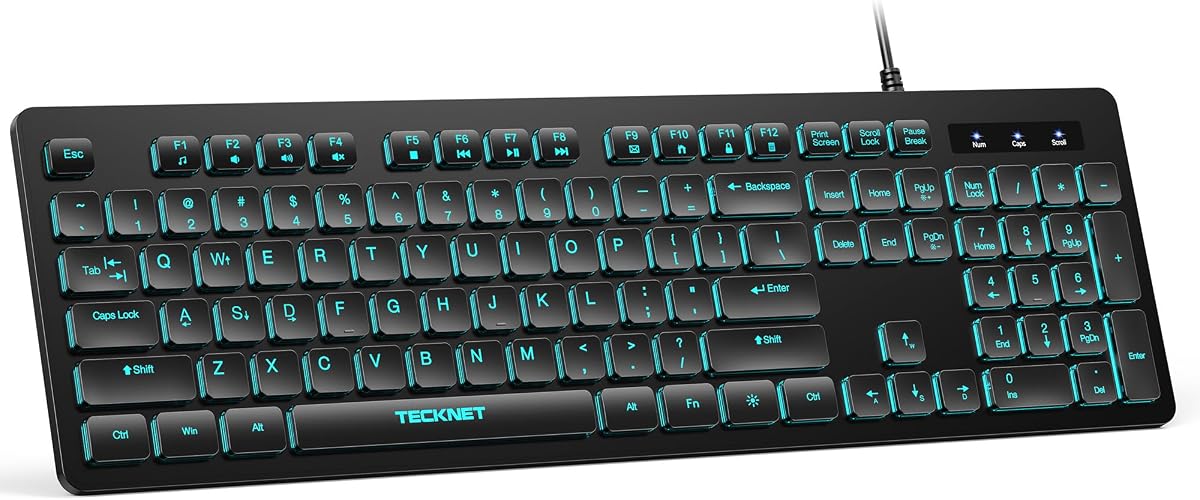
TECKNET Wired Keyboard
4.5Editor score
Silent typing design
7-color RGB lighting
Spill-resistant construction
This guide compares the top 10 membrane keyboards for gaming and typing, highlighting features, durability, and value to help you choose the right model.
Membrane keyboards remain a popular choice for gamers and typists who value quiet operation and affordability. They use a rubber dome under each key to register presses, offering a soft feel that reduces finger fatigue during long sessions. Understanding the nuances of membrane technology helps you find a board that balances performance with cost effectively.
We evaluated ten leading membrane keyboards based on build quality, switch feel, lighting options, and additional features like macro keys and spill resistance. Each product was assessed for its suitability in different environments, from home offices to gaming setups. Our goal is to provide a clear overview of what each model offers without bias toward any single brand.
Every pick in this list includes detailed specifications, pros, cons, and real-world usage insights to help you make an informed decision. Note that product availability and pricing can change frequently, so verify the latest details before purchasing. We update our recommendations regularly to reflect new releases and user feedback from the community.
4.5Editor score

4.5Editor score

4.4Editor score
This side-by-side comparison highlights the key specifications and unique features of each membrane keyboard to help you quickly identify the best fit for your needs.


The Razer Ornata V3 stands out as a top choice for users seeking a refined membrane experience. With a 4.5 rating, it delivers a unique blend of mechanical-like responsiveness and traditional comfort. The low-profile keys and snappy feedback make it ideal for both gaming and extended typing sessions without causing strain.
We may earn a commission when you buy through this link, at no additional cost to you.
Its standout feature is the Mecha-Membrane switch technology, which combines the clicky feedback of mechanical switches with the smooth feel of conventional membranes. The UV-coated keycaps ensure legends stay visible longer, resisting wear from daily use. Additionally, the magnetic soft-touch wrist rest provides essential support during long hours of activity.
While the lack of dedicated macro software may limit power users, the keyboard compensates with dedicated media keys for quick adjustments. The backlighting is functional but not as customizable as higher-end models. These trade-offs are acceptable for those prioritizing build quality and typing comfort over extensive programmability.
This keyboard is best suited for gamers and professionals who value a quiet yet responsive typing experience. It offers a premium feel at a reasonable price point. If you want a reliable membrane keyboard that doesn't compromise on comfort or durability, the Ornata V3 is a strong recommendation.
The low-profile key design reduces finger travel distance, allowing for faster typing with less effort during marathon work sessions.
UV-coated keycaps resist fading and scratching, ensuring your keyboard looks new even after years of heavy daily use.
We may earn a commission when you buy through this link, at no additional cost to you.
The SteelSeries Apex 3 is engineered for gamers who need a reliable and quiet typing experience. It holds a 4.6 rating thanks to its whisper-quiet switches and robust IP32 water-resistant design. These features make it a great choice for shared spaces where noise and accidental spills are common concerns.
We may earn a commission when you buy through this link, at no additional cost to you.
Its 10-zone RGB illumination provides ample customization for visual appeal without requiring complex software. The magnetic wrist rest adds a premium touch, offering full palm support that enhances comfort during long gaming sessions. Compatibility across Windows, Mac, and consoles ensures versatility for multi-platform users.
However, the keycaps are slightly softer than some competitors, which might feel less precise for some typists. The cable is non-detachable, which limits portability for travel. These are minor drawbacks considering the overall value and durability offered by the keyboard for everyday gaming needs.
This model is ideal for streamers and office workers who prioritize silence and spill protection. It delivers a solid balance of features and performance. If you need a keyboard that won't disturb others and can handle minor accidents, the Apex 3 is a trustworthy option.
Whisper quiet switches reduce noise significantly, making this keyboard perfect for late-night work or quiet environments.
IP32 water resistance protects against accidental spills, keeping your setup safe during casual use or messy moments.
We may earn a commission when you buy through this link, at no additional cost to you.
The Corsair K55 CORE delivers essential gaming features in a compact and affordable package. With a 4.4 rating, it meets the basic needs of gamers looking for RGB lighting and responsive keys without a high price tag. Its spill resistance adds a layer of durability for everyday use.
We may earn a commission when you buy through this link, at no additional cost to you.
Ten-zone RGB backlighting allows for colorful visual effects that can be synced with other iCUE-compatible devices. The 12-Key Rollover ensures accurate input during intense gameplay, preventing missed keystrokes. Dedicated media keys provide quick access to volume and playback controls for convenience.
The build is functional but feels lighter than premium options, which might not satisfy those seeking a heavier board. The wrist rest area is minimal, so additional support might be needed for long sessions. These limitations are acceptable given the budget-friendly price and core feature set.
This keyboard is perfect for casual gamers or those setting up their first gaming station. It offers good value for money with reliable performance. If you want a straightforward membrane keyboard with good lighting and basic durability, the K55 CORE is a practical choice.
Ten distinct lighting zones allow for varied RGB effects to match your desk setup or game themes easily.
12-Key Rollover and high polling rate ensure every keystroke is registered accurately even during rapid gaming sequences.
We may earn a commission when you buy through this link, at no additional cost to you.
The TECKNET Wired Keyboard is a budget-friendly option that does not sacrifice essential features like silence and durability. It holds a 4.5 rating for its quiet typing experience and full-size ergonomic layout. This makes it an excellent choice for office environments or shared living spaces.
We may earn a commission when you buy through this link, at no additional cost to you.
Its low-profile membrane keys reduce noise significantly, creating a focused workspace. The keyboard offers 7-color RGB lighting with adjustable brightness levels for personalization. Additionally, it includes a lifetime warranty, providing peace of mind for long-term users looking for reliability without breaking the bank.
While the RGB effects are simpler than gaming-specific boards, they are sufficient for general desktop aesthetics. Mac users may find limited functionality on multimedia keys, so compatibility should be checked if using Mac OS. For Windows users, this keyboard offers a robust feature set at a minimal cost.
This model is ideal for students, remote workers, or anyone needing a quiet and reliable typing tool. The lifetime warranty adds significant value to the purchase. If you want a no-nonsense membrane keyboard that works hard without costing much, the TECKNET is a top contender.
Designed with low-profile keys to minimize noise, making it perfect for libraries or quiet offices.
A lifetime warranty ensures that you are protected against manufacturing defects for the life of the product.
We may earn a commission when you buy through this link, at no additional cost to you.
The Corsair K55 RGB PRO stands as a premium membrane option with advanced features tailored for gamers. With a 4.4 rating, it offers dynamic lighting, dedicated macro keys, and robust protection against dust and spills. The detachable palm rest enhances comfort for extended use.
We may earn a commission when you buy through this link, at no additional cost to you.
Its six dedicated macro keys allow for complex commands and shortcuts, set up through iCUE software. The IP42-rated protection guards against accidents, ensuring uninterrupted gameplay. Additionally, the Elgato integration enables instant streaming commands, making it a versatile choice for content creators.
While the price is higher than basic models, the extra features justify the cost for serious users. The requirement for software to access all functions might be a drawback for those who prefer plug-and-play simplicity. However, the customization options outweigh this inconvenience for most gamers.
This keyboard is best for gamers and streamers who need extra functionality and a polished look. It combines aesthetics with practical utility. If you are looking for a membrane keyboard that offers premium features and solid build quality, the K55 RGB PRO is worth the investment.
Six dedicated macro keys allow complex actions to be assigned easily for faster gameplay efficiency.
Direct integration with Elgato Stream Deck software lets you control streaming commands without extra hardware.
We may earn a commission when you buy through this link, at no additional cost to you.
The Corsair K55 CORE TKL offers a compact solution for gamers who need more desk space for mouse movement. With a 4.7 rating, it delivers eight-zone RGB lighting and responsive membrane keys in a tenkeyless form factor. This design is ideal for small desks or travel setups.
We may earn a commission when you buy through this link, at no additional cost to you.
Its 1,000Hz polling rate ensures rapid input detection, crucial for competitive play. The 300ml spill resistance provides protection against common accidents. The lack of a numpad is a trade-off for the additional space, making it better suited for gaming than data-heavy typing tasks.
However, the absence of a wrist rest might cause discomfort during very long sessions for some users. The compact layout means you lose number pad functionality, which could be a dealbreaker for accountants or data entry professionals. For general gaming, it remains a strong choice.
This model is perfect for gamers with limited desk space or those who prefer a minimalist setup. It offers high performance in a smaller footprint. If you want a reliable tenkeyless membrane keyboard with good lighting, the K55 CORE TKL is a smart pick.
The tenkeyless layout frees up space for broader mouse movements during gaming without sacrificing essential keys.
1,000Hz polling ensures fast and accurate input detection for competitive gaming responsiveness.
We may earn a commission when you buy through this link, at no additional cost to you.
The Redragon K512 packs a surprising number of features into an affordable membrane keyboard. With a 4.5 rating, it includes onboard macro keys and a dedicated media wheel for easy control. This makes it highly functional for gamers who do not want to install extra software.
We may earn a commission when you buy through this link, at no additional cost to you.
Its 26 Anti-Ghosting keys allow for simultaneous inputs without conflict, which is essential for complex game moves. True RGB lighting offers 13 modes for visual customization. The detachable wrist rest adds comfort, and fade-resistant keycaps ensure longevity over years of use.
The build is primarily plastic, which may feel less sturdy than premium metal options. The layout is standard, so there are no unique ergonomic curves. For the price, however, the value proposition is strong, offering features usually reserved for more expensive boards.
This keyboard is ideal for budget-conscious gamers who want extra functions without compromise. It delivers great value for money. If you need a functional and bright membrane keyboard under a strict budget, the Redragon K512 is a great option.
Record and assign macros directly on the board without needing any drivers or software installed on your PC.
A dedicated media wheel allows quick volume adjustments and media control without leaving your game window.
We may earn a commission when you buy through this link, at no additional cost to you.
The Razer Ornata V3 TKL brings the refined feel of Razer's membrane technology to a compact tenkeyless design. With a 4.6 rating, it offers 8-zone Chroma RGB lighting and the unique Snap Tap feature for responsive movement. This is a strong choice for gamers already invested in the Razer ecosystem.
We may earn a commission when you buy through this link, at no additional cost to you.
Low-profile keys provide a sleek look and comfortable typing feel. The magnetic wrist rest snaps on seamlessly for added support. UV-coated keycaps resist wear, and dedicated media keys allow quick control without interrupting gameplay. Synapse 4 software unlocks deeper customization options.
However, full benefits rely on Synapse software, which can be resource-heavy on some systems. The 8-zone lighting is less customizable than full per-key RGB found on mechanical boards. Despite this, the performance and feel are competitive for a membrane keyboard in this price range.
This keyboard is best for Razer fans who want a compact and comfortable typing experience. It balances aesthetics and utility well. If you want a reliable tenkeyless membrane keyboard with Razer branding, the Ornata V3 TKL is a solid recommendation.
Prioritize the latest input between key pairs for truly responsive in-game movement when enabled via Synapse.
Sync with hundreds of Chroma-integrated games for dynamic lighting effects that react to your gameplay.
We may earn a commission when you buy through this link, at no additional cost to you.
The Corsair K55 RGB PRO supports multiple platforms including PC, Mac, and Xbox, making it versatile for diverse gaming setups. It holds a 4.3 rating for its durable build and macro functionality. The Elgato integration makes it particularly useful for streamers using the Stream Deck software.
We may earn a commission when you buy through this link, at no additional cost to you.
Six dedicated macro keys allow complex actions to be triggered easily. IP42 dust and spill resistance ensures longevity even in less controlled environments. The detachable palm rest offers comfort, and dedicated volume keys help manage audio without pausing games.
On Mac, some features might be limited compared to Windows, which is common for multi-platform devices. The software is required to unlock all customization, which might not appeal to casual users. For those needing a robust keyboard for different systems, this is a strong contender.
This model is ideal for users with multi-device gaming setups or streamers. It provides essential features and durability across systems. If you need a membrane keyboard that works across Xbox, PC, and Mac, this K55 RGB PRO version is worth considering.
Use instant streaming commands through Elgato Stream Deck software for quick control during live broadcasts.
Supports PC, Mac, and Xbox for flexible use across different gaming systems and environments.
We may earn a commission when you buy through this link, at no additional cost to you.
The MSI Vigor GK30 features mechanical-like plunger switches that deliver a crisp typing experience. With a 4.6 rating, it stands out for its water repellent design and 6-zone RGB lighting. It offers a sturdy gaming base that adds stability to your desk setup.
We may earn a commission when you buy through this link, at no additional cost to you.
Dragon Center software allows for detailed settings tuning, ensuring you can adjust lighting and performance to your preference. The keyboard is designed to withstand spills, making it durable for daily use. It provides a clean look with good backlighting options for gaming nights.
However, it relies on software for full customization, which can be a hurdle for some users. Media controls are basic compared to boards with dedicated volume wheels. For gaming-focused users who want a simple and responsive keyboard, it remains a reliable choice.
This keyboard is best for gamers who prefer a straightforward and sturdy membrane option. It offers good performance without high cost. If you need a responsive membrane keyboard with splash protection, the Vigor GK30 is a practical pick.
Plunger switches provide a crisp feel similar to mechanical keys, enhancing the typing experience significantly.
A water repellent design safeguards the board against accidental spills and splashes during everyday use.
We may earn a commission when you buy through this link, at no additional cost to you.
Selecting the right membrane keyboard involves understanding key features that impact performance and comfort.
Membrane keyboards use rubber domes that offer a softer feel compared to mechanical switches. Some models feature silent switches for quiet typing, while others offer tactile feedback that mimics mechanical keys.
Choose silent switches if you work in shared spaces, or opt for tactile feedback if you prefer more feedback.
Look for keyboards with reinforced frames and spill resistance. Many modern membrane boards include water-resistant coatings or IP ratings to protect against accidental spills.
Prioritize models with spill resistance if you drink beverages at your desk.
RGB lighting adds visual appeal and allows you to personalize your setup. Some keyboards offer multiple zones for varied lighting effects, while others have single-color backlighting.
Check how many RGB zones are available if lighting customization is important to you.
Wrist rests are essential for preventing strain during long typing or gaming sessions. Detachable or magnetic wrist rests offer flexibility and comfort.
Select a keyboard with a comfortable wrist rest to maintain good posture.
Macro keys allow you to record complex commands for easier access. Media keys provide quick control over volume and playback without leaving your application.
Look for dedicated macro and media keys if you need quick access to shortcuts and volume.
Some keyboards require software for advanced features like lighting customization and macro programming. Others function well out of the box.
Decide if you are comfortable using software or prefer plug-and-play simplicity.
Full-size keyboards include a number pad, while tenkeyless models save space. Consider your desk space and whether you need a numpad.
Choose a tenkeyless layout for more mouse movement space.
Ensure the keyboard works with your operating system. Most support Windows and Mac, but some features may be limited on Mac.
Check compatibility details if you use Mac OS or console systems.
Position your keyboard at a comfortable height with your wrists straight to reduce strain. Use the included wrist rest if available to support your palms during long typing sessions.
Regularly clean the surface with a soft cloth or compressed air to remove dust. Avoid using excessive liquid when cleaning to prevent damage to the internal membrane layers.
Store the keyboard in a dry place away from direct sunlight to prevent keycap fading. For models with software, update regularly to ensure all features function correctly.
Yes, membrane keyboards are suitable for gaming and offer quiet operation. Many models include anti-ghosting and high polling rates to ensure accurate input during gameplay. They are also more affordable than mechanical options, making them a practical choice for budget gamers.
Use compressed air to blow out debris and a damp cloth for surface cleaning. Avoid soaking the keyboard as liquid can damage the membrane layers beneath the keycaps. Gentle care ensures your keyboard lasts longer without internal damage.
Many membrane keyboards offer RGB customization through dedicated software or onboard controls. Some provide multiple zones and color presets for personalization. Check the product description to see if software is required for full customization.
Membrane switches use rubber domes for a softer and quieter feel compared to mechanical switches. They are generally more affordable and durable but may not offer the same tactile feedback or longevity as mechanical options.
Yes, membrane keyboards are comfortable for extended typing due to their soft key travel. Ergonomic features like wrist rests further enhance comfort during long sessions. They are a solid choice for office work and writing tasks.
Most membrane keyboards function immediately via USB without software. However, advanced features like macro programming and RGB customization may require specific software. Basic typing works without installation on any computer.
A quality membrane keyboard can last several years with normal use. They are often rated for millions of keystrokes. Durability depends on build quality and proper care like regular cleaning and avoiding spills.
Models designed with silent switches are best for quiet offices. Look for keyboards explicitly marketed as silent or whisper-quiet. These reduce noise significantly so your typing does not disturb coworkers.
We have explored ten of the best membrane keyboards available today, each offering unique features for different needs. From the Razer Ornata V3's refined feel to the TECKNET Wired Keyboard's budget-friendly value, there is something for everyone.
Prioritize factors like quiet operation, durability, and layout based on your usage. A keyboard that suits your workflow will improve productivity and comfort over time.
Remember to check current availability and verify compatibility before purchasing. With the right choice, you can enjoy a reliable typing experience that meets your specific demands.