
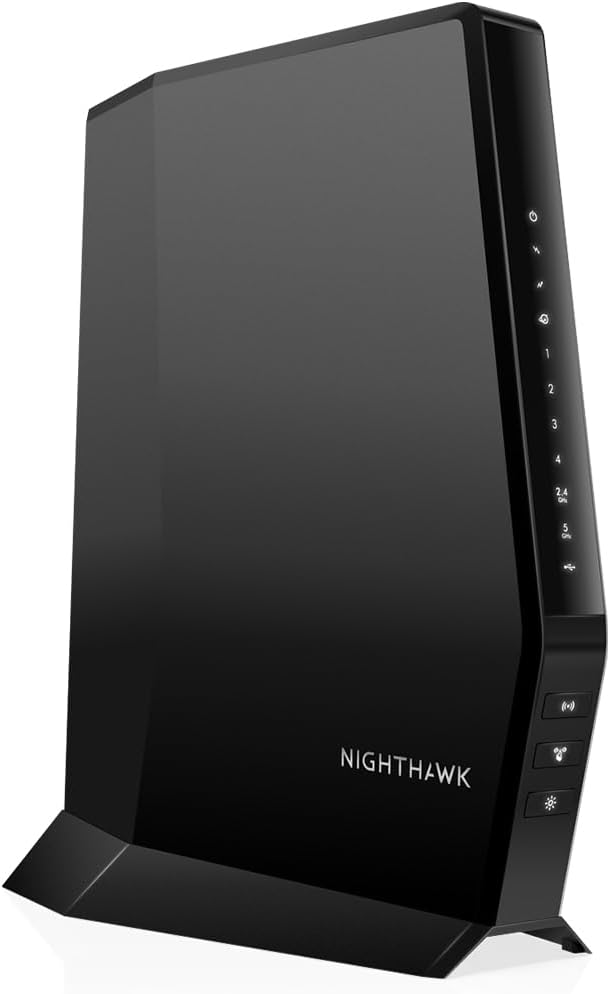
NETGEAR Nighthawk AC1900 (24×8) DOCSIS 3.0 WiFi Cable Modem Router Combo (C7000) (Renewed)
4.2Editor score
DOCSIS 3.0 channel bonding
Up to 1800 sq ft coverage
Four Gigabit Ethernet ports
Discover the top modem router combos for Spectrum internet. We compare features, speeds, and compatibility to help you choose the best all-in-one device for
Choosing the right modem router combo for Spectrum can save you money and boost your home network performance. These all-in-one devices simplify setup while delivering reliable connectivity for streaming, gaming, and work.
We evaluated ten top-rated models based on DOCSIS compatibility, WiFi coverage, and ease of use. Our comparison highlights key specs and real-world performance to help you find the perfect match for your internet plan.
Each pick showcases unique strengths, from budget-friendly options to premium mesh systems. Keep in mind that availability and compatibility may vary by location and provider plan. Always verify with Spectrum before purchasing to ensure seamless activation.
4.2Editor score

4.1Editor score

4.0Editor score
The following table provides a side-by-side comparison of all ten models. Review key specifications like WiFi standards, coverage area, and Ethernet ports to determine which device aligns best with your household needs and Spectrum plan.



The NETGEAR Nighthawk CAX30 stands out as a top choice for Spectrum users seeking modern performance. It combines DOCSIS 3.1 cable modem capabilities with WiFi 6 routing to support high-speed plans and multiple connected devices effectively.
We may earn a commission when you buy through this link, at no additional cost to you.
Its AX2700 dual-band WiFi ensures smooth streaming and low latency for gaming. The inclusion of four Gigabit Ethernet ports allows you to hardwire critical devices like consoles or PCs for maximum stability and speed.
While the range is solid for most homes, physical obstacles can reduce effective coverage. The device also requires activation with your provider, which adds a step to setup but ensures compatibility with your specific plan.
Ideal for households needing reliable gigabit speeds and advanced security features. If you want a balance of performance and value without mesh complexity, this combo delivers strong results for everyday use and future upgrades.
Supports Spectrum plans up to 1Gbps, ensuring you get the full speed you pay for without bottlenecks.
Handles 25+ connected devices simultaneously, reducing congestion during peak family usage times.
We may earn a commission when you buy through this link, at no additional cost to you.
The ARRIS Surfboard G34 offers a sleek, modern design that fits well in any home environment. As a DOCSIS 3.1 combo, it supports high-speed plans and delivers AX3000 WiFi 6 performance for reliable connectivity.
We may earn a commission when you buy through this link, at no additional cost to you.
Its compact footprint saves space while providing essential features like four Gigabit Ethernet ports. Setup is straightforward, requiring only coaxial connection and provider activation. It is a practical choice for those prioritizing simplicity.
However, user reviews suggest it may not match the performance consistency of other top models. While it covers basic needs well, advanced users might find the feature set somewhat limited compared to branded alternatives.
Best for users who value a clean aesthetic and straightforward operation. If your internet plan does not demand cutting-edge features, this device provides a cost-effective way to eliminate monthly rental fees.
Ensures compatibility with major providers including Spectrum, giving confidence in connectivity.
The small size allows flexible placement options without sacrificing performance or heat dissipation.
We may earn a commission when you buy through this link, at no additional cost to you.
This renewed version of the Nighthawk CAX30 offers the same robust performance as a new unit at a lower cost. It supports DOCSIS 3.1 and WiFi 6, making it an attractive option for budget-conscious Spectrum subscribers.
We may earn a commission when you buy through this link, at no additional cost to you.
Buyers can expect identical features like AX2700 speeds and four Gigabit ports. The refurbishment process ensures the device meets quality standards, though cosmetic signs of prior use may be present on the exterior.
While it offers excellent value, warranty coverage may differ from new products. Check the seller terms to understand return policies and support options before purchasing to ensure peace of mind.
Ideal for those wanting premium features without the premium price tag. If you are comfortable with renewed electronics, this device delivers reliable connectivity and modern standards for a fraction of the cost.
Save money upfront while still accessing the latest DOCSIS and WiFi standards for long-term use.
Renewed units are tested to function like new, ensuring you get the full speed you expect.
We may earn a commission when you buy through this link, at no additional cost to you.
The Nighthawk C7000 Renewed remains a popular choice for those on a strict budget. It delivers solid DOCSIS 3.0 performance and AC1900 WiFi, suitable for plans up to 800Mbps and typical household needs.
We may earn a commission when you buy through this link, at no additional cost to you.
Its 24×8 channel bonding ensures stable connections even during busy times. The inclusion of a USB port adds versatility for connecting storage devices, which is a rare feature in modern combos.
Since it lacks DOCSIS 3.1, it may not support the absolute highest tier plans. However, for most users, this is not a bottleneck. It offers great value for those who do not need cutting-edge WiFi 6.
Perfect for budget seekers who need reliable internet without frills. If your plan is under 800Mbps and you want to stop renting equipment, this renewed model is a smart financial decision.
Delivers core functionality at a fraction of the cost of newer models, ideal for basic usage.
The C7000 is a trusted model with years of reliable performance data across many households.
We may earn a commission when you buy through this link, at no additional cost to you.
Even as a discontinued model, the C7000 continues to serve many Spectrum users well. It offers reliable AC1900 speeds and Beamforming+ technology to optimize signal strength across your home for consistent performance.
We may earn a commission when you buy through this link, at no additional cost to you.
The device supports plans up to 800Mbps and includes useful features like the Nighthawk app for management. While it lacks modern WiFi 6, it still handles typical streaming and browsing tasks effectively.
Availability may be limited to refurbished stock or older inventory. This can impact warranty and support options. It is worth considering if you find a good deal and do not need the latest WiFi standards.
Suitable for those seeking a no-frills, stable modem router combo. If you prioritize reliability over the latest features, this model remains a trustworthy choice for everyday internet needs.
Focuses WiFi signals directly to your devices, improving range and stability in larger homes.
Provides easy access to settings, speed tests, and parental controls via your smartphone.
We may earn a commission when you buy through this link, at no additional cost to you.
The CAX80 is designed for high-speed users with plans up to 2Gbps. Its DOCSIS 3.1 modem paired with AX6000 WiFi 6 ensures that you can utilize the full potential of your internet connection without throttling.
We may earn a commission when you buy through this link, at no additional cost to you.
A standout feature is the 2.5G Ethernet port, which allows wired devices to exceed standard Gigabit limits. This makes it ideal for NAS setups or high-performance workstations that need maximum wired bandwidth.
User feedback is mixed, with some reporting setup challenges or connectivity hiccups. While performance is theoretically superior, real-world stability can depend on your environment and ISP configuration.
Best for tech-savvy users with very fast plans who need wired speed headroom. If you have specific needs like 4K streaming and large file transfers, this device offers the raw power to handle them.
Allows wired devices to transfer data faster than standard Gigabit ports, ideal for local networks.
Offers higher capacity and throughput for multiple devices, reducing congestion during peak times.
We may earn a commission when you buy through this link, at no additional cost to you.
The Orbi CBK752 combines a modem with a mesh satellite to blanket large homes in reliable WiFi. It supports Spectrum plans up to 1Gbps and offers AX4200 tri-band speeds with a dedicated backhaul channel.
We may earn a commission when you buy through this link, at no additional cost to you.
With a claimed coverage of up to 5000 sq ft, it effectively eliminates dead zones. The satellite unit ensures strong signals even in distant rooms. This makes it perfect for multi-story homes or large floor plans.
Setup is streamlined through the Orbi app, guiding you through connection and management steps. While the price is high, the investment is worthwhile for those who struggle with range issues using standard routers.
Ideal for large households needing whole-home coverage without separate mesh nodes. If budget is not a constraint and you need extensive range, this combo delivers premium performance and ease of use.
A dedicated band ensures the satellite communicates with the router without slowing down client devices.
Covers up to 5000 sq ft, ensuring consistent speeds and connectivity throughout your property.
We may earn a commission when you buy through this link, at no additional cost to you.
The Motorola MG8702 combines DOCSIS 3.1 with AC3200 WiFi, offering a robust solution for modern internet needs. It is approved for Spectrum plans and features Intelligent Power Boost to extend range and signal strength.
We may earn a commission when you buy through this link, at no additional cost to you.
Its design is practical, with a focus on stable performance rather than complex features. The mobile app simplifies setup and management, making it accessible for users of all technical levels.
While it lacks WiFi 6, its performance remains competitive for most households. The higher AC bandwidth ensures smooth streaming and browsing. However, it comes at a price point comparable to newer WiFi 6 models.
A good choice for those preferring a straightforward, reliable device. If you want a proven brand with solid features without needing the latest WiFi specs, this model offers good value.
Optimizes signal strength to cover more area, reducing dead spots in larger homes.
Use the mobile app to monitor usage and manage settings remotely for convenience.
We may earn a commission when you buy through this link, at no additional cost to you.
The CM3000 is a high-performance modem designed for users with the fastest internet plans. It features DOCSIS 3.1 and supports mid/high-split networks to unlock higher upload speeds and reduced latency.
We may earn a commission when you buy through this link, at no additional cost to you.
Its 2.5G Ethernet port allows connection to powerful routers, ensuring your router does not limit your internet speed. This makes it perfect for those who already have a strong WiFi system.
Since it lacks routing functions, you must pair it with a separate router. This adds to the initial cost but offers flexibility to choose the best WiFi solution for your home.
Ideal for advanced users with fast plans who want maximum wired performance. If you need future-proofing for gigabit upgrades, this modem provides the necessary capabilities.
Prepares your network for higher upload speeds, beneficial for video conferencing and large uploads.
Enables wired connections faster than standard Gigabit, ensuring no bottleneck for fast routers.
We may earn a commission when you buy through this link, at no additional cost to you.
The CBR750 integrates a DOCSIS 3.1 modem with a powerful AX4200 router. It covers up to 2500 sq ft and can handle 40+ devices, making it suitable for families with many connected gadgets.
We may earn a commission when you buy through this link, at no additional cost to you.
You can expand coverage by adding Orbi satellites if needed. This flexibility allows you to start with a standalone unit and grow into a mesh system without replacing the modem.
While effective, it is pricier than standard combos. However, the build quality and ecosystem integration justify the cost for those wanting reliability and seamless upgrades later on.
Perfect for those who want a high-performance device with the option to expand. If you value a unified brand experience and robust WiFi 6 speeds, this model is a strong contender.
Supports adding satellites to increase coverage without replacing your main unit or losing performance.
Delivers fast tri-band WiFi speeds, ensuring smooth performance for multiple users and devices.
We may earn a commission when you buy through this link, at no additional cost to you.
Selecting the right modem router combo involves understanding your internet plan, home size, and specific device needs. This guide outlines key factors to consider for a confident purchase.
DOCSIS 3.1 is the current standard that supports gigabit speeds and future network upgrades. Older DOCSIS 3.0 modems may bottleneck high-speed plans above 800Mbps. Ensure the combo you choose matches the maximum speed of your Spectrum plan.
For best long-term value, prioritize DOCSIS 3.1 models to avoid needing an upgrade when speeds increase.
WiFi 6 (802.11ax) offers better efficiency and capacity for multiple devices compared to older AC models. Look for combinations with WiFi 6 if you have many connected gadgets or live in a congested wireless area.
Choosing WiFi 6 ensures smoother streaming and lower latency during peak usage hours.
Estimate your home's square footage to select a unit with sufficient range. Larger homes may require mesh systems or additional satellites to eliminate dead zones effectively.
Always check the advertised coverage and consider walls or floors that might reduce signal strength.
Gaming consoles and PCs benefit from wired connections for stability. Ensure the combo has enough Gigabit Ethernet ports to connect your critical devices without extra switches.
Some models include 2.5G ports for even faster wired speeds which is useful for high-performance setups.
User-friendly mobile apps simplify activation and management. Look for models with intuitive interfaces that guide you through ISP activation and network settings.
A straightforward setup process saves time and reduces technical stress for all users.
Built-in security like WPA3 and firewall protection helps keep your network safe. Some models offer trial subscriptions for advanced protection against malware and intrusions.
Verify that the device supports modern encryption standards to protect your personal data.
Prices vary based on features and performance. Determine your needs to avoid overspending on unnecessary specs or underbuying for your plan requirements.
Renewed models can offer significant savings if you are comfortable with refurbished electronics.
Reputable brands provide better firmware updates and customer support. Reliable support ensures your network remains secure and stable over time.
Check warranty terms and support availability to ensure assistance if issues arise.
Start by connecting the coaxial cable from the wall to the modem port, then plug in the power adapter. Allow the unit to boot up and wait for the online status light to stabilize before proceeding.
Use your ISP's app or website to activate the device by entering the MAC address if required. This step ensures your connection is authorized to access Spectrum services.
Keep the device in a well-ventilated area away from direct sunlight or heat sources. Regularly restart the unit every few weeks to clear caches and maintain optimal performance.
Not every device is compatible. Spectrum requires DOCSIS 3.0 or 3.1 certified modems. Always check the provider's approved list before purchasing to ensure the unit will work with your specific plan.
Yes, owning your own equipment eliminates monthly rental fees charged by Spectrum. While there is an upfront cost, it pays off within months compared to continuous rental charges.
WiFi 6 improves efficiency for multiple devices and reduces congestion. If you have many smart devices or stream in multiple rooms, WiFi 6 offers noticeable performance gains over older standards.
Connect the coax and power cables, then follow the ISP activation process. Use the included app to configure your network name and password for secure wireless access.
You may need a system with expandable mesh capabilities to cover more space. Combos with satellite options allow you to add nodes without replacing the main unit.
Renewed devices are tested to work like new but may show cosmetic wear. They offer a cost-effective way to get high-end features if you check warranty and return policies carefully.
Yes, you can bridge the combo or connect a separate router via Ethernet. This adds flexibility if you need specialized routing features or additional ports.
The ten models reviewed offer diverse options ranging from budget-friendly AC units to high-performance WiFi 6 mesh systems. Each provides a unique balance of speed, coverage, and features tailored to different household needs.
Prioritize DOCSIS 3.1 compatibility and WiFi 6 support to future-proof your investment. Matching the device capabilities with your Spectrum plan ensures you get maximum value without unnecessary spending.
Always verify current specifications and pricing before purchasing as details may change. Taking time to compare your options guarantees a smooth setup and reliable internet for your home.