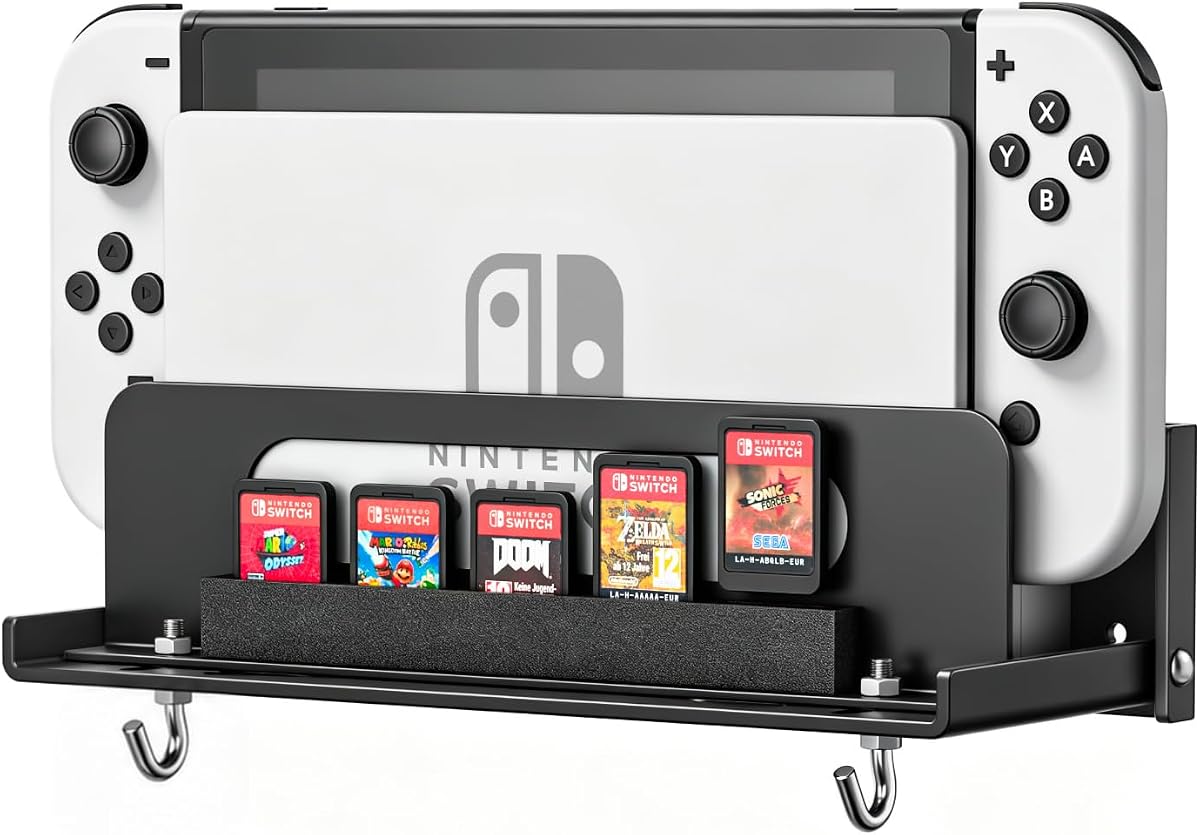
Wall Mount Compatible with Nintendo Switch 1/OLED/2
4.6Editor score
Fits multiple Switch generations
Open-air design cooling
Integrated controller storage
This guide compares the top Nintendo Switch 2 wall mounts for organization, cooling, and style to help you choose the perfect setup for your gaming space.
Finding the right Nintendo Switch 2 wall mount helps keep your console safe and organized. A good mount protects your device from dust and accidental bumps while freeing up valuable desk space for other essentials.
We compared ten real products based on build quality, compatibility, and features. Each option was evaluated for how well it handles heat, stores accessories, and fits different gaming setups around TVs or desks.
Each pick below shows what makes it stand out and who it suits best. Prices and availability change often so check the current listings before you buy to ensure you get the right deal for your needs.
4.6Editor score

4.8Editor score

4.1Editor score
The table below offers a quick side-by-side look at key specs for all ten options so you can compare them easily before making your final choice.


This mount ranks top for its all-in-one design that combines storage with RGB lighting and charging. It earns a high 4.8 rating from users who appreciate the colorful atmosphere and functional organization.
We may earn a commission when you buy through this link, at no additional cost to you.
The standout strength is its 8-in-1 functionality that holds six controllers and ten cards plus wrist straps and pro controllers while also acting as a charger with USB ports.
Trade-offs include the need for drilling into walls and limited cable management beyond the included p-controller holders which might not suit every gaming desk setup.
Buy this if you want a stylish organizer that lights up your room and keeps all your gear neatly stored within reach near your TV or desktop console.
Short press the lighting button to switch colors while long press memorizes your favorite mode to create a custom gaming vibe.
Use the 2 extra USB 2.0 ports for low-current charging and data transfer while storing cables neatly in the p-controller holders.
We may earn a commission when you buy through this link, at no additional cost to you.
This metal mount offers a no-frills secure way to hang your Switch console behind a TV with a solid 4.7 rating reflecting its reliable hold and easy setup.
We may earn a commission when you buy through this link, at no additional cost to you.
Its hollowed structure aids heat dissipation while EVA strips keep the console from shaking and the steel build ensures it withstands daily use without bending.
The simple design means it lacks built-in chargers or RGB lights but the included mounting plate with screws and bubble level makes installation straightforward for most users.
Choose this budget option if you prioritize keeping your console safe and cool without paying extra for decorative features or charging capabilities.
Made of strong steel with a powder-coat finish to resist rust and protect your console from scratches over time.
The compact hollowed structure allows airflow to help keep your console cool during long gaming sessions.
We may earn a commission when you buy through this link, at no additional cost to you.
This bracket focuses on saving space by mounting the Switch 2 dock on the left side of your TV with a high 4.8 rating praising its sleek fit and secure hold.
We may earn a commission when you buy through this link, at no additional cost to you.
The contoured metal design ensures the dock stays firmly in place without wobbling while the left-side position helps route cables cleanly behind your entertainment center.
It is not compatible with older Switch models and offers minimal accessory storage which may limit users who need to hang controllers or cards nearby.
Ideal for minimalists who want a clean look and maximum TV clearance while keeping the docked console safely out of the way.
The left-side TV mount maximizes entertainment space and keeps your gaming setup clean and organized.
The perfectly contoured bracket ensures your Switch 2 dock stays firmly in place and prevents accidental drops.
We may earn a commission when you buy through this link, at no additional cost to you.
This premium mount earns praise for its exclusive custom fit for the Switch 2 dock and its no heat trap design that promotes airflow and safety with a 4.1 rating.
We may earn a commission when you buy through this link, at no additional cost to you.
Constructed from heavy-gauge cold-rolled steel and made in the USA it locks securely without wobbling and resists rust with a powder-coated finish to protect your console.
The price is higher than basic options and it offers minimal RGB or accessory storage which may not suit users wanting flashy lighting or multiple controller slots.
Buy this if you value American-made durability and ventilation and want a secure mount that keeps your console cool and wobble-free for years.
Custom-designed for Nintendo Switch 2 console and dock to ensure a perfect wobble-free fit every time.
Purpose-built for maximum ventilation to keep all vents open and prevent heat buildup during gameplay.
We may earn a commission when you buy through this link, at no additional cost to you.
This versatile wall mount works with Switch 1 OLED and 2 consoles and earns a 4.6 rating for its simple secure fit and helpful storage integration.
We may earn a commission when you buy through this link, at no additional cost to you.
The open-air design helps reduce heat buildup while integrated storage keeps controllers and game cards organized and within reach for a streamlined gaming station.
It lacks the flash of RGB lighting or advanced locking mechanisms but the affordable price and fast installation make it a practical choice for many homes.
Choose this if you want a single solution that fits your console upgrade path and keeps your area clutter-free without spending a lot.
Designed to securely fit Nintendo Switch 2 Switch OLED and the original Switch dock for simple upgrades.
The ventilated structure promotes airflow around the console and dock to help reduce heat buildup.
We may earn a commission when you buy through this link, at no additional cost to you.
VIVO offers a practical mount with an adjustable width range that earns a 4.6 rating for fitting various docks securely while maintaining a clean low-profile look.
We may earn a commission when you buy through this link, at no additional cost to you.
The open frame design provides optimal cooling airflow to extend product life and the sturdy steel construction ensures excellent support for your console without bulk.
It does not include RGB lights or dedicated accessory slots but the lightweight design makes mounting fast and easy for most users.
Ideal for users who want a versatile adjustable mount that keeps their console safe and cool without unnecessary extras.
Range of 1.9 to 3 inches provides a customizable option for your entertainment center.
Provides optimal cooling and airflow that can extend the product life of your gaming system.
We may earn a commission when you buy through this link, at no additional cost to you.
This universal mount earns a 4.7 rating for its adjustable fit that can hold a Switch 2 dock as well as routers or media boxes behind your TV.
We may earn a commission when you buy through this link, at no additional cost to you.
The small plus wide device design helps hide messy cords and VESA holes let you mount directly to your display for a sleek media setup.
Because it is universal you must check device dimensions for a snug fit and it does not offer Switch-specific accessory storage options.
Pick this if you already use HIDEit products and want a versatile mount that can adapt to other gadgets as your setup grows.
Thanks to 75mm and 100mm VESA holes you can mount devices directly to the back of a TV.
The mount is adjustable to fit a variety of devices including Nintendo Switch 2 and media players.
We may earn a commission when you buy through this link, at no additional cost to you.
This dock-style mount offers four Joycon slots and vibrant lighting earning a 4.7 rating for users who want colorful displays and handy controller charging near their TV.
We may earn a commission when you buy through this link, at no additional cost to you.
The 15 light modes and 2 USB ports let you customize your setup while the multifunctional design stores game cards and pro controllers alongside your console.
It is optimized for Switch OLED or 1 models so Switch 2 owners should verify compatibility before purchasing to ensure the dock fits correctly.
Choose this if you love colorful RGB gaming aesthetics and want a single station to charge controllers and store accessories neatly.
Create a vibrant gaming atmosphere with monochrome and dynamic options to suit your mood.
Features LED indicator lights showing charging status and the option to switch between charging and stand modes.
We may earn a commission when you buy through this link, at no additional cost to you.
This metal bracket earns a 4.4 rating for its solid build and open bottom design that helps prevent overheating during docked play with the Switch 2.
We may earn a commission when you buy through this link, at no additional cost to you.
The two-piece kit separates the dock and controller hooks to avoid fighting for one hook and the powder coated finish resists rust and chipping over time.
You must verify your dock version before drilling as it is cut for the 2025 dock and may not fit older models securely.
Buy this if you play mostly docked and want a durable metal mount that keeps your console cool with minimal bulk on the wall.
A large hollow runs along the underside so warm air leaves from below instead of being trapped.
4mm pads on contact faces protect the dock shell from rubbing bare during use.
We may earn a commission when you buy through this link, at no additional cost to you.
This station focuses on controller charging and earns a 4.6 rating for its bidirectional magnetic slots that make charging easy without fiddling with alignment.
We may earn a commission when you buy through this link, at no additional cost to you.
The dock-integrated design connects to your Switch dock for a clutter-free setup and the hollowed bottom keeps cooling airflow open for the console.
It works with Switch 2 1 and OLED models but is more focused on charging than storing the console itself which may limit overall organization.
Select this if you want reliable magnetic charging and RGB style without complex wiring and your console stays elsewhere nearby.
Upgraded magnetic charging slots support bidirectional charging eliminating contact malfunctions.
Connects directly to your Switch dock for a neat and clutter-free setup.
We may earn a commission when you buy through this link, at no additional cost to you.
Selecting the right mount involves balancing design function and cooling needs for your specific setup.
Always check if the mount supports your specific console or dock version. Some options are built only for the Switch 2 dock while others fit multiple generations. Verifying this prevents drilling holes only to find the mount does not fit.
Verify exact dock compatibility before installing to save time and avoid damaging your console.
Metal mounts usually offer better durability and heat resistance compared to plastic. Look for powder-coated steel to prevent rust and protect your console from scratches during use.
Choose steel or heavy-gauge builds for long-term stability and scratch resistance.
Heat can shorten the life of your console so look for open designs that do not trap warm air behind the wall. Hollowed or ventilated structures help airflow and keep your dock cool during long sessions.
Prioritize open-bottom designs to avoid heat buildup during docked gameplay.
Some mounts offer slots for controllers cards and straps which keeps your setup tidy. Others focus only on the console and may leave accessories scattered. Decide if you want integrated storage or a separate organizer.
Choose integrated storage if you want all gear stored near your TV.
RGB lighting can enhance your gaming ambiance but it also requires extra ports and setup. If you prefer a clean look skip colorful options and focus on sturdy mounts without LED features.
Skip RGB if you want a minimalist setup without extra cables.
Most mounts include screws and plates but some require drilling into drywall or studs. Check if templates and levels are provided to make installation easier and safer.
Ensure the kit includes hardware and templates for smooth installation.
The mount should match your room style whether modern or playful. Color and design matter more for those who want the wall unit to complement their entertainment center.
Match the mount style to your room for a cohesive look.
Prices vary based on features and materials so decide your budget upfront. A simple metal mount costs less but offers fewer features than a multifunctional organizer with charging ports.
Set a budget that fits your feature needs before buying.
Install the mount by marking positions with a level and drilling pilot holes into the wall for security. Place the console into the bracket gently to ensure it sits securely without forcing.
Regularly wipe down the mount with a dry cloth to prevent dust buildup that could affect the finish or ventilation. Check screws occasionally to ensure tightness and avoid slips.
Keep cables neat and organized behind the TV to avoid strain on ports. Use cable clips or ties to maintain airflow and reduce clutter around the mount area.
Most mounts use screws and plates into the wall rather than directly to the TV. Some options include VESA holes to attach behind the screen so check the product specs for TV attachment options.
Not if you choose an open-air design. Look for mounts with hollow bottoms or open frames that leave vents clear to allow heat to escape during gameplay.
Only mounts labeled as multi-generation will fit older consoles. Many newer models are exclusive to the Switch 2 dock so verify compatibility before purchase.
Yes if they use low-voltage USB power. Ensure the RGB features do not block airflow and that cables are neatly routed to avoid hazards.
Some mounts include desk stand modes while others are wall-only. Check the product description to see if it supports dual placement options.
Most kits include screws and wall plugs. You will need a drill and screwdriver for mounting. Always use a level to ensure the mount sits straight.
Many models include dedicated Pro controller holders. Check the storage list to confirm Pro controller compatibility and accessory slots.
Use a soft cloth with mild soap and water to clean. Avoid abrasive cleaners that might scratch the powder-coated finish.
The FASTSNAIL RGB Switch 2 Wall Mount offers the best overall blend of features with its RGB lighting and all-in-one storage. For those prioritizing affordability the simple metal mount keeps costs low.
Consider what matters most whether it is ventilation storage or style. Choose mounts that keep your console cool and accessible without cluttering your gaming space.
Always check current prices and availability before buying as deals change often. With the right mount your gaming area will stay tidy and safe for years.