
8mm & Super 8 Film to Digital Converter
3.7Editor score
Includes 32GB SD card
2.4 inch display screen
No computer required setup
Preserving family memories captured on 8mm and Super 8 film reels is more important than ever before as analog media fades into history. These devices allow you to convert old film into digital files that can be viewed on modern screens without needing obsolete projectors or complicated setups.
We evaluated the leading digital converters available today by examining their scanning quality, ease of use, output formats, and compatibility with various reel sizes. Our comparison focuses on devices that offer standalone operation without requiring a computer connection for the initial digitization process.
Each pick in this list highlights key features and trade-offs to help you find the right tool for your specific collection needs. Please note that product availability and pricing can change frequently so verify current details before making your final purchase decision.
3.7Editor score

4.1Editor score

4.0Editor score
As an Amazon Associate we earn from qualifying purchases.
The following table provides a side-by-side comparison of all ten digital converters reviewed in this guide allowing you to quickly assess their core specifications and compatibility features.




The KODAK REELS Digitizer stands out as a top contender for converting 8mm and Super 8 film into 1080p MP4 files. Its 8MP sensor delivers sharp frame-by-frame captures while the 5 inch LCD touchscreen simplifies navigation and settings adjustments without requiring external devices.
We may earn a commission when you buy through this link, at no additional cost to you.
This device excels in versatility by accommodating film reels from 3 inches up to 9 inches with included adapters. You can adjust exposure sharpness and tint directly on the screen allowing you to enhance the footage as it scans ensuring the best possible visual quality.
One trade-off is the lack of audio in the output files which means you may need to add sound separately during editing. However for pure visual preservation of family memories this model offers robust features and ease of use that justify the investment.
It is ideal for families or archivists seeking a standalone solution with high resolution output and minimal setup. If you want to digitize a large collection efficiently while retaining control over image quality this digitizer is a strong recommendation.
Convert and save directly to SD card without needing a computer or software installation.
Adjust brightness sharpness and tint on the fly to improve faded or scratched film frames.
We may earn a commission when you buy through this link, at no additional cost to you.
This budget friendly converter offers a straightforward way to digitize old 8mm and Super 8 reels into standard MP4 files without breaking the bank. It captures footage frame by frame at 20 fps and saves directly to the included 32GB SD card for immediate storage.
We may earn a commission when you buy through this link, at no additional cost to you.
While it lacks the advanced image adjustment tools of premium models it still provides a functional solution for casual users. The built-in 2.4 inch screen lets you review converted movies instantly and the included TV cable allows for easy sharing with family on a larger display.
The main limitation is the sensor quality which may result in less detail compared to higher-end scanners. Additionally there are no options to adjust exposure or color during scanning which might leave some footage looking dull if the original film is faded.
It is best suited for beginners or those with a small collection who prioritize ease of use over professional grade image quality. If you want a simple plug-and-play device to preserve memories without a steep learning curve this is a solid choice.
Includes 32GB SD card so you can start digitizing immediately without extra purchases.
Use the integrated screen or TV connection to watch converted videos before transferring files.
We may earn a commission when you buy through this link, at no additional cost to you.
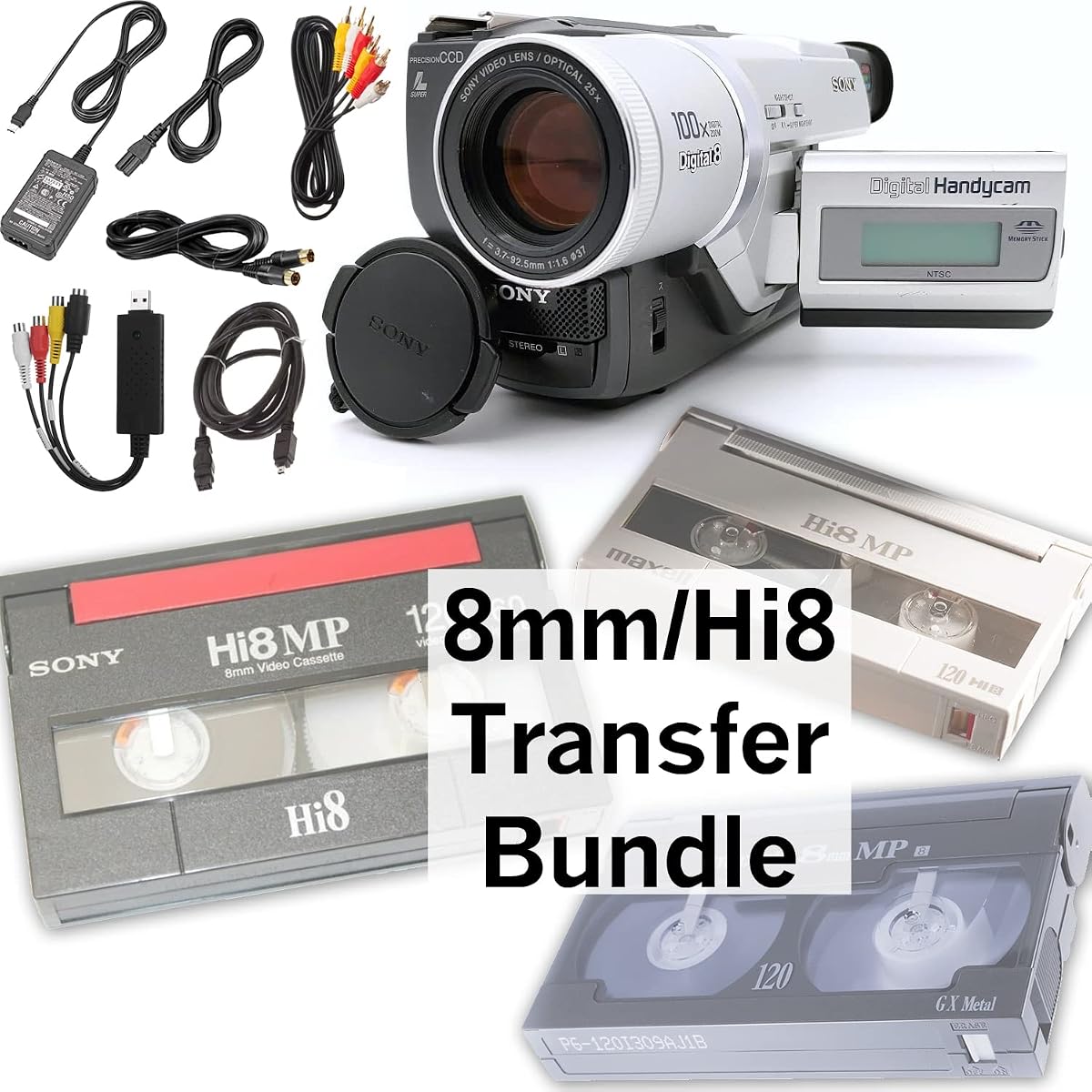
This bundle caters to those dealing with 8mm tapes as well as Digital8 and Hi8 formats rather than traditional film reels. It includes a camcorder to play the tapes and a USB capture device to transfer content to a computer for burning to DVD or editing.
We may earn a commission when you buy through this link, at no additional cost to you.
The inclusion of a working camcorder ensures you can playback any 8mm tape even if your old players are damaged. This makes it a practical all-in-one solution for families who have mixed media collections of both film reels and magnetic tapes.
Note that this device focuses on tapes and not standard 8mm film reels so it is not a replacement for a film scanner. The capture process requires a computer connection which may be a hurdle for users seeking standalone operation without technical setup.
It is ideal for households with tape collections needing a reliable way to digitize and preserve content. If you own Digital8 or Hi8 tapes and want a guaranteed working player plus capture tools this bundle offers excellent convenience and completeness.
Includes battery and AV cables so you can play tapes directly on TV or capture to PC.
Handles 8mm Hi8 and Digital8 tapes in one package for diverse media collections.
We may earn a commission when you buy through this link, at no additional cost to you.
The Magnasonic scanner brings back memories by automatically converting 3 5 and 7 inch reels into digital MP4 files with a single button press. It features a vibrant 2.3 inch screen that lets you view the scanned video immediately on the device.
We may earn a commission when you buy through this link, at no additional cost to you.
You can adjust brightness sharpness and framing directly on the scanner avoiding the need for expensive photo editing software. The included RCA video out cable enables you to watch converted files on a larger TV or monitor for better sharing experiences.
It only supports reels up to 7 inches which might not cover larger film collections but it keeps the device small and portable. The lack of audio in the output is common among these standalone converters but visual preservation remains the primary goal.
This model is perfect for users with moderate collections who value simplicity and portability. If you need a straightforward tool to digitize standard size reels without technical hassle this scanner delivers reliable performance and ease of use.
Adjust image settings like brightness and framing directly on the scanner for better output.
View on built-in screen or connect to TV via RCA cable for family viewing.
We may earn a commission when you buy through this link, at no additional cost to you.
This converter features a full color LCD screen with touch buttons that make recording and playback intuitive. It captures motion picture film into MP4 files using a 5 Megapixel sensor designed for clarity and color accuracy in your converted videos.
We may earn a commission when you buy through this link, at no additional cost to you.
The package includes a 32GB SD card so you can start digitizing right away without buying extra storage. You can change settings and adjust framing via easy-read buttons on the screen making the process smooth even for first time users.
While the touch interface is modern it may not offer as much precision as physical knobs for fine tuning. Additionally the lack of manual exposure control means you rely on automatic adjustments which might not suit all lighting conditions.
It is a great gift option for family members wanting to preserve memories without technical complexity. If you appreciate a clean interface and all-in-one packaging this converter provides a convenient path to digitizing your film collections.
Use touch buttons to change settings and select film types without complex menus.
Includes power adapter USB cable TV cable and 32GB card for full ready to use experience.
We may earn a commission when you buy through this link, at no additional cost to you.
This fully automated digitizer converts old 8mm and Super 8 reels into 1080P digital video files at 20 fps with ease. It supports reels up to 9 inches allowing you to process larger collections without changing the supply frequently.
We may earn a commission when you buy through this link, at no additional cost to you.
The included 32GB SD card lets you save digital movies directly without needing a computer connection. You can view files on the built-in 2.4 inch screen or transfer them to any Windows Mac or Linux system for further editing or sharing.
User ratings indicate some variability in performance which might suggest quality control issues or limitations in complex lighting. The controls are basic and may not offer the fine tuning needed for heavily degraded film without professional assistance.
It suits users looking for a cost-effective solution to digitize large reels with minimal setup. If you prioritize capacity and basic functionality over advanced image adjustments this digitizer offers a practical route to preserving your old movies.
MP4 output works seamlessly on Windows Mac and Linux for easy file management.
Handle up to 9 inch reels for extended sessions with fewer interruptions.
We may earn a commission when you buy through this link, at no additional cost to you.
This bundle is designed specifically for playback and transfer of 8mm Hi8 and Digital8 tapes rather than film reels. It includes a camcorder and blank tape plus a USB capture device to transfer content to computer files for burning to DVD.
We may earn a commission when you buy through this link, at no additional cost to you.
The inclusion of a blank tape allows you to test or record new content directly if needed. You can transfer tapes to a computer using the AV cables and USB adapter ensuring your digital backups are stored safely for future viewing.
The device relies on computer software for final conversion steps which might require technical knowledge. However for those with existing tape collections this bundle offers a guaranteed working setup without needing to source a compatible player.
It is ideal for budget-conscious users with tape formats wanting a complete solution. If you need a reliable way to digitize 8mm tapes without buying a camcorder separately this package provides essential tools at a competitive price.
Includes blank tape for testing and recording new content alongside transfer functions.
USB capture device transfers tapes to computer for easy archiving or DVD burning.
We may earn a commission when you buy through this link, at no additional cost to you.
This scanner brings obsolete film into the 21st century by converting 8mm and Super 8mm films into digital MP4 files for lifetime viewing. It features a 2.4 inch LCD screen and can serve as an elegant digital photo frame when not digitizing.
We may earn a commission when you buy through this link, at no additional cost to you.
It supports up to 5 inch reels which limits it to smaller collections but the direct save to SD card simplifies storage. Follow on-screen prompts to load film and transfer footage without needing any drivers or computer software installation.
Without customer ratings it is hard to gauge real-world reliability but the feature set focuses on ease of use. The digital photo frame functionality adds extra utility allowing you to showcase converted memories in a decorative manner.
It suits those needing a multi-purpose device that can digitize films and display photos. If you value compact design and dual functionality this scanner offers a unique blend of preservation and display capabilities for home or office use.
Switch between film scanning and digital photo frame mode for versatile home display.
Save footage directly to SD card without installing software on your computer.
We may earn a commission when you buy through this link, at no additional cost to you.
This device brings old 8mm and Super 8mm films into modern formats by converting them into digital JPEG images. It includes a display screen for viewing your scanned content and supports digital negatives for better color reproduction.
We may earn a commission when you buy through this link, at no additional cost to you.
The scanner operates without a computer making it accessible for users who prefer direct workflow. Load 3 or 5 inch film onto the supply reel and follow prompts to send footage directly to an SD card for storage.
Since it targets JPEG images rather than video it is suited for still frame extraction or slideshow creation. Without customer feedback reliability remains an open question but the design emphasizes straightforward preservation of visual memories.
It is a good option if you want to create digital photo albums from film frames. If you prefer static images over video files this scanner provides a specialized tool for converting your film collections into shareable JPEGs.
Convert films to JPEG images ideal for creating digital photo albums or prints.
Supports digital negatives for improved color and detail in scanned images.
We may earn a commission when you buy through this link, at no additional cost to you.
This film scanner is ideal for fast and stable digitization with a full accessory kit that includes everything needed to start. It includes film reels, power adapters and TV cables so you can connect directly to your home entertainment system.
We may earn a commission when you buy through this link, at no additional cost to you.
It converts 8mm and Super 8mm films into digital MP4 files suitable for lifetime viewing. The included RCA video output cable lets you watch your converted files on a TV or monitor which is perfect for sharing with family and friends.
With limited reels up to 5 inches it fits smaller collections but the included cleaning cloth helps maintain film quality during transfer. Operating without computer or drivers keeps the workflow simple for non-technical users.
It suits households seeking a ready-to-use package with all necessary cables included. If you want a complete solution that supports TV viewing and includes maintenance tools this scanner offers a comprehensive approach to film preservation.
Includes power adapter TV cables and cleaning cloth for immediate setup.
Connect to TV via RCA cable for easy family viewing of converted films.
We may earn a commission when you buy through this link, at no additional cost to you.
Choosing the right digital converter requires balancing budget features and format support to match your film collection needs.
Higher resolution sensors like 8MP produce sharper images that capture fine details in old film. Look for 1080p MP4 output to ensure your digitized videos look clear on modern high definition screens.
Prioritize models with high megapixel counts if you plan to edit or enlarge footage later.
Devices vary from supporting 3 inch reels up to 9 inches so check the max size before buying. Larger capacity means fewer interruptions when converting long collections of film.
Choose a scanner that matches the largest reel size you plan to digitize.
Most standalone converters save directly to SD cards without needing a computer connection. This simplifies the workflow and reduces software compatibility issues.
Verify that the device saves to SD card and requires no drivers for your needs.
Built-in screens range from 2.3 to 5 inches and some include touch buttons for easy navigation. Larger screens make reviewing and adjusting settings more convenient during scanning.
Consider a larger touch screen if you value intuitive on-device controls.
Most devices output MP4 files which are widely compatible with modern devices and editors. Some models offer JPEG outputs instead if you prefer static images over video.
Ensure the output format supports your intended use case like video editing or sharing.
Look for included RCA or HDMI cables that allow direct connection to a TV for immediate viewing. This feature is useful for sharing memories with family without transferring files first.
Confirm that the bundle includes the necessary cables for TV playback.
Complete kits often include power adapters, SD cards, and cleaning tools that save extra costs. Check if the product provides a full set to avoid buying missing items separately.
Choose a package that includes memory cards and cleaning cloths for convenience.
Many standalone scanners do not capture audio from film which may require external sound addition. If sound is essential consider models with audio input or plan to add sound digitally later.
Verify audio capabilities before purchase if sound preservation is a priority.
Start by inserting a clean film reel onto the supply hub ensuring the film path is clear and properly threaded. Use the on-screen prompts to select your film type and adjust settings like brightness and sharpness for the best results.
Press the start button to begin frame-by-frame conversion while monitoring progress on the built-in display. Once complete, transfer the files from the SD card to your computer or smart TV using the included USB cable.
Store your device in a dry cool place and use the included dusting cloth to keep the lens and film path free of debris. Regular maintenance helps ensure consistent image quality and extends the lifespan of your scanner.
Most standalone converters do not capture audio as older 8mm film typically did not include a soundtrack. You may need to add sound during post-production editing if audio is important for your project.
Standard converters support up to 9 inch reels so larger reels will need to be trimmed or spooled onto smaller ones. Check the manufacturer's specifications before attempting to load oversized film.
No many models allow standalone operation by saving directly to SD cards. This lets you digitize footage without needing a computer connection or software installation.
Most converters produce 1080p MP4 files which offer high definition quality for modern viewing. Higher sensor counts like 8MP improve detail and clarity in the final output.
The output MP4 files are widely compatible with standard video editors so specialized software is not required. You can use basic tools to trim or share footage on your computer or mobile device.
Use a soft lint-free cloth like the included dusting cloth to gently wipe the film surface. Ensure hands are clean and avoid touching the image area to prevent fingerprints or damage.
The KODAK REELS Digitizer offers the best combination of high resolution output and user-friendly touch controls for serious preservation. Its ability to handle large reels without a computer makes it ideal for large collections.
Budget options like the 8mm & Super 8 Converter provide entry-level functionality at a lower cost but may lack advanced adjustments. Evaluate your needs for image quality versus price before deciding.
Always check current availability and pricing since product details can change over time. Verify the included accessories and warranty terms to ensure you get a complete and reliable solution for your film digitization project.